Most repeated positive
13authors
A complete feature set
“cleanshotx - scrolling screenshots is much more robust.”Evidence: r/macapps · Shottr vs CleanShot X in 2026. Which one are you actually sticking with?

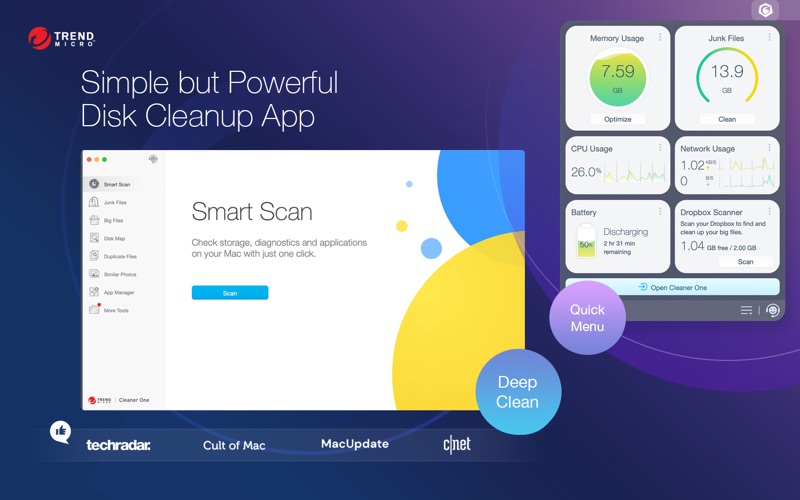
Cleaner One is an all-in-one disk cleaning and optimization master on your Mac. With the minimalist and easy-to-use interface, you can visualize, manage and free up your storage space in just one click. Cleaner One can optimize your Mac by…
Release notes parsed from trusted records and kept on this page. History provides context; a future Watch alert starts from a fresh baseline.
Be the first to request it
Request the same source-linked purchase brief shown in the completed example below. Your email starts the request and receives the result.
Want it sooner? Independent demand changes queue priority.
Completed example · CleanShot X data
Everything below belongs to CleanShot X. It is a real, completed example—not research about Cleaner One: Disk Clean.

CleanShot X
Example data
 Completed research example
Most repeated positive
13authors
“cleanshotx - scrolling screenshots is much more robust.”Evidence: r/macapps · Shottr vs CleanShot X in 2026. Which one are you actually sticking with?
Most repeated concern
16authors
“I don't think it makes sense to spend the money for Cleanshot when other apps do most of what it does for a lot less or free.”Evidence: r/macapps · Shottr vs CleanShot X in 2026. Which one are you actually sticking with?
Product context
Official or maker-supplied product information. It is kept separate from buyer evidence and independent purchase verification.
Cleaner One is an all-in-one disk cleaning and optimization master on your Mac. With the minimalist and easy-to-use interface, you can visualize, manage and free up your storage space in just one click.
Cleaner One can optimize your Mac by cleaning your disk drive, finding duplicate photos and other files, managing your apps, and much more.
Free up disk space and enhance system performance, now all made simple and effortless.
Fully compatible with macOS Monterey and Apple Silicon(M1, M1 Pro, M1 Max)!
Key Features: [Junk Files Cleaner] - Quick scan to remove temporary files in one click, including logs, mail caches, iTunes and so on. - Detect leftover hidden files from deleted Apps. - Clear trash on external drives.
[Big File Scanner] - Find big files on your disk and free up more storage. - Filter and manage files by size (from 10MB+), date, name and type. - Avoid accidental deletions: Lock to protect important big files. - No escape for local files synced from Cloud drives.
[Disk Map] - Analyze your storage in a visual and interactive map. - Color-coded breakdown of every folder on your disk, with detailed information in one click. - Easier to manually navigate and manage folders/files by size.
[Duplicate File Scanner] - Thorough and quick scan — fast and accurate scanning technique covers your entire home folder - Smart and accurate selection — duplicates are selected not only by file names but also by their contents. Files are shown in detailed previews. It can also help you decide which copy to delete by presenting "Auto Select" button
[Similar Photo Scanner] - Quickly find similar photos - Preview photos in groups after scanning - Organize your Photo Library
[Intelligent App Manager] - Auto-clean leftovers of deleted Apps - Manage all the applications installed on your Mac easily - View all the information of applications installed on your Mac clearly and easily - List all the applications installed on your Mac by name, size, and last opened date
[Memory Monitoring] - Monitor system memory usage. - Recycle memory with just one click.
Download Cleaner One to bring your device back to its best performance!
For any inquiries or suggestions, please comment in the App Store or email us directly at mac_support@trendmicro.com.
- Fixed several minor bugs.
More Business apps from the directory.