
Most repeated positive
13authors
A complete feature set
“cleanshotx - scrolling screenshots is much more robust.”Evidence: r/macapps · Shottr vs CleanShot X in 2026. Which one are you actually sticking with?

FileZilla Pro is a fast and reliable FTP, FTPS, SFTP, Amazon S3, Backblaze B2, Box, Dropbox, Google Cloud Storage, Google Drive, Microsoft OneDrive, Microsoft Azure Storage, OpenStack Swift (using Keystone v2) and WebDAV client with lots o…
Release notes parsed from trusted records and kept on this page. History provides context; a future Watch alert starts from a fresh baseline.
Be the first to request it
Request the same source-linked purchase brief shown in the completed example below. Your email starts the request and receives the result.
Want it sooner? Independent demand changes queue priority.
Completed example · CleanShot X data
Everything below belongs to CleanShot X. It is a real, completed example—not research about FileZilla Pro - FTP and Cloud.

CleanShot X
Example data
 Completed research example
Most repeated positive
13authors
“cleanshotx - scrolling screenshots is much more robust.”Evidence: r/macapps · Shottr vs CleanShot X in 2026. Which one are you actually sticking with?
Most repeated concern
16authors
“I don't think it makes sense to spend the money for Cleanshot when other apps do most of what it does for a lot less or free.”Evidence: r/macapps · Shottr vs CleanShot X in 2026. Which one are you actually sticking with?
Product context
Official or maker-supplied product information. It is kept separate from buyer evidence and independent purchase verification.
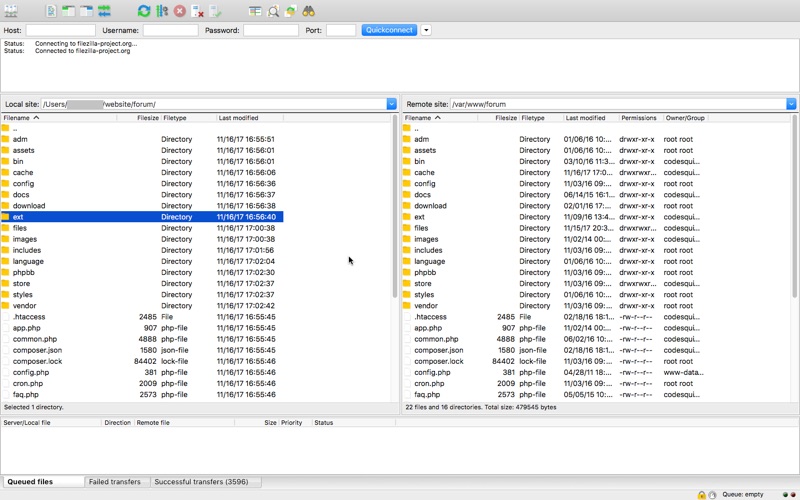
FileZilla Pro is a fast and reliable FTP, FTPS, SFTP, Amazon S3, Backblaze B2, Box, Dropbox, Google Cloud Storage, Google Drive, Microsoft OneDrive, Microsoft Azure Storage, OpenStack Swift (using Keystone v2) and WebDAV client with lots of useful features. FileZilla Pro comes with an intuitive tabbed user interface and is available in more than 50 languages.
You can use the Site Manager to organize your sites and bookmarks. FileZilla Pro lets you synchronize the Site Manager data securely so that you can access your stored sites from all your machines. Your credentials are stored securely, protected by strong cryptography.
Use powerful tools to quickly and easily navigate the server and locate your files: Directory listing filters hide irrelevant files from view. Compare local and remote directories and highlight the difference. Change both local and remote directories in lockstep. Or just use the the search dialog to find your files.
The transfer queue lets you manage your transfers, even if you queue millions of files. The size of your files does not matter, FileZilla Pro knows no size limit. Use drag&drop or the context menu to queue files. You can also directly transfer and open remote files in your favorite editor.
Configurable speed limits let you throttle FileZilla Pro if you need bandwidth for other purposes.
FileZilla Pro is ready for the Internet of the future with complete IPv6 support. Compatible with HTTP/1.1, SOCKS5 and FTP proxies.
The network configuration wizard guides you through configuring not just FileZilla Pro but also any firewall or NAT router you are using.
Subscription information.
FileZilla Pro requires a subscription to use.
Subscribe to FileZilla Pro to begin your 7 days free trial. You can cancel during the free trial up to 24 hours before the end of your 7 days trial, and you won't be charged.
After 7 days, you'll automatically be billed 12.99 dollars/euros per year (or the equivalent in your country) through an auto-renewing subscription.
An active subscription entitles you to unlimited FileZilla Pro app updates, including minor and major updates.
You can cancel your subscription at any time. If you do, once you reach the end of your subscription period, the app will no longer function. Restart your subscription if you need it again, your data won't be lost.
See also https://filezilla-project.org/terms.php?type=appstore&inapp=2 for the terms of use.
* SFTP: Added compatibility flag to Site Manager to ignore invalid bits in file attributes flags received from non-compliant servers * Removed autodetection of FTP server type governing the remote path syntax. Exotic server types now need to be set explicitly on the advanced page in the Site Manager
More Files & Storage apps from the directory.
