Most repeated positive
13authors
A complete feature set
“cleanshotx - scrolling screenshots is much more robust.”Evidence: r/macapps · Shottr vs CleanShot X in 2026. Which one are you actually sticking with?

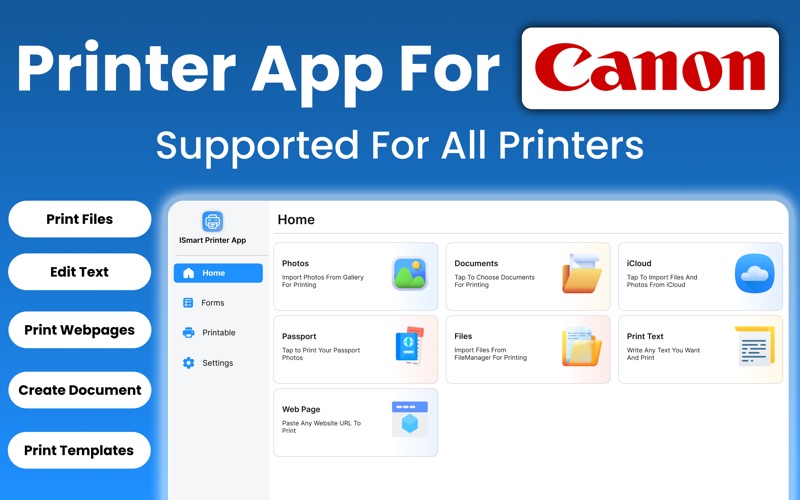
Experience fast, simple, and professional printing with our App For Canon Printer for Mac. It turns your computer into a powerful and organized printing center that helps you handle photos, documents, passport photos, web pages, cloud file…
Release notes parsed from trusted records and kept on this page. History provides context; a future Watch alert starts from a fresh baseline.
Be the first to request it
Request the same source-linked purchase brief shown in the completed example below. Your email starts the request and receives the result.
Want it sooner? Independent demand changes queue priority.
Completed example · CleanShot X data
Everything below belongs to CleanShot X. It is a real, completed example—not research about App For Canon Printer.

CleanShot X
Example data
 Completed research example
Most repeated positive
13authors
“cleanshotx - scrolling screenshots is much more robust.”Evidence: r/macapps · Shottr vs CleanShot X in 2026. Which one are you actually sticking with?
Most repeated concern
16authors
“I don't think it makes sense to spend the money for Cleanshot when other apps do most of what it does for a lot less or free.”Evidence: r/macapps · Shottr vs CleanShot X in 2026. Which one are you actually sticking with?
Product context
Official or maker-supplied product information. It is kept separate from buyer evidence and independent purchase verification.
Experience fast, simple, and professional printing with our App For Canon Printer for Mac. It turns your computer into a powerful and organized printing center that helps you handle photos, documents, passport photos, web pages, cloud files, and text notes in one place. The app is built with clarity and smooth navigation in mind, allowing you to start printing within seconds. Whether you use your Mac for work, study, or personal tasks, the app brings reliable printing tools right to your desktop without complicated setup or confusing menus.
The main screen presents all print options in a clean layout that keeps everything within easy reach. You can access your files, choose a print source, customize settings, and send jobs to your printer with just a few clicks. The app supports AirPrint printers and most major brands, giving you flexibility and full control over quality, size, and layout.
Photos from Device Print any photo stored in your Mac Photos library. Select single photos or groups, choose from a variety of print sizes, and apply simple adjustments such as cropping or color correction. The printing engine is optimized for sharpness and color accuracy, making your images come out clean, vivid, and ready for albums, frames, or creative projects. Whether you are printing personal memories or professional photo work, the app ensures excellent results.
Documents Print PDFs, spreadsheets, presentations, and text files with high precision. The document viewer gives you a clear preview to confirm layout, fonts, and page order before sending the job. You can choose single or double sided printing, adjust margins, select orientation, and set the number of copies. The app handles business documents, study materials, contracts, and personal files with smooth, dependable performance.
Passport Photos Create passport and ID photos directly from your Mac. The app includes presets for many countries, helping you automatically format the correct dimensions and background requirements. You can import a photo, center your face, adjust brightness, and export a ready to print sheet. This feature saves time and eliminates the need to visit photo studios or pay high fees.
File Manager The built in file manager organizes all your local and imported files in a clear and simple structure. You can rename documents, move items to folders, and quickly locate what you need. This makes printing multiple files or large sets much easier, especially when working on business or academic tasks.
Editor Text Write and print directly in the app with the built in text editor. Create notes, letters, reminders, or formatted documents without switching between different programs. The editor supports clean formatting so your text prints neatly and professionally on the page.
Web Page Print any webpage as it appears on your screen. The integrated browser lets you open articles, tickets, recipes, research materials, or travel information and convert them into clean paper copies. A simplified mode is available to remove ads and unnecessary elements so your printout is clear and distraction free.
The Printer App for Mac brings together speed, convenience, and full feature control in a single environment. With easy file access, smart tools, and dependable print quality, it gives you everything you need to transform digital content into polished printed results. Print photos, documents, IDs, notes, and web pages with confidence and simplicity, directly from your Mac.
Disclaimer: Our app supports printers from various manufacturers, including Canon, HP, and others. We are not officially affiliated with, endorsed by, or representative of any of these brands. All trademarks and brand names are the property of their respective owners.
Privacy Policy: https://sites.google.com/view/uftechs/privacy-policy Terms & Conditions: https://sites.google.com/view/uftechs/terms-conditions EULA: https://www.apple.com/legal/internet-services/itunes/dev/stdeula/
- New Designs Added - Compatibility Issue Fixed - Text Editors issues fixed - Crashes Fixed
More Business apps from the directory.


