Most repeated positive
13authors
A complete feature set
“cleanshotx - scrolling screenshots is much more robust.”Evidence: r/macapps · Shottr vs CleanShot X in 2026. Which one are you actually sticking with?

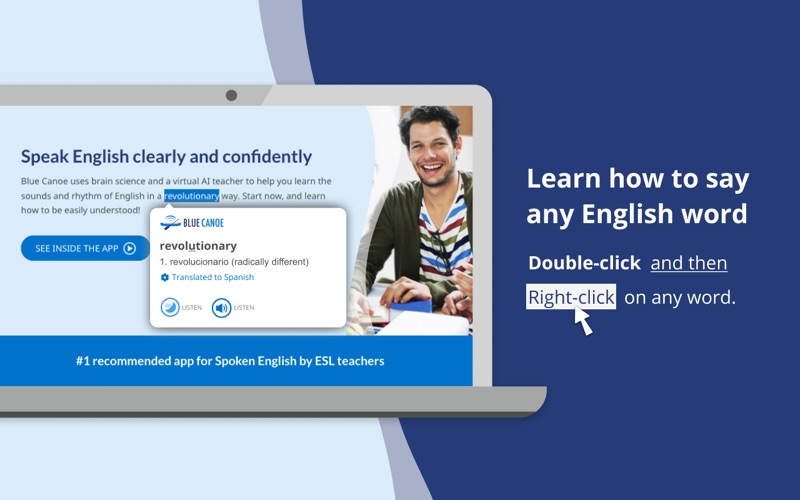
Double-click and then right-click on any word to see its stress and vowel. Simply select a word and get a pop-up that teaches you the two most important things about saying that word: where to put the stress, and what vowel sound (color) y…
Release notes parsed from trusted records and kept on this page. History provides context; a future Watch alert starts from a fresh baseline.
Update for manifest v3
Be the first to request it
Request the same source-linked purchase brief shown in the completed example below. Your email starts the request and receives the result.
Want it sooner? Independent demand changes queue priority.
Completed example · CleanShot X data
Everything below belongs to CleanShot X. It is a real, completed example—not research about Blue Canoe Dictionary.

CleanShot X
Example data
 Completed research example
Most repeated positive
13authors
“cleanshotx - scrolling screenshots is much more robust.”Evidence: r/macapps · Shottr vs CleanShot X in 2026. Which one are you actually sticking with?
Most repeated concern
16authors
“I don't think it makes sense to spend the money for Cleanshot when other apps do most of what it does for a lot less or free.”Evidence: r/macapps · Shottr vs CleanShot X in 2026. Which one are you actually sticking with?
Product context
Official or maker-supplied product information. It is kept separate from buyer evidence and independent purchase verification.
Double-click and then right-click on any word to see its stress and vowel.
Simply select a word and get a pop-up that teaches you the two most important things about saying that word: where to put the stress, and what vowel sound (color) you should use. This dictionary is built on the award-winning Color Vowel® System, used by more than 10,000+ ESL teachers around the world, and now you can use it, for free, on your computer.
Frustrated by all the complexities and “exceptions” of English pronunciation? Tired of not being able to listen and then accurately repeat a word? You are not alone! Blue Canoe and the Color Vowel System will help!
Visit www.bluecanoelearning.com for more information. Download the Blue Canoe mobile app for daily lessons that work to improve your spoken clarity and confidence.
Watch this 3-minute video to learn more about the most successful way to improve your spoken English. (https://youtu.be/21XNGIefcR8)
* Move from just knowing what a word means, to confidently using a word when you talk. * Double-click to select, and then right-click on any word to get a pop-up that tells you which syllable to stress (make longer), and what vowel sound (color) you should use, as you say the word out loud. * Listen to the vowel sound recording and then the word recording, and the visual and musical parts of your brain will help you to “hear” it in a way that is not possible with just your language brain. * Go to the Options in Blue Canoe icon in the browser extension bar to change how you call up the pop up, if desired. * Use the Blue Canoe mobile AI app to learn and practice so much more about speaking English with clarity and confidence. Get it from your mobile App Store.
NOTE: After installing this extension, refresh any previously opened tabs to use it on those tabs.
Terms of service: https://bluecanoelearning.com/terms-of-service/ Privacy policy: https://bluecanoelearning.com/privacy-policy/
Update for manifest v3
More Education apps from the directory.