Most repeated positive
13authors
A complete feature set
“cleanshotx - scrolling screenshots is much more robust.”Evidence: r/macapps · Shottr vs CleanShot X in 2026. Which one are you actually sticking with?

CotEditor is a lightweight plain-text editor for source code, notes, Markdown, web content, and more. Its clean, neat interface makes everyday editing simple and comfortable, while powerful tools support more advanced work when you need th…
Release notes parsed from trusted records and kept on this page. History provides context; a future Watch alert starts from a fresh baseline.
Improvements
Fixes
Be the first to request it
Request the same source-linked purchase brief shown in the completed example below. Your email starts the request and receives the result.
Want it sooner? Independent demand changes queue priority.
Completed example · CleanShot X data
Everything below belongs to CleanShot X. It is a real, completed example—not research about CotEditor.

CleanShot X
Example data
 Completed research example
Most repeated positive
13authors
“cleanshotx - scrolling screenshots is much more robust.”Evidence: r/macapps · Shottr vs CleanShot X in 2026. Which one are you actually sticking with?
Most repeated concern
16authors
“I don't think it makes sense to spend the money for Cleanshot when other apps do most of what it does for a lot less or free.”Evidence: r/macapps · Shottr vs CleanShot X in 2026. Which one are you actually sticking with?
Product context
Official or maker-supplied product information. It is kept separate from buyer evidence and independent purchase verification.
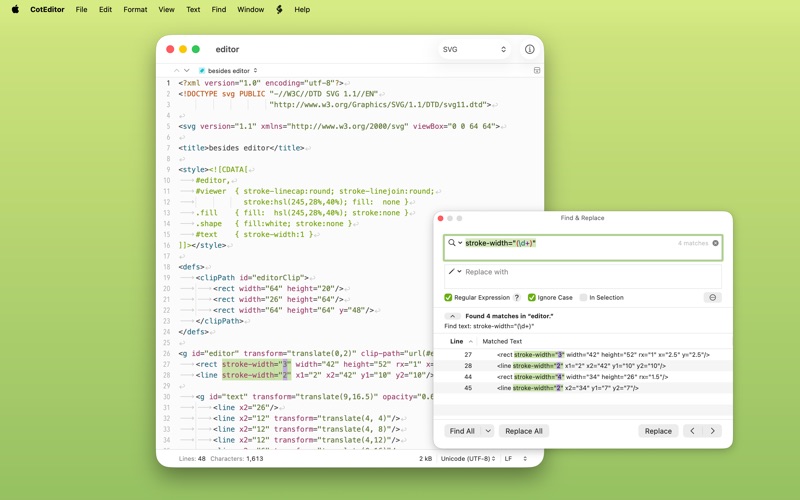
CotEditor is a lightweight plain-text editor for source code, notes, Markdown, web content, and more. Its clean, neat interface makes everyday editing simple and comfortable, while powerful tools support more advanced work when you need them.
Made for Mac
CotEditor is built exclusively for macOS and designed to feel at home from the start. It follows familiar system conventions, integrates seamlessly with features such as Dark Mode, Versions, iCloud, and VoiceOver, and keeps settings in a standard settings window, right where Mac users expect them.
Fast, Focused, and Ready for Real Work
CotEditor launches quickly, and its simple, well-organized interface helps you stay focused on your work. Built-in syntax highlighting for many popular languages and an outline menu based on syntax help you grasp the structure of your documents at a glance. When your work calls for more, CotEditor is ready with powerful find and replace, precise tools for editing text, scripting support, and the flexibility to tailor the details to your workflow.
Thoughtful About Text
CotEditor pays attention to the details that make plain-text editing reliable, from text encodings and line endings to Unicode normalization and diverse writing systems. It helps you see what’s really in your document by revealing invisible characters, warning about mixed line endings or characters that cannot be saved in the chosen encoding, and offering detailed character inspection. It also makes CotEditor comfortable across different writing systems and text conventions.
Key Features
• Syntax highlighting for more than 70 preset languages • Powerful find and replace with regular expressions • Live character, word, and line counts • Auto Save with an option to avoid overwriting the original file • Careful handling of text encodings and line endings • Outline menu based on syntax • Multi-cursor editing • Sidebar folder navigation • Character inspector with enlarged glyph and Unicode information • Support for diverse writing styles, including CJK text, vertical text layout, and right-to-left text • Various Unicode normalizations • Command-line tool • Scriptable in your favorite language
All features in CotEditor are available for free. In-app purchases are optional and support the project.
Terms of Service: https://www.apple.com/legal/internet-services/itunes/dev/stdeula/ Privacy Policy: https://coteditor.com/privacy
Improvements - Improve the performance of saving a large document encoded in Western (ASCII). - Improve overall stability and performance.
Fixes - Fix an issue where changes to the “Make file executable” option in a canceled save panel could be applied to a subsequent save. - Fix an issue where the app became unresponsive when a document was automatically updated due to an external modification while an alert for the document was displayed. - Fix an issue where the alerts about inconsistent line endings or an external modification could be displayed twice for the same document. - Fix an issue where text typed in an untitled document while another document was being opened could be lost without warning. - Fix an issue in the file browser where the “Open in New Window” command did not work for the file currently displayed as a preview. - Fix an issue where the Syntax toolbar menu was no longer updated once the toolbar customization dialog was opened. - Fix an issue where wrapped lines could be printed with an incorrect indentation width when hanging indentation was enabled. - Fix several issues in editing commands with multiple cursors or selections. - Fix an issue where the “Shift Left” command could crash the app when the selection started within the indentation. - Fix an issue where the app could crash when selecting a completion candidate in the Touch Bar. - Fix an issue where the app could become unresponsive when modifying the selection word by word in text containing combining characters. - Fix an issue where setting the tab width to zero with AppleScript could crash the app. - Fix an issue where the automatic outdent when typing a closing symbol, such as “}”, removed only a single character instead of a whole indent level in space-indented documents when the tab character is preferred for indentation. - Fix an issue where the “URL Encode” command could fail for selections containing an invalid percent-encoding sequence, such as a standalone “%”. - Fix an issue where expanding the selection to the beginning of the line discarded the selected range ahead of the anchor when the selection was made from left to right. - Fix several issues in modifying the selection in documents containing inconsistent CRLF line endings. - Fix an issue where the insertion point could move to an unexpected position after typing a quotation mark when the Smart Quotes substitution is enabled. - Fix the Portuguese localization.
Recent conversations with a verified link to this App.

26 upvotes · 60 comments ·
32 upvotes · 7 comments ·
6 upvotes · 26 comments ·
More Productivity apps from the directory.