Most repeated positive
13authors
A complete feature set
“cleanshotx - scrolling screenshots is much more robust.”Evidence: r/macapps · Shottr vs CleanShot X in 2026. Which one are you actually sticking with?

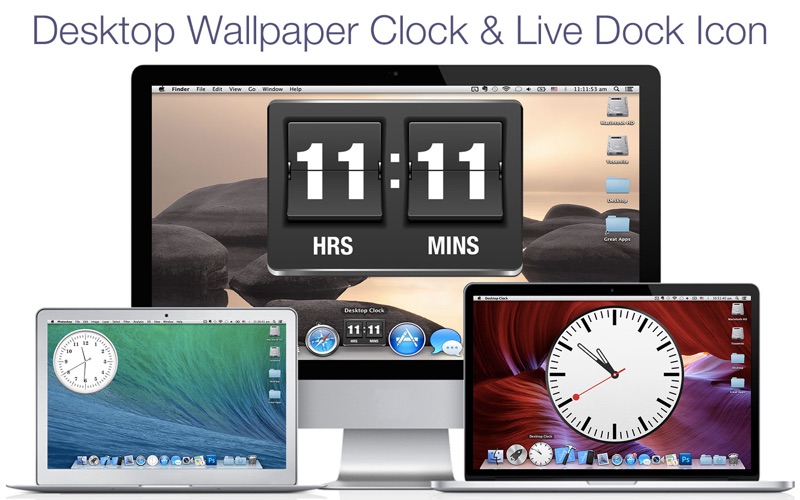
Bring elegance and functionality to your Mac’s desktop with the "Desktop Clock" app, offering dozens of stunning clock designs to suit any style. Experience timekeeping like never before, right on your desktop and Dock. The "Desktop Clock"…
Release notes parsed from trusted records and kept on this page. History provides context; a future Watch alert starts from a fresh baseline.
We’re thrilled to bring you an update that enhances your experience with exciting new features, performance improvements, and important bug fixes!
New Features: Explore fresh additions designed to make your app experience even better. Enhanced Performance: Enjoy a faster, smoother experience with optimizations across the board. Bug Fixes: We’ve addressed various issues to improve stability and reliability. Refined UI: Experience a cleaner, more intuitive interface with subtle yet impactful design tweaks.
Thank you for using our app! We’re committed to continuous improvement, and your feedback helps us get better with every update. Be sure to download the latest version and discover what’s new!
Be the first to request it
Request the same source-linked purchase brief shown in the completed example below. Your email starts the request and receives the result.
Want it sooner? Independent demand changes queue priority.
Completed example · CleanShot X data
Everything below belongs to CleanShot X. It is a real, completed example—not research about Desktop Clock Live.

CleanShot X
Example data
 Completed research example
Most repeated positive
13authors
“cleanshotx - scrolling screenshots is much more robust.”Evidence: r/macapps · Shottr vs CleanShot X in 2026. Which one are you actually sticking with?
Most repeated concern
16authors
“I don't think it makes sense to spend the money for Cleanshot when other apps do most of what it does for a lot less or free.”Evidence: r/macapps · Shottr vs CleanShot X in 2026. Which one are you actually sticking with?
Product context
Official or maker-supplied product information. It is kept separate from buyer evidence and independent purchase verification.
Bring elegance and functionality to your Mac’s desktop with the "Desktop Clock" app, offering dozens of stunning clock designs to suit any style. Experience timekeeping like never before, right on your desktop and Dock.
The "Desktop Clock" app transforms your Mac into a stylish timepiece, blending beauty with practicality. Choose from a variety of clock designs, whether you love the classic look of analog, the retro vibe of flip-clocks, or the smooth precision of animated quartz movement. With customizable options, you can make the clock truly your own, perfectly tailored to fit your desktop setup.
App Features: - Dozens of Clock Designs: Explore a wide range of clock styles, from analog to flip-clocks, and more. - Customizable Position & Size: Easily adjust the clock’s placement and size to suit your needs. - Transparency Control: Blend the clock seamlessly with your desktop by adjusting its transparency. - Always on Top: Keep the clock visible over all windows with the "Always on top" feature. - Hot Corners: Quickly bring the clock to the front using customizable Hot Corners. - Supports Multiple Desktops: Enjoy your clock across all your desktop spaces without interruption. - Minimal System Impact: The app is designed to run efficiently, using very little system resources.
We are dedicated to providing you with a high-quality experience. Your feedback helps us improve, and we’re committed to responding to all inquiries quickly.
Download the "Desktop Clock" app today and elevate your Mac's timekeeping experience with style and precision!
We’re thrilled to bring you an update that enhances your experience with exciting new features, performance improvements, and important bug fixes!
New Features: Explore fresh additions designed to make your app experience even better. Enhanced Performance: Enjoy a faster, smoother experience with optimizations across the board. Bug Fixes: We’ve addressed various issues to improve stability and reliability. Refined UI: Experience a cleaner, more intuitive interface with subtle yet impactful design tweaks.
Thank you for using our app! We’re committed to continuous improvement, and your feedback helps us get better with every update. Be sure to download the latest version and discover what’s new!
More Weather apps from the directory.


