Most repeated positive
13authors
A complete feature set
“cleanshotx - scrolling screenshots is much more robust.”Evidence: r/macapps · Shottr vs CleanShot X in 2026. Which one are you actually sticking with?

Featuring an extensive collection of tools, DICOM Studio empowers users to instantly visualize and interact with complex anatomical data across detailed 2D slices and intuitive 3D reconstructions. Features of DICOM Studio: 2D DICOM Viewer…
Release notes parsed from trusted records and kept on this page. History provides context; a future Watch alert starts from a fresh baseline.
Be the first to request it
Request the same source-linked purchase brief shown in the completed example below. Your email starts the request and receives the result.
Want it sooner? Independent demand changes queue priority.
Completed example · CleanShot X data
Everything below belongs to CleanShot X. It is a real, completed example—not research about DICOM Studio.

CleanShot X
Example data
 Completed research example
Most repeated positive
13authors
“cleanshotx - scrolling screenshots is much more robust.”Evidence: r/macapps · Shottr vs CleanShot X in 2026. Which one are you actually sticking with?
Most repeated concern
16authors
“I don't think it makes sense to spend the money for Cleanshot when other apps do most of what it does for a lot less or free.”Evidence: r/macapps · Shottr vs CleanShot X in 2026. Which one are you actually sticking with?
Product context
Official or maker-supplied product information. It is kept separate from buyer evidence and independent purchase verification.
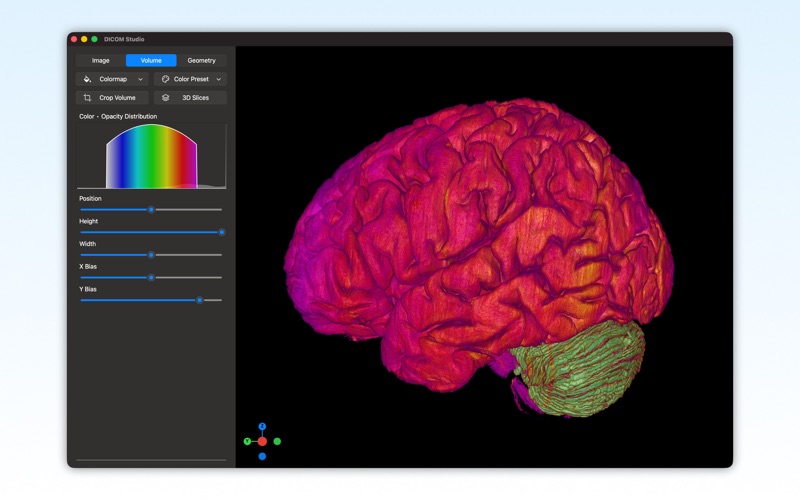
Featuring an extensive collection of tools, DICOM Studio empowers users to instantly visualize and interact with complex anatomical data across detailed 2D slices and intuitive 3D reconstructions.
Features of DICOM Studio:
2D DICOM Viewer • Import and Scroll through Individual Slices in a DICOM Series • Switch between Axial, Sagittal and Coronal Orientations • Apply Scientific or DICOM Standard Colormaps • Adjust Contrast and Brightness using Color Level & Color Window Controls • Analyze Images using Angle & Distance Measurement Tools • Pan & Zoom
3D Volumetric Reconstructions • Apply and Adjust Volumetric Colormaps • Apply and Adjust Pre-defined Color Presets • Gain Clearer Views of Internal Structures using the Crop Tool • Add and Scroll through Axial, Sagittal and Coronal Slices in 3D • Rotate, Pan & Zoom
3D Geometric Reconstructions • Create 3D Models using Mesh Generation Algorithms • Select Regions of Interest • Reveal Internal Structures using the Crop Tool • View the Internal Topology of a 3D Model in Wireframe Mode • Finish a 3D Model's Surface with the Smoothing and Fill Holes Tools • Export Models in STL Format for further work • Rotate, Pan & Zoom
Learn more at: https://marceda.com/dicom-studio
• Application of Window Center & Window Width values from DICOM Tags when loading DICOM Images. • Significant Performance Improvements. • UI Improvements. • Bug Fixes.
More Medical apps from the directory.


