Most repeated positive
13authors
A complete feature set
“cleanshotx - scrolling screenshots is much more robust.”Evidence: r/macapps · Shottr vs CleanShot X in 2026. Which one are you actually sticking with?

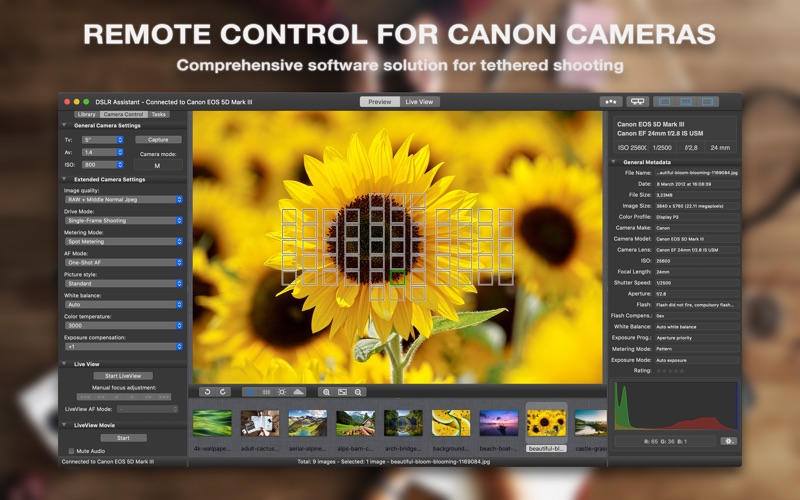
Operate a Canon camera tethered to a Mac, efficiently capture digital images, automatically perform various photo tasks and maintain the high quality of images throughout your workflow. WHY SHOOT TETHERED? • Save Time. Perform you photo ta…
Release notes parsed from trusted records and kept on this page. History provides context; a future Watch alert starts from a fresh baseline.
Bug fixes and improvements. Added support for the macOS Tahoe 26.
Be the first to request it
Request the same source-linked purchase brief shown in the completed example below. Your email starts the request and receives the result.
Want it sooner? Independent demand changes queue priority.
Completed example · CleanShot X data
Everything below belongs to CleanShot X. It is a real, completed example—not research about DSLR Assistant.

CleanShot X
Example data
 Completed research example
Most repeated positive
13authors
“cleanshotx - scrolling screenshots is much more robust.”Evidence: r/macapps · Shottr vs CleanShot X in 2026. Which one are you actually sticking with?
Most repeated concern
16authors
“I don't think it makes sense to spend the money for Cleanshot when other apps do most of what it does for a lot less or free.”Evidence: r/macapps · Shottr vs CleanShot X in 2026. Which one are you actually sticking with?
Product context
Official or maker-supplied product information. It is kept separate from buyer evidence and independent purchase verification.
Operate a Canon camera tethered to a Mac, efficiently capture digital images, automatically perform various photo tasks and maintain the high quality of images throughout your workflow.
WHY SHOOT TETHERED?
• Save Time. Perform you photo tasks faster, better and more easily. Reduce the amount of post processing workflow. • Enhance Image Quality. Make sure that focus, exposure, lighting, and of course composition are all the way you want them. • Get immediate feedback from the client and/or model. Make on-the-spot decisions which would benefit both of you. • Automate Common Tasks. Easily capture sequences of photos for HDR, macro and time-lapse photography.
FEATURES:
TETHERED SHOOTING • Control practically all camera parameters, key settings and shooting functions remotely. With only a few clicks you may change aperture, shutter speed, ISO, image size and quality, control lens focus and more. While it is still possible to set all options in the camera, it often makes more sense to make the changes remotely. • Release the shutter by pressing the release button on a camera body or remotely from the app. • Automatically transfer all captured images to your Mac. • See a live view from a camera on a large screen while shooting. • Adjust lens focus precisely when shooting at a shallow depth of field. • Record high quality native video stream into a file.
IMAGE LIBRARY • Automatically organise captured images. • Support for tokens in file and folder names. • Rate images from within the app.
INSTANT IMAGE PREVIEW • Preview captured images instantly on a large screen while shooting. • Image histogram with red, green and blue channels. • Identify overexposed and underexposed areas of the image. • Review the focus points used by the camera when recording the picture. • Examine EXIF information describing different parameters digital camera used while taking a shot.
LIVE VIEW • Frame the shot without the need to look through the camera's viewfinder, you may use the Mac screen instead. • Precisely adjust lens focus. • Zoom LiveView image in and out. • Flip live preview image horizontally. • Record LiveView video stream into a file.
NIGHT MODE • Dim the screen to preserve your eyesight in a darkened environment. • Make your screen red to preserve your night vision even better.
INTERVAL SHOOTING • Arbitrary number of shots in the sequence. • User-defined time interval between shots. • Start and finish shooting at the predefined time. • Shooting on certain weekdays.
FOCUS BRACKETING • Automatically capture images with different positions of the focal plane to increase depth of field in your macro shots. • User-defined focus step between sequential shots.
EXPOSURE BRACKETING • Automatic capture of bracketed series of images for high dynamic range photography. • Far greater dynamic range. • User-defined bracketing step.
BULB MODE • Set your shutter speed for longer than 30 seconds.
SUPPORTED CANON EOS CAMERAS 40D, 50D, 60D, 70D, 77D, 80D, 90D, 100D, 200D, 250D, 450D, 500D, 550D, 600D, 650D, 700D, 750D, 760D, 800D, 850D, 1000D, 1100D, 1200D, 1300D, 2000D, R, RP, R5, R6, 1D Mark III, 1Ds Mark III, 1D Mark IV, 1D X, 1D X Mark II, 5D Mark II, 5D Mark III, 5D Mark IV, 5DS, 6D, 6D Mark II, 7D, 7D Mark II Rebel XSi, T1i, T2i, T3i, T4i, T5i, T6i, T6s, T7i, SL1, SL2, SL3, XS, T3, T5, T6, T7 Kiss X2, X3, X4, X5, X6i, X7, X7i, X9, X9i, F, X50, X70
LEGAL Duration and price of each subscription are displayed in DSLR Assistant storefront at the time of purchase. Payment will be charged to iTunes account at confirmation of purchase. Subscriptions will automatically renew unless canceled within 24-hours before the end of the current period. You can cancel anytime with your iTunes account settings. Any unused portion of a free trial period is forfeited as soon as a subscription is purchased.
Terms of Use: https://www.dslrassistant.com/termsofuse Privacy Policy: https://www.dslrassistant.com/privacy
Bug fixes and improvements. Added support for the macOS Tahoe 26.
More Screen Capture apps from the directory.