Most repeated positive
13authors
A complete feature set
“cleanshotx - scrolling screenshots is much more robust.”Evidence: r/macapps · Shottr vs CleanShot X in 2026. Which one are you actually sticking with?

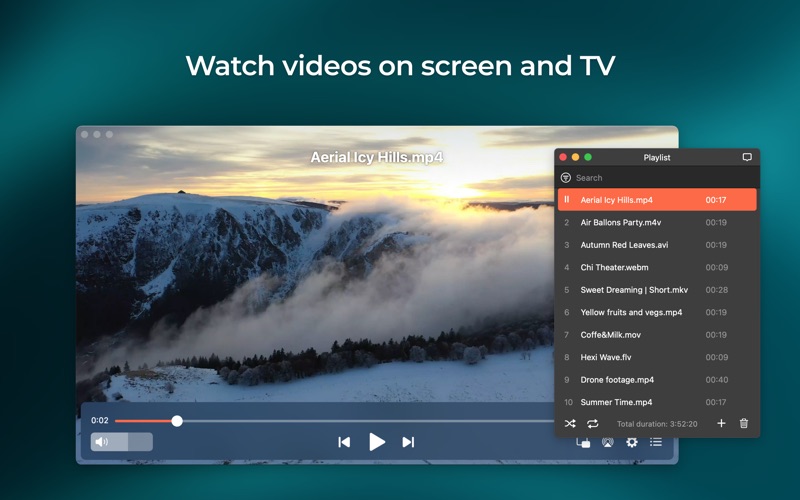
Elmedia Video Player is a free media player for macOS that doesn't call for any additional plugins or codecs. It can play pretty much any file type, be it AVI, MP4, FLV, SWF, WMV, MKV, MP3, M4V, etc. Thanks to native hardware-accelerated d…
Release notes parsed from trusted records and kept on this page. History provides context; a future Watch alert starts from a fresh baseline.
Added: support for M4B audiobook files. Other minor fixes and improvements.
Be the first to request it
Request the same source-linked purchase brief shown in the completed example below. Your email starts the request and receives the result.
Want it sooner? Independent demand changes queue priority.
Completed example · CleanShot X data
Everything below belongs to CleanShot X. It is a real, completed example—not research about Elmedia Video Player.

CleanShot X
Example data
 Completed research example
Most repeated positive
13authors
“cleanshotx - scrolling screenshots is much more robust.”Evidence: r/macapps · Shottr vs CleanShot X in 2026. Which one are you actually sticking with?
Most repeated concern
16authors
“I don't think it makes sense to spend the money for Cleanshot when other apps do most of what it does for a lot less or free.”Evidence: r/macapps · Shottr vs CleanShot X in 2026. Which one are you actually sticking with?
Product context
Official or maker-supplied product information. It is kept separate from buyer evidence and independent purchase verification.
Elmedia Video Player is a free media player for macOS that doesn't call for any additional plugins or codecs. It can play pretty much any file type, be it AVI, MP4, FLV, SWF, WMV, MKV, MP3, M4V, etc. Thanks to native hardware-accelerated decoding that unloads the processor and brings smooth and clean video onto the screen, this player has a wonderful HD experience to offer.
**Native Apple Silicon support**
HIGHLIGHTS:
VIDEO AND AUDIO PLAYBACK
- Keep the media player on top of all apps to never miss a moment of the movie - Can switch between audio tracks, including external files - Offers its own volume control - Works great with various subtitles files - Lets you create & manage playlists - Able to fit the window to your screen - Adjustable playback speed - Audio visualizer helps you experience your songs in a new way - Seek through videos with the help of thumbnail preview. - Sync subtitles with the video
BUILT-IN SUBTITLES SEARCH
For effortless access to various subtitles, we integrated Elmedia Video Player with the opensubtitles.com service, which lets you add desired subtitles to videos without leaving the app.
SUPPORTED FORMATS
Audio: mp3, m4a, wma, aac, ac3, aiff, ape, flac, mka, ogg, pcm, ra, vaw, waw, wav, aif, oga, caf, acm, dts, mpa, webm
Video: 3gp, avi, mp4, mpeg, vob, flv, mov, mkv, 3iv, asf, fli, m1v, m2t, m2ts, m2v, m4v, mp2, mpg, mpg2, mpg4, mpv, mqv, nut, nuv, nsv, qt, ram, rec, rm, rmvb, ts, vcd, vfw, wmv, webm, rv, f4v, ogv, ogm, divx, asx, dat, tp, mjp, yuv, xvid, vc1, mtv
Subtitles: utf, srt, ass, smi, txt, ssa, smil, jss, rt, idx, sub, vtt
**************************************************************************************************** Elmedia Video Player PRO is available via in-app purchase.
**Extra useful features of Elmedia Video Player PRO!**
- Picture-in-picture mode - Ability to save subtitles from opensubtitles.com - Adjust brightness, contrast, saturation, and more even during playback - Make the sound perfect for your ears with a 10-band equalizer. Choose one of the existing presets or create your own unique sound - Make a screenshot of any moment or make the entire video a series of pictures with adjustable interval - Select the output device for audio - Transmit AC-3/DTS through S/PDIF - Select preferred audio and subtitles language - Flip, rotate, and mirror the video - Loop any part of a video or audio file continuously
Elmedia is also a great streaming media player that allows:
- Streaming local files to Chromecast-enabled devices (incl. 4K videos for Chromecast Ultra and Chromecast with Google TV (4K)) - Streaming local files to DLNA-enabled devices, for example, Smart TVs (Samsung Smart TV, Sony Smart TV, LG Smart TV) - Streaming local files to Apple TVs (incl. 4K videos for Apple TV 4K) - Streaming local files to Roku devices - Streaming video and audio files in their native formats or will transcode them to a supported format in real time - Streaming videos with subtitles (both embedded and external) - Having full control over media streaming directly from the app. Play, pause, seek or stop the video. When streaming to DLNA-compliant devices or Chromecast you can control the volume in the player.
You can use Elmedia Video Player either to mirror the screen of your iPhone or as an audio receiver over AirPlay. The latest is helpful when you need to stream audio from your phone to a Mac with larger speakers.
Note: streaming functionality in the free version is available for 5 minutes only.
Added: support for M4B audiobook files. Other minor fixes and improvements.
More Entertainment apps from the directory.


