Most repeated positive
13authors
A complete feature set
“cleanshotx - scrolling screenshots is much more robust.”Evidence: r/macapps · Shottr vs CleanShot X in 2026. Which one are you actually sticking with?

This application is designed to improve your hearing by amplifying the sounds around you. You can use it if you have trouble perceiving your surroundings or when you feel uncomfortable wearing headphones and not knowing what is happening a…
Release notes parsed from trusted records and kept on this page. History provides context; a future Watch alert starts from a fresh baseline.
Be the first to request it
Request the same source-linked purchase brief shown in the completed example below. Your email starts the request and receives the result.
Want it sooner? Independent demand changes queue priority.
Completed example · CleanShot X data
Everything below belongs to CleanShot X. It is a real, completed example—not research about Hearing Aid • Ear booster.

CleanShot X
Example data
 Completed research example
Most repeated positive
13authors
“cleanshotx - scrolling screenshots is much more robust.”Evidence: r/macapps · Shottr vs CleanShot X in 2026. Which one are you actually sticking with?
Most repeated concern
16authors
“I don't think it makes sense to spend the money for Cleanshot when other apps do most of what it does for a lot less or free.”Evidence: r/macapps · Shottr vs CleanShot X in 2026. Which one are you actually sticking with?
Product context
Official or maker-supplied product information. It is kept separate from buyer evidence and independent purchase verification.
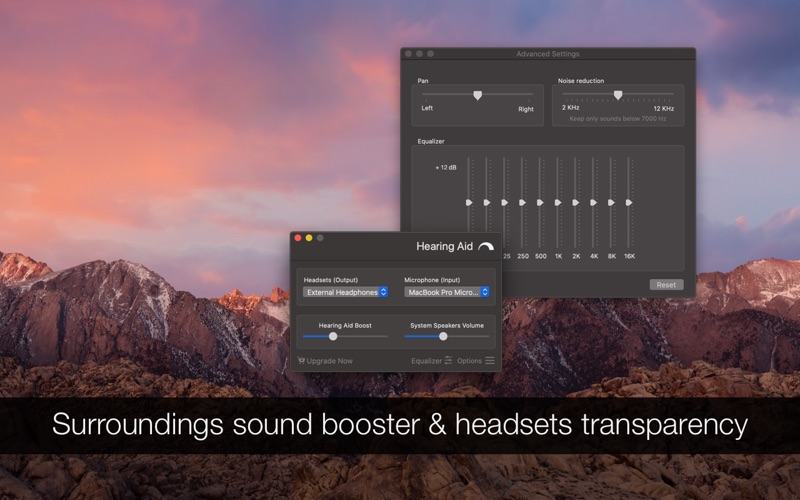
This application is designed to improve your hearing by amplifying the sounds around you. You can use it if you have trouble perceiving your surroundings or when you feel uncomfortable wearing headphones and not knowing what is happening around (sound transparency).
The microphone picks up sound the around you, the application boosts the volume and reduces the noise, then your headphones sends these amplified sounds to your ear. All these very fast.
TIPS • Move the microphone or Mac computer closer to your sound source (conversation partner or your TV) and the sound will be much clearer • The app can also be used as a headphones transparency system (hear environment sounds even if your headphones are covering your entire ear) • Want to spy a room? Leave your computer in the room and connect your AirPods as speakers
FEATURES • Select from any microphone, amplify the sound to any headsets • Control the volume booster level • Control the system wide sound volume • Control the advanced features: pan, noise reduction and sound equaliser • Hotkeys setup for enabling and opening the application
NOTES • Using bluetooth or wireless headsets can cause a small delay between the event and the sound due to environment limitations. It is recommended to use wired/cabled headsets • Bluetooth microphones are not supported since the recording quality is low because of bandwidth limitations. Please use a high quality microphone • Please note that a high volume boost or close proximity can cause a noisy feedback between your microphone and your headsets
SUPPORT We read your support emails every day, day by day. Write with confidence any question, feedback or complaint and you will receive an answer in a very short period of time.
• Bug fixes and improvements
More Medical apps from the directory.


