Most repeated positive
13authors
A complete feature set
“cleanshotx - scrolling screenshots is much more robust.”Evidence: r/macapps · Shottr vs CleanShot X in 2026. Which one are you actually sticking with?

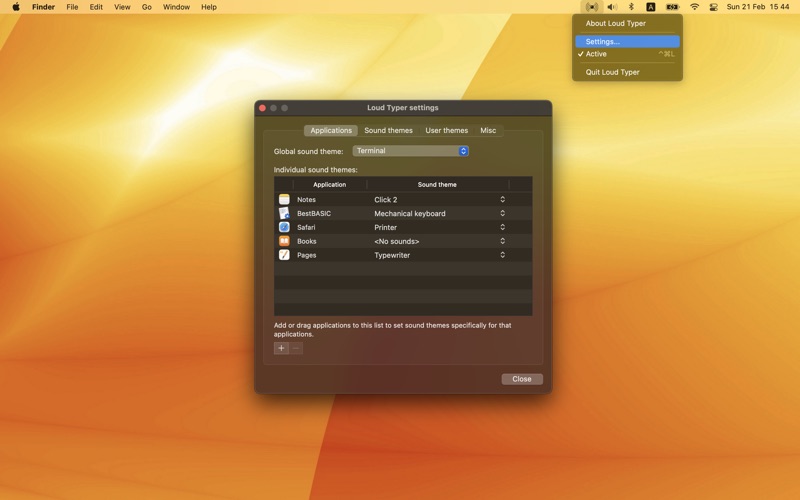
Do you want your Mac keyboard to sound like a real typewriter? Or maybe you want to hear cool clicking sounds every time you press any key? If yes, then Loud Typer is for you because it adds sounds to your Mac keyboard. Every time you pres…
Release notes parsed from trusted records and kept on this page. History provides context; a future Watch alert starts from a fresh baseline.
Translation to Thai language is added.
Be the first to request it
Request the same source-linked purchase brief shown in the completed example below. Your email starts the request and receives the result.
Want it sooner? Independent demand changes queue priority.
Completed example · CleanShot X data
Everything below belongs to CleanShot X. It is a real, completed example—not research about Loud Typer.

CleanShot X
Example data
 Completed research example
Most repeated positive
13authors
“cleanshotx - scrolling screenshots is much more robust.”Evidence: r/macapps · Shottr vs CleanShot X in 2026. Which one are you actually sticking with?
Most repeated concern
16authors
“I don't think it makes sense to spend the money for Cleanshot when other apps do most of what it does for a lot less or free.”Evidence: r/macapps · Shottr vs CleanShot X in 2026. Which one are you actually sticking with?
Product context
Official or maker-supplied product information. It is kept separate from buyer evidence and independent purchase verification.
Do you want your Mac keyboard to sound like a real typewriter? Or maybe you want to hear cool clicking sounds every time you press any key? If yes, then Loud Typer is for you because it adds sounds to your Mac keyboard. Every time you press any key, you hear a sound.
By default, Loud Typer emits typewriter sounds. But it has a large selection of built-in sound sets, and in addition, you can create your own sound themes. You can also customize Loud Typer to sound differently in different applications.
Loud Typer is loaded as an icon in the system menu bar. The main program window can be opened as follows: System menu bar -> "Loud Typer" icon -> "Settings" menu item.
Note: You may experience sound delays when using external speakers (Bluetooth or USB speakers). In this case, consider using internal Mac speakers or wired headphones instead of external speakers.
Translation to Thai language is added.
More Lifestyle apps from the directory.


