Most repeated positive
13authors
A complete feature set
“cleanshotx - scrolling screenshots is much more robust.”Evidence: r/macapps · Shottr vs CleanShot X in 2026. Which one are you actually sticking with?

Introducing PDF Office - the ultimate PDF Editor & Reader that takes your productivity to new heights! Edit PDF text, images & forms, Fill forms, sign documents, annotate, convert PDFs to Word, Excel, PowerPoint & images, smart compress PD…
Release notes parsed from trusted records and kept on this page. History provides context; a future Watch alert starts from a fresh baseline.
Bug Fixes & Improvements - Thanks to your valuable feedback, we've resolved various issues to make PDF Office even better!
Be the first to request it
Request the same source-linked purchase brief shown in the completed example below. Your email starts the request and receives the result.
Want it sooner? Independent demand changes queue priority.
Completed example · CleanShot X data
Everything below belongs to CleanShot X. It is a real, completed example—not research about PDF Office: Acrobat Pro Expert.

CleanShot X
Example data
 Completed research example
Most repeated positive
13authors
“cleanshotx - scrolling screenshots is much more robust.”Evidence: r/macapps · Shottr vs CleanShot X in 2026. Which one are you actually sticking with?
Most repeated concern
16authors
“I don't think it makes sense to spend the money for Cleanshot when other apps do most of what it does for a lot less or free.”Evidence: r/macapps · Shottr vs CleanShot X in 2026. Which one are you actually sticking with?
Product context
Official or maker-supplied product information. It is kept separate from buyer evidence and independent purchase verification.
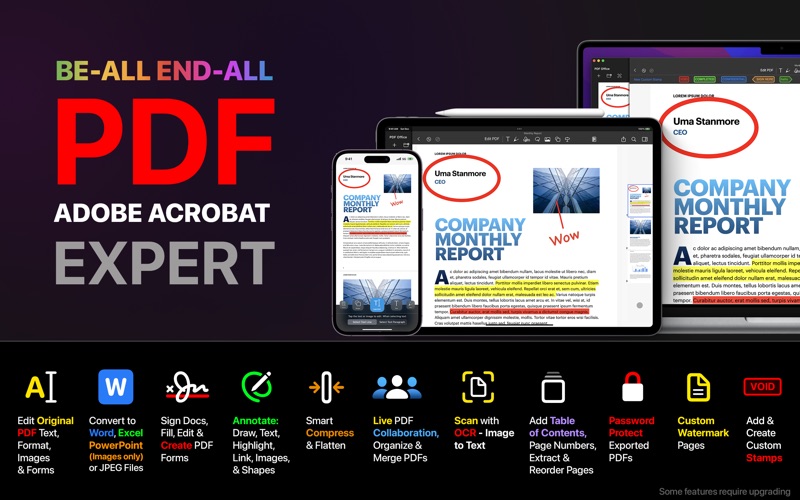
Introducing PDF Office - the ultimate PDF Editor & Reader that takes your productivity to new heights! Edit PDF text, images & forms, Fill forms, sign documents, annotate, convert PDFs to Word, Excel, PowerPoint & images, smart compress PDFs, live-collaborate, OCR image-to-text scanner, protect PDFs, and much more - all in one powerful app!
Why choose PDF Office? Our app offers a comprehensive suite of best-in-class features - giving you unparalleled control over your PDF documents. With a sleek and user-friendly interface, PDF Office makes working with PDFs easier than ever before. Transform the way you work with PDFs - download PDF Office today and experience the difference for yourself!
Key Features of PDF Office:
EDIT PDFs - Effortlessly edit original text & images • Modify, add or remove text, images, and fonts • Change font, size, color, and alignment • Fill out static PDF forms and save changes
SIGN DOCUMENTS - Sign with a single click • Save signatures for future use • Easily resize and relocate signatures
POWERFUL EDITING TOOLS - Edit and enhance your PDFs • Freehand drawing with finger or Apple Pencil (Apple Pencil is iPad only) • Add custom text, comments, or notes • Scan and fill PDF forms • Merge or compress PDFs for easy sharing • Insert and resize photos in your PDFs
CONVERT PDFs - Convert to Word, Excel, PowerPoint & images • High-quality conversions with text formatting, annotations, highlights, drawings, images, and tables • Secure server-side conversion with data protection and privacy
OCR - Convert images to text • Next-generation OCR with impressive accuracy • On-device processing for complete privacy
SMART COMPRESS - Optimize your PDFs • Control image resolution and quality • Flatten PDFs or remove images for a smaller file size
CUSTOM PDF FORMS - Create forms with ease • Start with templates for common PDF form objects • Add text input boxes, checkboxes, radio buttons, and more
STAMPS - Create custom stamps • Emphasize sections of your PDF • Design unique stamps for various purposes
COLLABORATE IN REAL-TIME - Share and edit with others • Create shared folders and invite others for real-time editing • Collect feedback in one place
ANNOTATE & ORGANIZE - Enhance your PDFs • Annotate with highlights, underlines, or handwriting • Add comments or notes within the file • Use bookmarks for intuitive navigation • Organize your PDFs with folders and iCloud sync
DARK MODE - Comfortable reading experience • Enable dark mode for extended reading sessions • Adjust buttons and toolbars for convenience
UPGRADE FOR MORE - Some features require upgrading to access
Transform the way you work with PDFs - download PDF Office today and experience the difference for yourself!
Bug Fixes & Improvements - Thanks to your valuable feedback, we've resolved various issues to make PDF Office even better!
More Business apps from the directory.