Most repeated positive
13authors
A complete feature set
“cleanshotx - scrolling screenshots is much more robust.”Evidence: r/macapps · Shottr vs CleanShot X in 2026. Which one are you actually sticking with?

QuickMD is the fastest, most elegant Markdown viewer for macOS. Double-click any .md file and instantly see beautifully rendered content. COMPANION TO YOUR EDITOR • Auto-reload: the document refreshes the moment your editor saves it. Enabl…
Release notes parsed from trusted records and kept on this page. History provides context; a future Watch alert starts from a fresh baseline.
COMPANION TO YOUR EDITOR
BIG PERFORMANCE WIN
MERMAID
ALSO FIXED
Be the first to request it
Request the same source-linked purchase brief shown in the completed example below. Your email starts the request and receives the result.
Want it sooner? Independent demand changes queue priority.
Completed example · CleanShot X data
Everything below belongs to CleanShot X. It is a real, completed example—not research about QuickMD.

CleanShot X
Example data
 Completed research example
Most repeated positive
13authors
“cleanshotx - scrolling screenshots is much more robust.”Evidence: r/macapps · Shottr vs CleanShot X in 2026. Which one are you actually sticking with?
Most repeated concern
16authors
“I don't think it makes sense to spend the money for Cleanshot when other apps do most of what it does for a lot less or free.”Evidence: r/macapps · Shottr vs CleanShot X in 2026. Which one are you actually sticking with?
Product context
Official or maker-supplied product information. It is kept separate from buyer evidence and independent purchase verification.
QuickMD is the fastest, most elegant Markdown viewer for macOS. Double-click any .md file and instantly see beautifully rendered content.
COMPANION TO YOUR EDITOR • Auto-reload: the document refreshes the moment your editor saves it. Enable auto-save in VS Code, Cursor or Zed and QuickMD becomes a live preview • Open in External Editor (Cmd+E): one-click handoff to VS Code, Cursor, Sublime Text, Zed, Typora, Obsidian, Nova, BBEdit, MacDown or iA Writer (auto-detected, configurable in Settings) • Copy button on every code block, like on GitHub
INSTANT LAUNCH, INSTANT DOCUMENTS • Opens in milliseconds, no loading screens • Native macOS app, no Electron bloat • Lazy native rendering: even 10,000+ line documents open without freezing • Native text selection in paragraphs, quotes and code
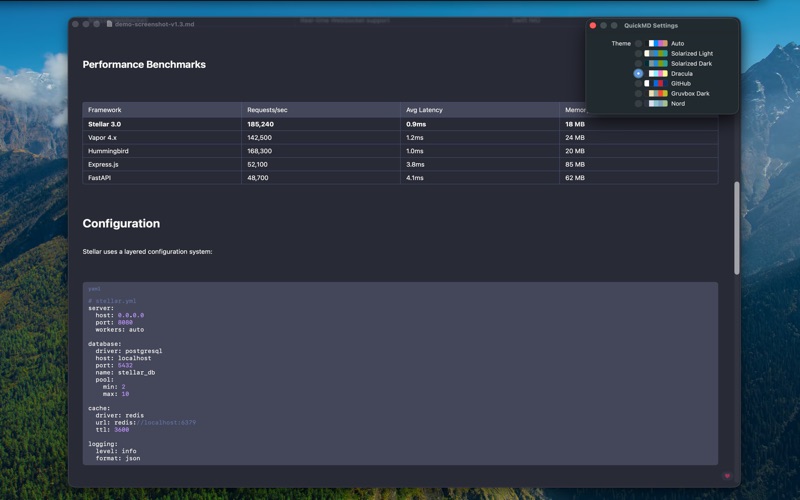
COMPLETE MARKDOWN SUPPORT • Headers (ATX and setext), bold, italic, strikethrough • Tables with proper column alignment • Code blocks with syntax highlighting • LaTeX math: display ($$...$$) and inline ($...$) with TeX-quality rendering • Mermaid diagrams with pinch-to-zoom viewer • Footnotes, task lists, nested lists and blockquotes • Images (local and remote), links of every style • YAML frontmatter rendered as a tidy code block • Windows (CRLF) files and legacy encodings just work
NAVIGATION & SEARCH • Find in document (Cmd+F) with per-word match count and navigation • Highlighting across all block types (text, code, tables, blockquotes) • Table of Contents sidebar (Cmd+Shift+T), auto-generated from headings • Recent documents sidebar (Cmd+Shift+D) • Copy the whole document (Cmd+Shift+C) or any section (hover a heading) • Export to PDF and Print
THEMES • 7 built-in: Auto (follows system), Solarized Light/Dark, Dracula, GitHub, Gruvbox Dark, Nord • Custom themes: drop a JSON file into the themes folder, live reload, import button in Settings
PRIVACY FOCUSED • No analytics, no tracking • Works completely offline • Your files stay on your device
Perfect for developers, writers, students, and anyone who works with Markdown daily. QuickMD is the Preview.app equivalent for Markdown files.
COMPANION TO YOUR EDITOR • Auto-reload: QuickMD watches every open document and refreshes it the moment the file changes on disk. Enable auto-save in your editor and you get a practical live preview • Open in External Editor (Cmd+E): one-click handoff to your editor. First use asks which app to use; change it anytime in Settings -> Editor • Copy button on code blocks: hover and click
BIG PERFORMANCE WIN • Documents with 10,000+ lines now open without freezing the UI thanks to native lazy text rendering • Native macOS text selection in paragraphs, quotes and code • Scrolling back to a Mermaid diagram is instant
MERMAID • Zoom any diagram: hover, click the zoom button, then pinch or use the zoom controls • Fixed diagrams failing to render in files with Windows line endings
ALSO FIXED • Windows (CRLF) files now render exactly like Mac/Linux files • YAML frontmatter renders as a tidy code block • Setext headings (text underlined with dashes) render correctly • "Copy section" no longer miscounts headings when code blocks contain # comments • PDF export no longer cuts off very long code blocks • Custom theme files with invalid colors show a clear error • Hardened how diagram content is passed to the renderer (security)
More Developer Tools apps from the directory.