Most repeated positive
13authors
A complete feature set
“cleanshotx - scrolling screenshots is much more robust.”Evidence: r/macapps · Shottr vs CleanShot X in 2026. Which one are you actually sticking with?

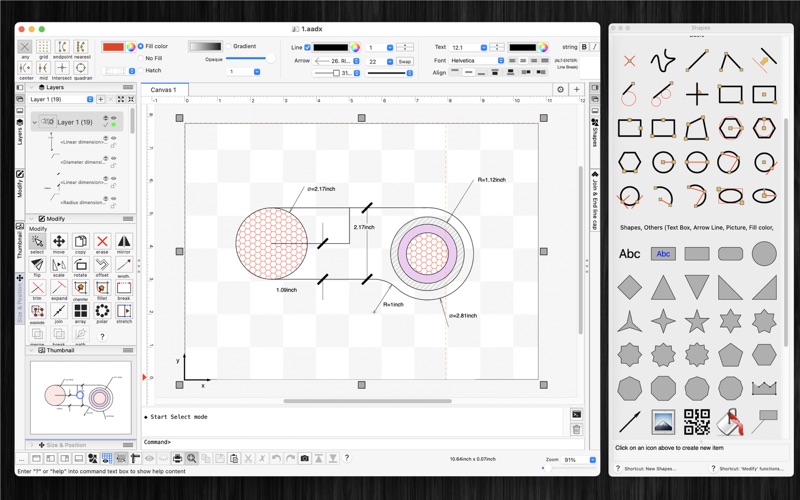
This is the Pro version of SimpleCAD. SimpleCAD2 is an easy, simple to learn 2D Computer Aided Design program (CAD) made to meet all of your basic design needs. SimpleCAD2 is more than just a vector paint program, because you could move, c…
Release notes parsed from trusted records and kept on this page. History provides context; a future Watch alert starts from a fresh baseline.
Previous updates:
Be the first to request it
Request the same source-linked purchase brief shown in the completed example below. Your email starts the request and receives the result.
Want it sooner? Independent demand changes queue priority.
Completed example · CleanShot X data
Everything below belongs to CleanShot X. It is a real, completed example—not research about SimpleCAD2.

CleanShot X
Example data
 Completed research example
Most repeated positive
13authors
“cleanshotx - scrolling screenshots is much more robust.”Evidence: r/macapps · Shottr vs CleanShot X in 2026. Which one are you actually sticking with?
Most repeated concern
16authors
“I don't think it makes sense to spend the money for Cleanshot when other apps do most of what it does for a lot less or free.”Evidence: r/macapps · Shottr vs CleanShot X in 2026. Which one are you actually sticking with?
Product context
Official or maker-supplied product information. It is kept separate from buyer evidence and independent purchase verification.
This is the Pro version of SimpleCAD. SimpleCAD2 is an easy, simple to learn 2D Computer Aided Design program (CAD) made to meet all of your basic design needs. SimpleCAD2 is more than just a vector paint program, because you could move, copy, edit, scale, rotate and offset… objects.
(* Number of objects/shapes added to each document is limited, you could upgrade to Pro-Version to remove this limitation. *)
Main Functions of the application:
- Multi-sheets: Each document support multiple sheets of drawing canvas
- Basic draw items: including freehand lines, line, polyline, orthogonal line, tangent line, parallel line, rectangle, polygon, circle, arc (NOTE: native ellipse is not supported, only support ellipse created by polyline object). Text box, callout box, picture box (imported from image file), measure items…
- Modify functions: move, erase, copy, mirror, offset, rotate, scale, stretch items' vertices, lengthen, trim, extend, break, chamfer, fillet and explode polyline, join, array, polar array...
- Auto Snap point setting: Snap to grid, end points of objects, on entity, center of arc - line - circle, middle point of arc - line, intersections, snap to top, left, right, bottom edges of a circle, arc
- Multi layers: you could create new layer to draw more items. Layers could be shown, hidden independently.
- Add image: You could add any image file (support file type: svg, svgz, gif, jpeg, png, bmp, pict, tiff) to display as an item inside the application. Image file could be shown in following modes: Stretch / Fit inside bound / Fit outside bound. The application also allows to DRAG/DROP many image files directly from Finder (or press Cmd-V to paste image from current Clipboard) to current editing window to add them to the diagram.
- Add items (block) to Block Template list: Right click on selected items then select "Add to template list" to save the block to template list so that you can reuse it later
- Customizable background: Background color, total size of the diagram could be changed during editing. Background color also can be set to transparent.
- Open/Save to "*.AAD" file: AAD (*.aad) is the new file type created only for this application. Press "Cmd-S" to save current diagram to an AAD file so that you could load it later for editing.
- Capture to clipboard: Press "Cmd-9" or click on Capture button to export current diagram image to clipboard, then you could paste that image to another application. Example: Open [Preview] application, press "Cmd-N" to paste above captured image to view or to save to an image file. Of course, you could paste that image to Excel, Word application too.
- SUPPORT MULTI-LANGUAGES: English Deutsch Français 日本語 한국어 Español Português Čeština Dansk Suomi Italiano Nederlands Norsk Polski Русский Svenska ไทย Türkçe Tiếng Việt 中文(中国) 中文(台灣)
Other functions: - Supports Metric or English units (you could change it in the Preferences dialog) - Unlimited Undo/Redo (shortcut key: Cmd-Z / Shift-Cmd-Z) - Support Thumbnail view - Copy / Paste (shortcut key: Cmd-C / Cmd-V) - Group / Ungroup Items (shortcut key: Cmd-G / Shift-Cmd-G) - Lock/Unlock items position (shortcut key: Cmd-L / Shift-Cmd-L) - Change display order - Export to png, jpeg, tiff, pdf image file (shortcut key: Cmd-E) - Print supported (shortcut key: Cmd-P)
- Improve UI - Fix bugs
Previous updates: - Support "BLOCK" - Add "Insert" command to insert block into drawing - Allow to edit single item inside its group - Support macOS 13 Ventura - Allow modify functions (copy, trim..) to change objects from multiple layers - Allow modify functions (copy, trim..) to accept "right-click on mouse" as "press-ENTER" - Allow modify functions (copy, trim..) to accept undo/redo functions - Allow to change order of Inspector-views on left/right sides of document window - Support tree-view of all objects (via "Layers" Inspector-view) - Allow to import/export custom favorite shapes - Allow to find/replace string inside shapes - Add shortcut: hold SPACE key then move mouse to maneuver around document
More Graphics & Design apps from the directory.


