Most repeated positive
13authors
A complete feature set
“cleanshotx - scrolling screenshots is much more robust.”Evidence: r/macapps · Shottr vs CleanShot X in 2026. Which one are you actually sticking with?

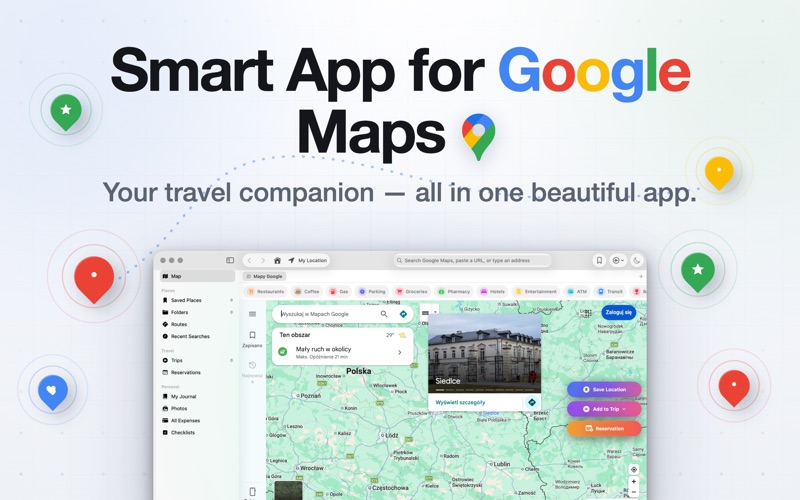
Smart App for Google Maps is the clean, native macOS app for Google Maps. Open the world's most popular map in its own Mac window — tabs, saved places, trip planning, expenses, reservations and more. Your saved places even work offline. No…
Release notes parsed from trusted records and kept on this page. History provides context; a future Watch alert starts from a fresh baseline.
What's new in Smart App 1.1.10
Fixes: address bar now hints coordinates for backroads, more reliable "My Location", improved Print behaviour, and dozens of small polish improvements.
Be the first to request it
Request the same source-linked purchase brief shown in the completed example below. Your email starts the request and receives the result.
Want it sooner? Independent demand changes queue priority.
Completed example · CleanShot X data
Everything below belongs to CleanShot X. It is a real, completed example—not research about Smart App for Google Maps.

CleanShot X
Example data
 Completed research example
Most repeated positive
13authors
“cleanshotx - scrolling screenshots is much more robust.”Evidence: r/macapps · Shottr vs CleanShot X in 2026. Which one are you actually sticking with?
Most repeated concern
16authors
“I don't think it makes sense to spend the money for Cleanshot when other apps do most of what it does for a lot less or free.”Evidence: r/macapps · Shottr vs CleanShot X in 2026. Which one are you actually sticking with?
Product context
Official or maker-supplied product information. It is kept separate from buyer evidence and independent purchase verification.
Smart App for Google Maps is the clean, native macOS app for Google Maps. Open the world's most popular map in its own Mac window — tabs, saved places, trip planning, expenses, reservations and more. Your saved places even work offline.
No clutter. No browser tabs. No tracking. Just maps, built the Mac way.
FEATURES
- Native macOS window — multi-tab, address bar, keyboard shortcuts, dark mode - Unlimited saved places: 13 categories, colors, notes, ratings, reviews, photos, visit history - Quick-search chips: Restaurants, Coffee, Gas, Parking, Groceries, Pharmacy, Hotels and more - Native Apple Maps preview for every saved place - Travel Journal and Photos Gallery across your whole library - Dark Map mode that flips the entire Google Maps surface - Native share sheet, print, drag-drop to Notes, Mail, Messages - Spotlight indexing — find your saves from anywhere on your Mac - Menu bar item — quick search, recents, and a live trip countdown - ⌘K palette · ⌘F Global Search across places, folders, trips, stops, reservations, notes - Six Shortcuts / Siri actions: Open Place, Search Maps, Get Directions, Add Trip Expense, Log Visit, Route to Place - URL scheme (smartapp://…) for Alfred, Raycast and Notes hyperlinks - Paste lat,lng in the address bar for precise routing on backroads - Folders and color tags to organize places into trips or any group - Route Optimization — one tap arranges stops for shortest drive - Offline Map Snapshots — every place cached as an Apple Maps tile, works with no internet - PDF Trip Export — print or share a full itinerary - Routes with multiple stops, live traffic and road works - Compare Drive vs Walk vs Bike vs Transit in one click - Trip planner: day-by-day stops, times, budget, packing checklist - Reservations Calendar with 1-hour-before reminders - Aggregate views: All Expenses, All Checklists across every trip - JSON library export and import - Focus Filter — auto-filter places from macOS System Settings → Focus
DESIGNED FOR DAILY USE
- Floating "Save Location", "Add to Trip" and "Reservation" buttons on the map - "Get Directions Here" panel with origin picker and Save Route - "Nearby" tiles: Parking, Gas, Restaurants, Coffee, ATM, Grocery, Hotels, Pharmacy - Auto-extracted place name, address, phone and rating on save - Sort, pin, filter and search across everything
MADE FOR MAC
Built with Swift, SwiftUI and SwiftData — no Electron, no web app in disguise. Runs at native speed, uses about 2 MB on disk, respects Dark Mode and Dynamic Type, and integrates deeply with Focus, Shortcuts, Siri, Spotlight, Menu Bar, ⌘K and ⌘F.
PROUDLY PRIVATE No analytics. No tracking. No ads. Everything you save stays on your Mac, sandboxed by macOS.
PRICING — Smart App requires a subscription to use.
- Monthly: $4.99/month (no trial) - Yearly: $24.99/year with a 3-day free trial (most popular) - Lifetime: $39.99 one-time — yours forever
Subscription terms: Your Apple ID is charged at the price above. Subscriptions renew automatically unless cancelled at least 24 hours before the end of the current period. Manage or cancel anytime in your Apple ID's Subscriptions panel.
Privacy: https://gavcris.app/#privacy Terms: https://gavcris.app/#terms
Smart App is independent. Not affiliated with, sponsored by or endorsed by Google LLC. "Google" and "Google Maps" are trademarks of Google LLC. Smart App displays the public Google Maps website in a private Mac window; your use is subject to Google's Terms and Privacy Policy.
What's new in Smart App 1.1.10
• Route Optimization — one tap arranges any day's stops for the shortest total drive • Offline Map Snapshots — every saved place gets a cached MapKit tile that works without Wi-Fi • PDF Trip Export — print or share a full itinerary with days, stops, budget and checklist • Live Trip Countdown — the menu bar now counts down to your next trip and shows your next reservation • Global Search (⌘F) — find any place, folder, trip, stop, reservation or note across your whole library • 3 more Shortcuts / Siri actions — "Add expense to my Rome trip", "Log a visit", "Route to a saved place" • URL scheme — deep-link into places, trips and searches from other apps (smartapp://…) • JSON export & import — full library backup and restore, from Settings → Data • Focus Filter — Smart App integrates with macOS System Settings → Focus to auto-filter places by context • Better paywall recovery — if the App Store can't load plans, Smart App now offers a retry and a graceful fallback so nobody gets stuck
Fixes: address bar now hints coordinates for backroads, more reliable "My Location", improved Print behaviour, and dozens of small polish improvements.
More Travel apps from the directory.


