Most repeated positive
13authors
A complete feature set
“cleanshotx - scrolling screenshots is much more robust.”Evidence: r/macapps · Shottr vs CleanShot X in 2026. Which one are you actually sticking with?

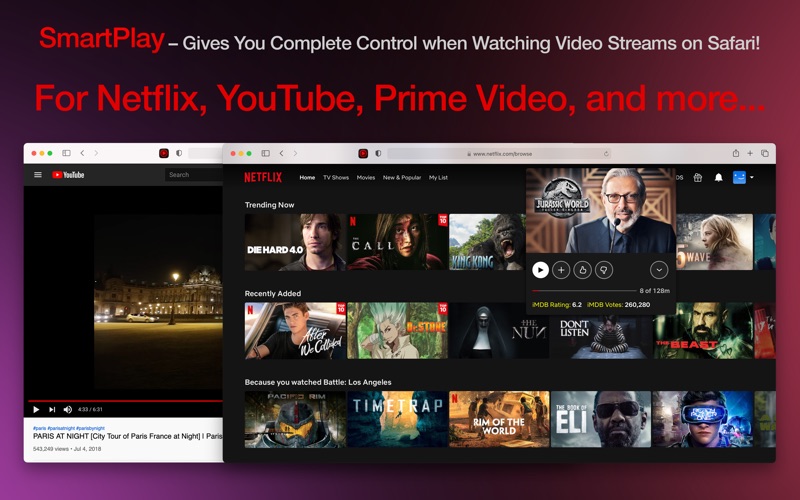
** SmartPlay is a Safari Web Extension that will give you extra control and functions (e.g., Video Effects, Playback Speed, Custom Subtitles, Auto Skip Intros, IMDB Rating, etc.) when you're watching video streams on popular websites. ** S…
Release notes parsed from trusted records and kept on this page. History provides context; a future Watch alert starts from a fresh baseline.
Be the first to request it
Request the same source-linked purchase brief shown in the completed example below. Your email starts the request and receives the result.
Want it sooner? Independent demand changes queue priority.
Completed example · CleanShot X data
Everything below belongs to CleanShot X. It is a real, completed example—not research about SmartPlay for Netflix.

CleanShot X
Example data
 Completed research example
Most repeated positive
13authors
“cleanshotx - scrolling screenshots is much more robust.”Evidence: r/macapps · Shottr vs CleanShot X in 2026. Which one are you actually sticking with?
Most repeated concern
16authors
“I don't think it makes sense to spend the money for Cleanshot when other apps do most of what it does for a lot less or free.”Evidence: r/macapps · Shottr vs CleanShot X in 2026. Which one are you actually sticking with?
Product context
Official or maker-supplied product information. It is kept separate from buyer evidence and independent purchase verification.
** SmartPlay is a Safari Web Extension that will give you extra control and functions (e.g., Video Effects, Playback Speed, Custom Subtitles, Auto Skip Intros, IMDB Rating, etc.) when you're watching video streams on popular websites. ** Supports Netflix, YouTube, Prime Video, HBO, Hulu, iQIYI, ESPN, Linkedin, Lynda, Udemy, etc. ** It's easy to use and doesn't track you or collect any personal information. Just play your favorite movie, TV show, or video, and a new control panel will appear on top of the player! "Safari Web Extension" was first introduced at WWDC 2020 June. This is the first Safari Web Extension that gives you complete control over your online video streams.
-- KEY FEATURES --
Shows IMDB Rating and Votes for each movie or TV show (Netflix Only). Access Netflix Hidden Categories and Search for Categories. Adjust video brightness, saturation, contrast, and gray scale. Live preview of changes. Control Playback Speed (from 0.01x slower to 5x faster). When watching a slow movie, you can speed it up; if you're learning a new language using Netflix, you can watch the video in slow motion.
Quick Rewind (60 seconds).
Auto-Skip Intros and Recaps. No need to press the Skip button each time (Netflix Only). Add Multiple Custom Subtitles (in SRT or VTT format) to your video stream. Supports any language. Customize subtitle position, color, size, background color, background opacity, time offset, font family, and font encoding. Control Volume with Mouse Wheel. Zoom in and out of the video. Change video position. Show Detailed Information about the Video Stream (Netflix Only). Includes detailed video, audio, and network information (e.g., Resolution, Frame Rate, Bitrate, Codec, HDR Support, Current CDN, Throughput, Movie ID, etc.). Supports Netflix, YouTube, Prime Video, HBO, Hulu, iQIYI, ESPN, Linkedin, Lynda, Udemy, and etc.
-- HOW TO SETUP --
\1. Please run the app and click the button on the welcome screen. This will take you to the Extensions Preferences pane in Safari. Click the checkbox next to the item called SmartPlay. \2. Go to a website (e.g., Netflix.com), click the SmartPlay icon in your Safari toolbar, then click "Always Allow on This Website" to grant SmartPlay access to this website. You're all set! Click the SmartPlay icon again to customize the extension's settings.
Note: Safari may show you a notice saying that the extension can read your sensitive information and browsing history. It's just a general reminder that shows up for every extension. SmartPlay never reads or collects any of your personal information such as passwords or credit card numbers. It's completely safe to use. You have my word! The extension will work on Safari version 14 for MacOS version 11, 10.15, and 10.14. -- DISCLAIMER --
This browser extension is not endorsed or affiliated with any of the aforementioned websites or services in any way. All product names, logos, and brands are property of their respective owners.
-- SUBSCRIPTION --
Payment will be charged to iTunes Account at confirmation of purchase. Subscription automatically renews unless auto-renew is turned off at least 24-hours before the end of the current period. Account will be charged for renewal within 24-hours prior to the end of the current period. The cost depends on the selected plan. Subscriptions may be managed by the user and auto-renewal may be turned off by going to the user's Account Settings after purchase. Any unused portion of the free trial will be forfeited when the user purchases a subscription.
Privacy Policy: http://www.9bestapp.com/resources/privacy-policy.html Terms: http://www.9bestapp.com/terms/
* Bug fixes and app improvements.
More Entertainment apps from the directory.


