Most repeated positive
13authors
A complete feature set
“cleanshotx - scrolling screenshots is much more robust.”Evidence: r/macapps · Shottr vs CleanShot X in 2026. Which one are you actually sticking with?

Sphero Edu is your hub to create, contribute, and learn with Sphero robots. Go beyond code by incorporating unique STEAM lessons to complete with your bot. Designed for learner progression, Sphero Edu beginners can give robots commands by…
Release notes parsed from trusted records and kept on this page. History provides context; a future Watch alert starts from a fresh baseline.
Be the first to request it
Request the same source-linked purchase brief shown in the completed example below. Your email starts the request and receives the result.
Want it sooner? Independent demand changes queue priority.
Completed example · CleanShot X data
Everything below belongs to CleanShot X. It is a real, completed example—not research about Sphero Edu.

CleanShot X
Example data
 Completed research example
Most repeated positive
13authors
“cleanshotx - scrolling screenshots is much more robust.”Evidence: r/macapps · Shottr vs CleanShot X in 2026. Which one are you actually sticking with?
Most repeated concern
16authors
“I don't think it makes sense to spend the money for Cleanshot when other apps do most of what it does for a lot less or free.”Evidence: r/macapps · Shottr vs CleanShot X in 2026. Which one are you actually sticking with?
Product context
Official or maker-supplied product information. It is kept separate from buyer evidence and independent purchase verification.
Sphero Edu is your hub to create, contribute, and learn with Sphero robots. Go beyond code by incorporating unique STEAM lessons to complete with your bot.
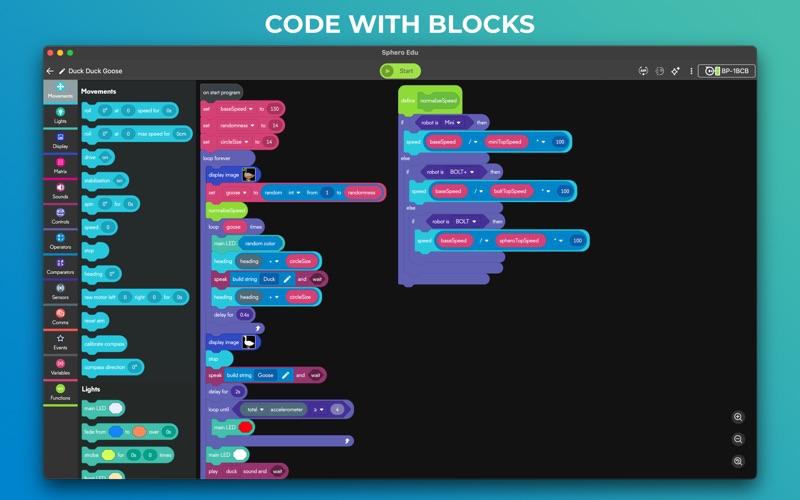
Designed for learner progression, Sphero Edu beginners can give robots commands by drawing a path in the app for their robot to follow. Intermediate coders can use Scratch blocks to learn more advanced logic, while pros can use text programming and write their own JavaScript or Python code.
Sphero Edu is built for makers, learners, educators, and parents. The interactive platform allows you to keep track of your class or group from one easy place. Anyone can save their progress, jump from device to device, and continue the discovery from anywhere. Preparing for the future has never been so fun.
SPHERO EDU FEATURES
PROGRAMS: Program your bots in 3 ways with Draw, Block, and Text modes. Start with the basics and grow.
SENSOR DATA: See location, accelerometer, gyroscope, velocity, and distance sensor data through visual graphs.
LESSONS: Program a painting. Navigate a maze. Mimic the solar system. The only limit is your imagination.
TAKE A DRIVE: Need a brain break? Set LED colors on your robot and zoom around in Drive mode.
ASSIGNMENTS: Are you a teacher? Monitor progress by creating lessons and assigning them to your students.
INTEGRATIONS: Simplify classroom use by signing in and syncing classrooms with Google and Clever accounts.
COMPATIBILITY Supported Robots: Sphero BOLT+, Sphero BOLT, Sphero RVR/RVR+, Sphero SPRK+, Sphero SPRK Edition, Sphero 2.0, Sphero Mini, Ollie, BB-8, BB-9E, R2-D2, R2-Q5
Unsupported Robots: Sphero Original, Force Band, Lightning McQueen, Spider-Man, indi
• Bug and crash fixes
More Education apps from the directory.


