Most repeated positive
13authors
A complete feature set
“cleanshotx - scrolling screenshots is much more robust.”Evidence: r/macapps · Shottr vs CleanShot X in 2026. Which one are you actually sticking with?

Two-week free trial! So you can purchase SQLiteFlow after you know you like it! SQLiteFlow is an SQLite editor for Mac & iOS which is intuitive, stable and reliable to use. It includes the following features: Query Editor • Multi-query exe…
Release notes parsed from trusted records and kept on this page. History provides context; a future Watch alert starts from a fresh baseline.
Be the first to request it
Request the same source-linked purchase brief shown in the completed example below. Your email starts the request and receives the result.
Want it sooner? Independent demand changes queue priority.
Completed example · CleanShot X data
Everything below belongs to CleanShot X. It is a real, completed example—not research about SQLiteFlow - SQLite Editor.

CleanShot X
Example data
 Completed research example
Most repeated positive
13authors
“cleanshotx - scrolling screenshots is much more robust.”Evidence: r/macapps · Shottr vs CleanShot X in 2026. Which one are you actually sticking with?
Most repeated concern
16authors
“I don't think it makes sense to spend the money for Cleanshot when other apps do most of what it does for a lot less or free.”Evidence: r/macapps · Shottr vs CleanShot X in 2026. Which one are you actually sticking with?
Product context
Official or maker-supplied product information. It is kept separate from buyer evidence and independent purchase verification.
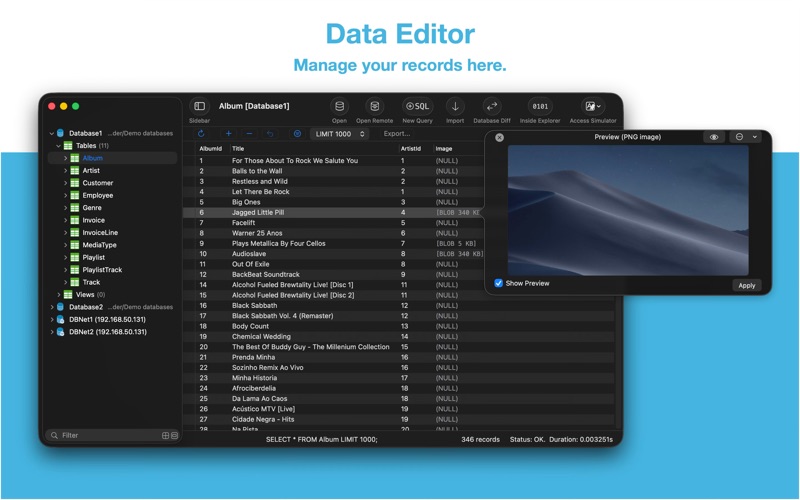
Two-week free trial! So you can purchase SQLiteFlow after you know you like it! SQLiteFlow is an SQLite editor for Mac & iOS which is intuitive, stable and reliable to use.
It includes the following features:
Query Editor • Multi-query execution. • Customize syntax highlighting. • SQL auto-completion. • Format query. • Copy query as code. • Paste recent query sessions. • Explain query.
Data Editor • View, edit, add or remove records. • View table data with a convenient data filter. • Edit blob data as hex or show it as preview if possible. • Edit JSONB as JSON. • Copy data to CSV,JSON, Markdown, and to Insert Statement or Update Statement if possible.
Table Schema • View, edit or add table fields, indexes, foreign keys, checks. • View triggers. • View DDL. • Preview the query that for altering table.
Database Statistics • Display tables count and each table's records count. • Display total size of each table, size of each table's content and size of each table's indexes.
ER Diagram • Supports display ER diagram. • Supports toggle field type hide or show. • Supports Relationship Guessing. • Supports copy as Mermaid markdown.
Database Diff • Supports generate SQL text that can let you transform a database into another. • Supports show a summary of the differences between two databases.
Import • Supports import CSV data to a table. • Supports import JSON data to a table. • Supports import data by SQL file.
Export • In Data Editor or Query Results, supports export data to CSV, JSON, Markdown or List. • In Data Editor, supports export data to Insert Statement or Update Statement if possible.
Database Encryption • Supports access encrypted SQLite database which is encrypted by SQLCipher library.
Remote Connect • Supports open remote SQLite databases on SQLiteFlow(iOS). One use case is that you can debug query performance issue on your iPhone or iPad directly through your Mac.
Dark Mode • Supports Dark Mode for macOS Mojave or later.
Drag and Drop • Open databases and SQL scripts. • Create multiple windows.
Access Apple simulator • Supports access Apple simulator. So you can open your app's Documents directory more easily than before when developing your apps.
Handle Database File Name or Directory Changes • One of a cool thing that benefit from this feature is, this makes SQLiteFlow can work friendly with your SQLite databases in iOS simulator.
Attach Database • Attach opened databases without any code. This is a very handy way to do attach database thing, and could save a lot of your time from writing ATTACH DATABASE commands if your business mode relies on it.
Inside Explorer • Show binary data structure of SQLite database file, journal file, WAL file or WAL-Index file.
Shortcuts • Supports "Run Query" action. • Supports "Import CSV" action. • Supports "Import JSON" action. (Requires macOS 14.0 or later.)
Create Function • Supports create scalar function using a simple JavaScript routine.
Load Extension • Supports SQLite load extension.
LLDB Co-worker • Supports sfopen command. Let you open a copy of a temporary local database that originally in debugged device. • Supports sfsave command. Let you copy the temporary local database (that originally created by sfopen command) to debugged device.
Terms of Use: https://www.apple.com/legal/internet-services/itunes/dev/stdeula/
• Update SQLite library to version 3.53.3 (2026-06-26). • Update SQLCipher to 4.17.0. • Additional bug fixes and stability improvements.
More Developer Tools apps from the directory.