Most repeated positive
13authors
A complete feature set
“cleanshotx - scrolling screenshots is much more robust.”Evidence: r/macapps · Shottr vs CleanShot X in 2026. Which one are you actually sticking with?

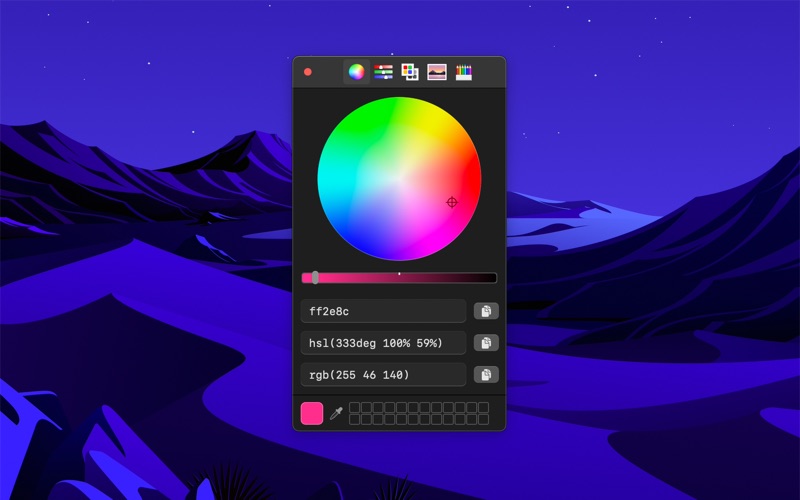
Pick colors from anywhere using the built-in color picker. Note: On macOS 26, a system bug causes the color sampler to sometimes pick the wrong color. The app relies on macOS's color sampler and canot fix this. ■ Features - Palettes - Rece…
Release notes parsed from trusted records and kept on this page. History provides context; a future Watch alert starts from a fresh baseline.
Be the first to request it
Request the same source-linked purchase brief shown in the completed example below. Your email starts the request and receives the result.
Want it sooner? Independent demand changes queue priority.
Completed example · CleanShot X data
Everything below belongs to CleanShot X. It is a real, completed example—not research about System Color Picker.

CleanShot X
Example data
 Completed research example
Most repeated positive
13authors
“cleanshotx - scrolling screenshots is much more robust.”Evidence: r/macapps · Shottr vs CleanShot X in 2026. Which one are you actually sticking with?
Most repeated concern
16authors
“I don't think it makes sense to spend the money for Cleanshot when other apps do most of what it does for a lot less or free.”Evidence: r/macapps · Shottr vs CleanShot X in 2026. Which one are you actually sticking with?
Product context
Official or maker-supplied product information. It is kept separate from buyer evidence and independent purchase verification.
Pick colors from anywhere using the built-in color picker.
Note: On macOS 26, a system bug causes the color sampler to sometimes pick the wrong color. The app relies on macOS's color sampler and canot fix this.
■ Features
- Palettes - Recently picked colors - Quickly copy, paste, and convert colors in Hex, HSL, RGB, Unit RGB (0-1), OKLCH, LCH, CMYK format - Show as a normal app or in the menu bar - Pick a color or toggle the window from anywhere with a global keyboard shortcut - Make the window stay on top of all other windows - Launch it at login (when in the menu bar) - Hide menu bar icon - Shortcuts support - Import Simple Color Palette and Adobe Swatch Exchange (ASE) palettes
■ Tip
Press the Space key while using the color sampler to show the RGB values. The color sampler is a system component and it can unfortunately not show other kinds of color values.
■ Keyboard shortcuts
You can use the following keyboard shortcuts in the app:
- Pick color: Command+p - Copy as Hex: Shift+Command+h - Copy as HSL: Shift+Command+s - Copy as RGB: Shift+Command+r - Copy as Unit RGB: Shift+Command+u - Copy as OKLCH: Shift+Command+o - Copy as LCH: Shift+Command+l - Copy as CMYK: Shift+Command+k - Paste color: Shift+Command+v (In the format Hex, HSL, RGB, Unit RGB, OKLCH, LCH, or CMYK) - Reset opacity: Control+Shift+o
■ Support
Use the feedback button in the “Help” menu in the app.
- Bug fixes.
More Developer Tools apps from the directory.