Most repeated positive
13authors
A complete feature set
“cleanshotx - scrolling screenshots is much more robust.”Evidence: r/macapps · Shottr vs CleanShot X in 2026. Which one are you actually sticking with?

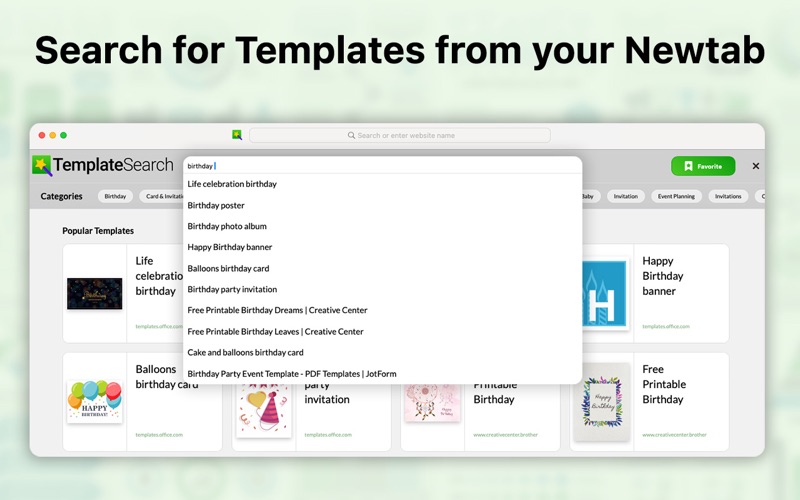
Tap “Get” to access templates easily! Template Search puts hundreds of professionally designed documents—resumes, presentations, invitations, invoices, greeting cards, and more—right at your fingertips. No sign-ups, no ads, and zero tracki…
Release notes parsed from trusted records and kept on this page. History provides context; a future Watch alert starts from a fresh baseline.
Refreshed design inspired by the macOS Safari New Tab experience Updated visuals and assets to better highlight the product’s core value and benefits
Be the first to request it
Request the same source-linked purchase brief shown in the completed example below. Your email starts the request and receives the result.
Want it sooner? Independent demand changes queue priority.
Completed example · CleanShot X data
Everything below belongs to CleanShot X. It is a real, completed example—not research about Templates for All.

CleanShot X
Example data
 Completed research example
Most repeated positive
13authors
“cleanshotx - scrolling screenshots is much more robust.”Evidence: r/macapps · Shottr vs CleanShot X in 2026. Which one are you actually sticking with?
Most repeated concern
16authors
“I don't think it makes sense to spend the money for Cleanshot when other apps do most of what it does for a lot less or free.”Evidence: r/macapps · Shottr vs CleanShot X in 2026. Which one are you actually sticking with?
Product context
Official or maker-supplied product information. It is kept separate from buyer evidence and independent purchase verification.
Tap “Get” to access templates easily! Template Search puts hundreds of professionally designed documents—resumes, presentations, invitations, invoices, greeting cards, and more—right at your fingertips. No sign-ups, no ads, and zero tracking: just click the Safari toolbar icon, enter what you need, and instantly preview the perfect design to print or save.
Smart Categorization - Filter templates by category, style, or purpose—resumes, invoices, social posts—and pinpoint the perfect design in seconds.
Instant Preview - Hover over any template to see a full-size preview before you commit—no more guessing if it’ll fit your needs.
Seamless Editing - Open templates directly in Word, Pages, PowerPoint, or your favorite editor with a single click—customize text, colors, and layouts instantly.
Always Fresh Collections - Updates with new, on-trend templates — stay ahead with the latest designs for business, education, and personal projects.
Why You’ll Love Template Search - Instantly access hundreds of professionally designed templates - Use smart categorization and instant previews to find the perfect templates - Edit templates directly in your favorite editors like Word or PowerPoint with one click.
Refreshed design inspired by the macOS Safari New Tab experience Updated visuals and assets to better highlight the product’s core value and benefits
More Tasks & Projects apps from the directory.