Most repeated positive
13authors
A complete feature set
“cleanshotx - scrolling screenshots is much more robust.”Evidence: r/macapps · Shottr vs CleanShot X in 2026. Which one are you actually sticking with?

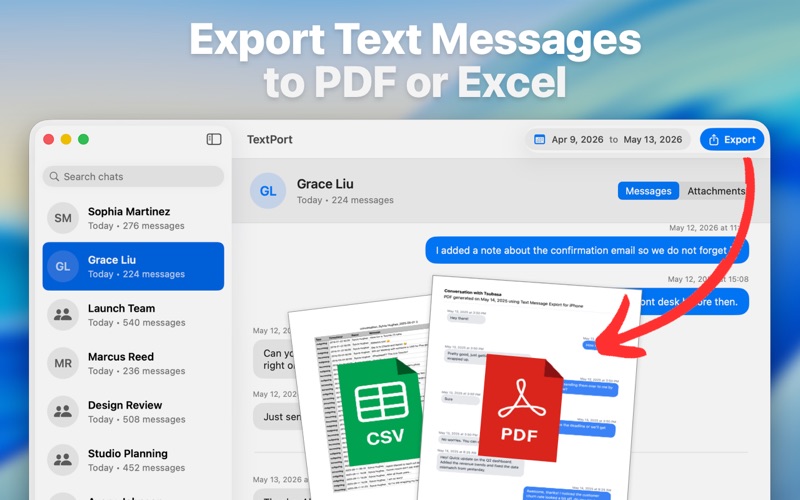
TextPort for Mac makes it simple to save, search, and export your iPhone text messages and iMessage conversations from your computer. Whether you need a personal archive, legal documentation, business records, or a reliable backup of impor…
Release notes parsed from trusted records and kept on this page. History provides context; a future Watch alert starts from a fresh baseline.
Improvements and bug fixes.
Be the first to request it
Request the same source-linked purchase brief shown in the completed example below. Your email starts the request and receives the result.
Want it sooner? Independent demand changes queue priority.
Completed example · CleanShot X data
Everything below belongs to CleanShot X. It is a real, completed example—not research about TextPort: Export Text Messages.

CleanShot X
Example data
 Completed research example
Most repeated positive
13authors
“cleanshotx - scrolling screenshots is much more robust.”Evidence: r/macapps · Shottr vs CleanShot X in 2026. Which one are you actually sticking with?
Most repeated concern
16authors
“I don't think it makes sense to spend the money for Cleanshot when other apps do most of what it does for a lot less or free.”Evidence: r/macapps · Shottr vs CleanShot X in 2026. Which one are you actually sticking with?
Field notes from people who used TextPort: Export Text Messages. The opinions are theirs; quoted facts are re-checked by AI Research.
Product context
Official or maker-supplied product information. It is kept separate from buyer evidence and independent purchase verification.
TextPort for Mac makes it simple to save, search, and export your iPhone text messages and iMessage conversations from your computer. Whether you need a personal archive, legal documentation, business records, or a reliable backup of important conversations, TextPort helps you preserve your messages in practical, easy-to-use formats.
Use messages available on your Mac to review conversations, organize them, and export the records you need. Create clean PDF documents for printing or sharing, export CSV files for analysis, or save plain text copies for long-term archives.
KEY FEATURES
• Export Messages on Mac: Save SMS and iMessage conversations from your iPhone backups or Mac Messages data. • PDF, CSV, and Text Export: Turn conversations into readable PDFs, structured spreadsheets, or plain text files. • Built for Large Archives: Review and export long conversations without copying messages one by one. • Search and Organize: Find the conversations you need and preserve them in formats that are easy to review later. • Professional Documentation: Create clear message records for legal, business, client, or personal use. • Local-First Workflow: Work from your Mac and keep control of your message export process.
PERFECT FOR
• People who need to export text messages from iPhone to PDF • Professionals documenting important conversations • Businesses keeping communication records • Families preserving meaningful message history • Anyone looking for an easier way to back up and print iPhone messages
WHY CHOOSE TEXTPORT?
TextPort is designed for people who need more than screenshots. Instead of manually saving individual messages, you can export full conversations into useful files that are easier to search, store, print, and share.
Whether you are preparing documentation, organizing personal records, or keeping a backup of meaningful conversations, TextPort gives you a straightforward way to preserve your message history from your Mac.
Terms of Use: https://textport.com/terms Privacy Policy: https://textport.com/privacy
Improvements and bug fixes.
More Files & Storage apps from the directory.
