Most repeated positive
13authors
A complete feature set
“cleanshotx - scrolling screenshots is much more robust.”Evidence: r/macapps · Shottr vs CleanShot X in 2026. Which one are you actually sticking with?

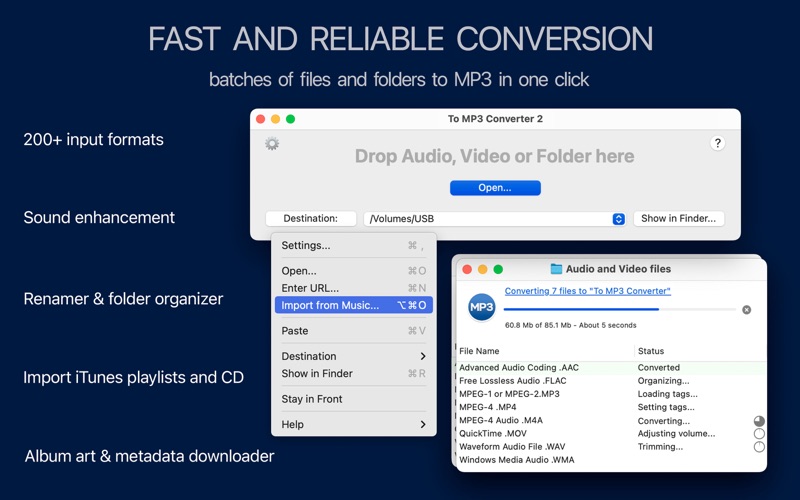
To MP3 Converter encodes more than 200 audio and video formats to MP3 in one click. Get quality MP3 effortlessly: • Convert audio or video to MP3 in one click • Get the best possible MP3 quality with auto settings • Transfer tags from sour…
Release notes parsed from trusted records and kept on this page. History provides context; a future Watch alert starts from a fresh baseline.
To MP3 Converter Now Optimized for macOS 26 Tahoe:
Want more? Unlock Premium Features in Help > Get Premium Features...
Be the first to request it
Request the same source-linked purchase brief shown in the completed example below. Your email starts the request and receives the result.
Want it sooner? Independent demand changes queue priority.
Completed example · CleanShot X data
Everything below belongs to CleanShot X. It is a real, completed example—not research about To MP3 Converter 2.

CleanShot X
Example data
 Completed research example
Most repeated positive
13authors
“cleanshotx - scrolling screenshots is much more robust.”Evidence: r/macapps · Shottr vs CleanShot X in 2026. Which one are you actually sticking with?
Most repeated concern
16authors
“I don't think it makes sense to spend the money for Cleanshot when other apps do most of what it does for a lot less or free.”Evidence: r/macapps · Shottr vs CleanShot X in 2026. Which one are you actually sticking with?
Product context
Official or maker-supplied product information. It is kept separate from buyer evidence and independent purchase verification.
To MP3 Converter encodes more than 200 audio and video formats to MP3 in one click. Get quality MP3 effortlessly:
• Convert audio or video to MP3 in one click • Get the best possible MP3 quality with auto settings • Transfer tags from source files or load them from files and folder names • Add converted files to Apple Music or iTunes playlist.
INPUT FORMATS* To MP3 Converter accepts and processes more than 200 audio and video formats, including, but not limited to, WMA, MP4, M4A, FLAC, WAV, VID, FLV, AVI, MPG, ASF, MPE, MOV, 3GP, M4V, MKV, MOD, OGM, and DV.
AUTOMATIC OUTPUT SETTINGS To MP3 Converter can analyze Bit Rate, Sample Rate, and Channels and apply optimal settings to output MP3s. As a result, it guarantees the best possible sound quality and saves time and hard drive space.
If you want to convert to a particular Bit Rate, Channels, etc., select the required settings in the Preferences/Format.
VOLUME NORMALIZER You will enjoy better audio quality thanks to the built-in MP3 booster and equalizer. It automatically boosts or equalizes the loudness of music, speech records, and voices in podcasts. At the same time, it will not change the already adjusted audio volume.
EXTRACT ALL AUDIO TRACKS FROM A VIDEO Most audio converters extract just one soundtrack from movies. However, you must find special software to extract multiple audio tracks from a video. To MP3 Converter is an ideal option for extracting every audio file from a movie.
CONVERT ENTIRE AUDIO COLLECTIONS WITH PREMIUM FEATURES To MP3 Converter is free to download and use. However, it has limitations for some features, such as batch processing, audio effects, tag downloader, and auto-organizer. Premium Features subscription removes these limitations and lets you convert to perfectly tuned and organized music collections in one click: • Batch processing – convert thousands of files and folders at once • CUE splitter - split music albums to separate tracks with CUE files • CD ripper – get quality and labeled songs from CD albums • Tag downloader - pull MP3 tags from files, folder names, and music metadata databases. • MP3 organizer – rename and organize output MP3 files into folders and playlists according to artists, genres, albums, and other music metadata. • Audio effects – listen to songs with a smooth fade in/out & without silence.
Subscriptions will be charged to your iTunes account. Your subscription will automatically renew unless canceled at least 24 hours before the end of the current period. You can manage your subscriptions in the App Store Account Settings.
CUSTOMERS SUPPORT Please email support@amvidia.com about any problems or feature requests. Also, if you like To MP3 Converter 2, we would appreciate a review at the App Store. Read the Terms of Use for "To MP3 Converter 2" at https://www.apple.com/legal/internet-services/itunes/dev/stdeula/.
*Note: Conversion of M4P (protected AAC audio files) and VOB files to MP3 format is not supported. **Note: Downloading music and videos from YouTube, Vimeo, and other similar services containing copyrighted content is not supported.
To MP3 Converter Now Optimized for macOS 26 Tahoe: • Faster and more reliable MP3 conversion on macOS 26. • New icon design — crisp look in both Light & Dark Mode. • Improved stability for smoother audio conversions. • Converts music, voice recordings, and videos to MP3 with pro-grade results.
Want more? Unlock Premium Features in Help > Get Premium Features...
More Music apps from the directory.


