Most repeated positive
13authors
A complete feature set
“cleanshotx - scrolling screenshots is much more robust.”Evidence: r/macapps · Shottr vs CleanShot X in 2026. Which one are you actually sticking with?

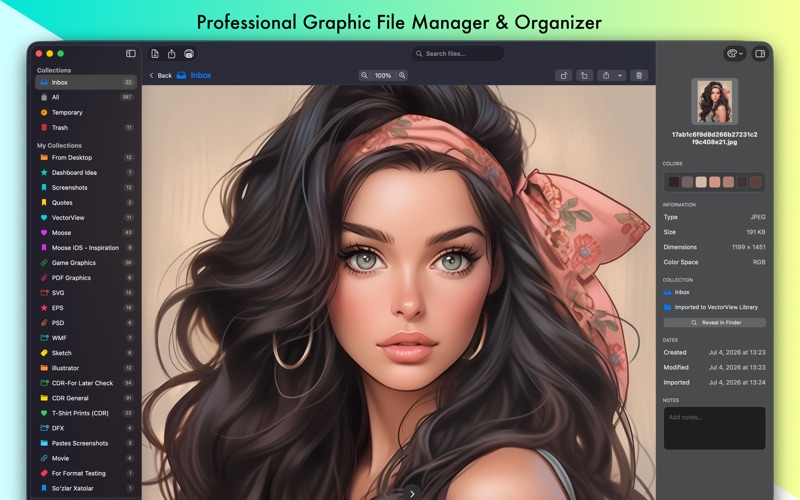
Open and preview CorelDRAW, EPS, SVG, DXF and other professional vector/raster files natively on your Mac. Organize your design library with smart collections. VectorView: The Professional Graphic File Manager for Mac Stop struggling with…
Release notes parsed from trusted records and kept on this page. History provides context; a future Watch alert starts from a fresh baseline.
Fixed Drag and Drop import from Finder Improved Translations Improved Thumnbails
Added SVGZ file format support Added Microsoft Publisher File format support, now you can preview .pub extension documents
Be the first to request it
Request the same source-linked purchase brief shown in the completed example below. Your email starts the request and receives the result.
Want it sooner? Independent demand changes queue priority.
Completed example · CleanShot X data
Everything below belongs to CleanShot X. It is a real, completed example—not research about VectorView: +Photo Organizer.

CleanShot X
Example data
 Completed research example
Most repeated positive
13authors
“cleanshotx - scrolling screenshots is much more robust.”Evidence: r/macapps · Shottr vs CleanShot X in 2026. Which one are you actually sticking with?
Most repeated concern
16authors
“I don't think it makes sense to spend the money for Cleanshot when other apps do most of what it does for a lot less or free.”Evidence: r/macapps · Shottr vs CleanShot X in 2026. Which one are you actually sticking with?
Product context
Official or maker-supplied product information. It is kept separate from buyer evidence and independent purchase verification.
Open and preview CorelDRAW, EPS, SVG, DXF and other professional vector/raster files natively on your Mac. Organize your design library with smart collections.
VectorView: The Professional Graphic File Manager for Mac
Stop struggling with incompatible file formats. VectorView gives your Mac native support for CorelDRAW, EPS, PS, SVG, AI, PSD, WMF, DXF and other professional vector files.
OPEN WHAT OTHERS CAN'T
• CorelDRAW (CDR/CMX/WPG) - Full native support for CorelDRAW files, the industry standard in print design and signage • Encapsulated PostScript (EPS/EPSF/EPSI) - Perfect rendering of EPS files from Adobe Illustrator and other professional tools • Adobe Illustrator (AI) - Preview AI files without needing Creative Cloud • PostScript (PS) - Handle PS files from professional print workflows • Autodesk (DXF) - Import Drawing Exchange Format File and Export to • Photoshop (PSD) - View layered Photoshop documents • Windows Metafile (WMF/EMF/EMZ) - Open Windows vector graphics seamlessly • Stencil (VSD/VSS/VSDX/VSSX) - Microsoft Visio Stencils • Plus: PDF, SVG, PNG, JPEG, TIFF, and all standard image formats • Raw Camera: Sony, Canon, Nikon, Olympus, Fuji, Samsung, Panasonic, Pentax, Epson, Minolta, Sigma
DESIGNED FOR PROFESSIONALS
VectorView was built specifically for designers, print shops, and creative professionals who work with files from multiple sources. Whether you're receiving CDR files from clients, managing EPS artwork, or organizing design assets, VectorView handles it all.
SMART ORGANIZATION
• Smart Collections - Organize files by project, client, or any category you need • Color-Coded Organization - Visual system with custom icons and colors • Quick Preview - Instant preview without opening heavy design apps • Batch Operations - Handle multiple files efficiently • Search & Filter - Find files instantly across your entire library
PROFESSIONAL EXPORT (Pro Version)
• High-Quality Export - Export to SVG, PNG, JPG, PDF, or TIFF • Custom DPI - Set exact resolution for print or web • Custom Sizing - Precise dimensions for any use case • Production Ready - Professional output quality
NATIVE PERFORMANCE
Built from the ground up for macOS with SwiftUI, VectorView feels instantly familiar: • Native Mac Design - Follows macOS design guidelines perfectly • Lightning Fast - Optimized for Apple Silicon and Intel Macs • Low Memory - Efficient resource usage • macOS Integration - Works seamlessly with Finder, Spotlight
WHY VECTORVIEW?
• No Conversion Needed - View files directly, no export/import workflow • Optional one-time purchase or affordable subscription • Professional Quality - Used by design studios and print shops • Always Updated - Regular updates with new features • Privacy First - All processing happens locally on your Mac
PERFECT FOR: • Graphic Designers managing client files • Print shops receiving various file formats • Creative professionals working cross-platform • Anyone who needs to open CDR, EPS, PostScript, Large PSD files on Mac • Design teams organizing asset libraries
Join thousands of designers and creative professionals who rely on VectorView for their daily workflow. Whether you're a freelance designer, work at a print shop, or manage a design studio, VectorView is the tool you've been waiting for.
Download VectorView Today!
Privacy Policy: https://blue-tail.com/privacy-policy/ Terms of Service: https://blue-tail.com/terms-of-service/
Fixed Drag and Drop import from Finder Improved Translations Improved Thumnbails
Added SVGZ file format support Added Microsoft Publisher File format support, now you can preview .pub extension documents
More Graphics & Design apps from the directory.


