Most repeated positive
13authors
A complete feature set
“cleanshotx - scrolling screenshots is much more robust.”Evidence: r/macapps · Shottr vs CleanShot X in 2026. Which one are you actually sticking with?

Widgetter is a direct line to upscaling your desktop into a work station perfectly tailored to your needs. Start building a CUSTOMIZED HOME SCREEN to have all the key data points and basic functions always remain available at a glance. The…
Release notes parsed from trusted records and kept on this page. History provides context; a future Watch alert starts from a fresh baseline.
Some minor bugs are fixed
Be the first to request it
Request the same source-linked purchase brief shown in the completed example below. Your email starts the request and receives the result.
Want it sooner? Independent demand changes queue priority.
Completed example · CleanShot X data
Everything below belongs to CleanShot X. It is a real, completed example—not research about Widgetter - Custom Desktop.

CleanShot X
Example data
 Completed research example
Most repeated positive
13authors
“cleanshotx - scrolling screenshots is much more robust.”Evidence: r/macapps · Shottr vs CleanShot X in 2026. Which one are you actually sticking with?
Most repeated concern
16authors
“I don't think it makes sense to spend the money for Cleanshot when other apps do most of what it does for a lot less or free.”Evidence: r/macapps · Shottr vs CleanShot X in 2026. Which one are you actually sticking with?
Product context
Official or maker-supplied product information. It is kept separate from buyer evidence and independent purchase verification.
Widgetter is a direct line to upscaling your desktop into a work station perfectly tailored to your needs.
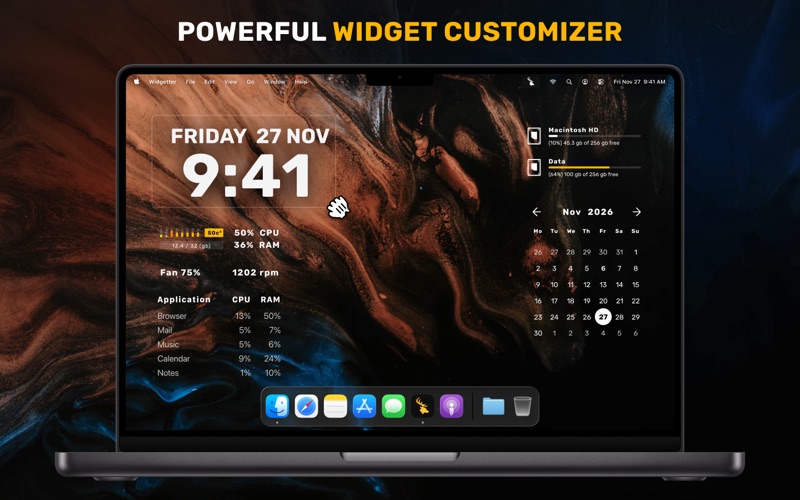
Start building a CUSTOMIZED HOME SCREEN to have all the key data points and basic functions always remain available at a glance. The app streamlines the controls by collecting the pivotal information about your Mac’s performance as well as the most essential commands and wrapping them into widgets. You can pick any combination of those to be displayed on the screen, group and ARRANGE THEM IN AN OPTIMAL WAY. For the most essential ones, make sure to use always-on-top feature so they show up over every opened window.
Customize the desired widget size as it suits you: no standard sizes! FULL CUSTOMIZATION: customize colors and fonts the way you like.
Choose the screensaver you like from the huge collection of 4k and 5k wallpapers
The collection of widgets covers a range of SYSTEM DATA (logs, reports and operations) that you can conveniently and easily manage right from your desktop. It doesn’t require any special knowledge, because our widgets will HIGHLIGHT and notify you about possible errors and problems.
The current lineup will provide you access to the following:
Date & Time: the nearest place to check in for temporal data.
Сalendar: refer to a wider context for your appointments and plans.
Weather: all the most important weather conditions - forecast for the current day and the upcoming week.
Battery: keep a consistent eye on the battery indicator to better plan around recharging times.
Music player: create the right ambience without extra clicks. The built-in playlist will help to directly navigate your audio library.
Internet speed and volume of downloaded files: monitor the current Internet connection speed.
Quotes of currencies and cryptocurrencies: keep an eye on the changes in exchange rates and monitor the movements on the exchanges.
Tasks and Reminders: all your current and future tasks at a glance - you will not miss anything important;
CPU: track the usage to pinpoint moments when the system gets too busy.
RPM: monitor how the cooling system is functioning and prevent overheating.
RAM: get insights on the memory usage, including the list of resource intensive apps.
HDD/SSD: make sure you’re not running out of storage space.
Add multiple widgets of the same type to keep track of weather and time data in different cities, as well as compose selections of the right stocks.
As a finishing touch to your customized workspace, you can choose a look for the desktop by applying the RIGHT SKINS.
We are constantly working on Widgetter by improving its functionality, new themes and new widgets - coming soon. Just check it out!
Widgetter is FULLY compatible with macOS Sonoma and optimised for Apple’s M1, M2 & M3 chips.
Privacy Policy: https://bitnite.studio/privacy Term Of Use: https://bitnite.studio/terms
Some minor bugs are fixed
More System Maintenance apps from the directory.