Most repeated positive
13authors
A complete feature set
“cleanshotx - scrolling screenshots is much more robust.”Evidence: r/macapps · Shottr vs CleanShot X in 2026. Which one are you actually sticking with?

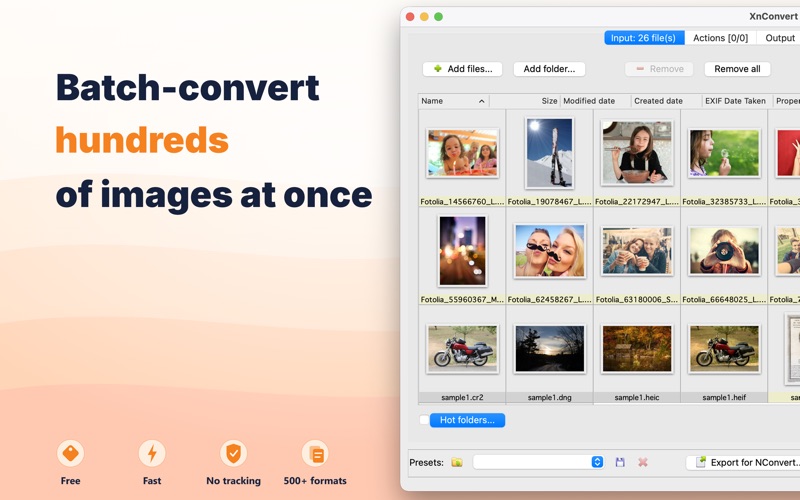
Drag your photos in. Pick your formats and edits. Get hundreds of finished images back — in seconds. XnConvert is the free batch image converter for macOS. It opens and converts 500+ formats — including ones most apps can't even read — the…
Release notes parsed from trusted records and kept on this page. History provides context; a future Watch alert starts from a fresh baseline.
** Bugs fixed & new features **
Got feedback or a format request? Reach us at https://newsgroup.xnview.com
Be the first to request it
Request the same source-linked purchase brief shown in the completed example below. Your email starts the request and receives the result.
Want it sooner? Independent demand changes queue priority.
Completed example · CleanShot X data
Everything below belongs to CleanShot X. It is a real, completed example—not research about XnConvert: Image Converter.

CleanShot X
Example data
 Completed research example
Most repeated positive
13authors
“cleanshotx - scrolling screenshots is much more robust.”Evidence: r/macapps · Shottr vs CleanShot X in 2026. Which one are you actually sticking with?
Most repeated concern
16authors
“I don't think it makes sense to spend the money for Cleanshot when other apps do most of what it does for a lot less or free.”Evidence: r/macapps · Shottr vs CleanShot X in 2026. Which one are you actually sticking with?
Product context
Official or maker-supplied product information. It is kept separate from buyer evidence and independent purchase verification.
Drag your photos in. Pick your formats and edits. Get hundreds of finished images back — in seconds. XnConvert is the free batch image converter for macOS.
It opens and converts 500+ formats — including ones most apps can't even read — then resizes, edits, and renames every file in one pass. No ads. No account. No data collected.
WHY XNCONVERT - 500+ formats in, 80+ out. Open RAW, HEIC, WebP, JPEG-XL, OpenEXR, TIFF and convert to whatever you need. - Build your pipeline once: convert, resize, watermark, and rename — then apply it to a whole folder. - Completely free. No subscription, no in-app purchases, no upsell. - Private by design: everything runs on your Mac. Nothing is uploaded, nothing is tracked. - Trusted for 20+ years, and available on macOS, Windows, and Linux.
WHAT YOU CAN DO Convert — Turn HEIC into JPG, RAW into TIFF, PNG into WebP, or batch-export to 80+ output formats with full quality control. Resize & crop — Resize by pixels, percentage, or fit; crop, rotate, flip, and add canvas — applied to every image at once. Enhance — Brightness, contrast, levels, shadows/highlights, color balance, sharpen, blur, and creative filters (Old photo, Emboss, Gaussian blur, and more). Brand & label — Add text or image watermarks, captions, and borders in batch. Organize — Batch rename with patterns, read and write IPTC/XMP metadata, strip or preserve EXIF, and handle multipage TIFF.
FORMATS Photos & web: JPEG, PNG, GIF, WebP, AVIF, HEIC/HEIF, JPEG-XL, JPEG 2000, BMP, TIFF (incl. multipage). Camera RAW: Canon, Nikon, Sony, Fujifilm, Olympus, Panasonic, DNG and more. Pro & niche: OpenEXR, PSD, TGA, PPM, and many formats other tools simply won't open.
WHO IT'S FOR iPhone on Mac — Convert your HEIC photos to JPG or PNG in bulk, locally, without uploading a single image to the cloud. Web & e-commerce — Batch-convert to WebP/AVIF, compress, resize, and rename product images for faster pages. Photographers & archivists — Process RAW, keep your IPTC/XMP metadata intact, watermark proofs, and convert multipage TIFF archives.
100% PRIVATE No ads, no account, no tracking. The Apple privacy label says it all: no data collected. Your images never leave your Mac.
Download XnConvert and convert your first batch in under a minute.
** Bugs fixed & new features **
Got feedback or a format request? Reach us at https://newsgroup.xnview.com
More Photo & Video apps from the directory.


