Piqt 1.2 Arrives as a Native Mac App, With Optional iCloud Sync
Piqt 1.2 brings the photo curator to the Mac with a windowed layout, keyboard shortcuts, and optional iCloud sync. This source-based brief summarizes the official 4 November 2026 blog, the press kit, and the U.S. App Store listing for version 1.2.1, including pricing, what stays free, and the privacy limits the company discloses.
Piqt 1.2 Arrives as a Native Mac App, With Optional iCloud Sync
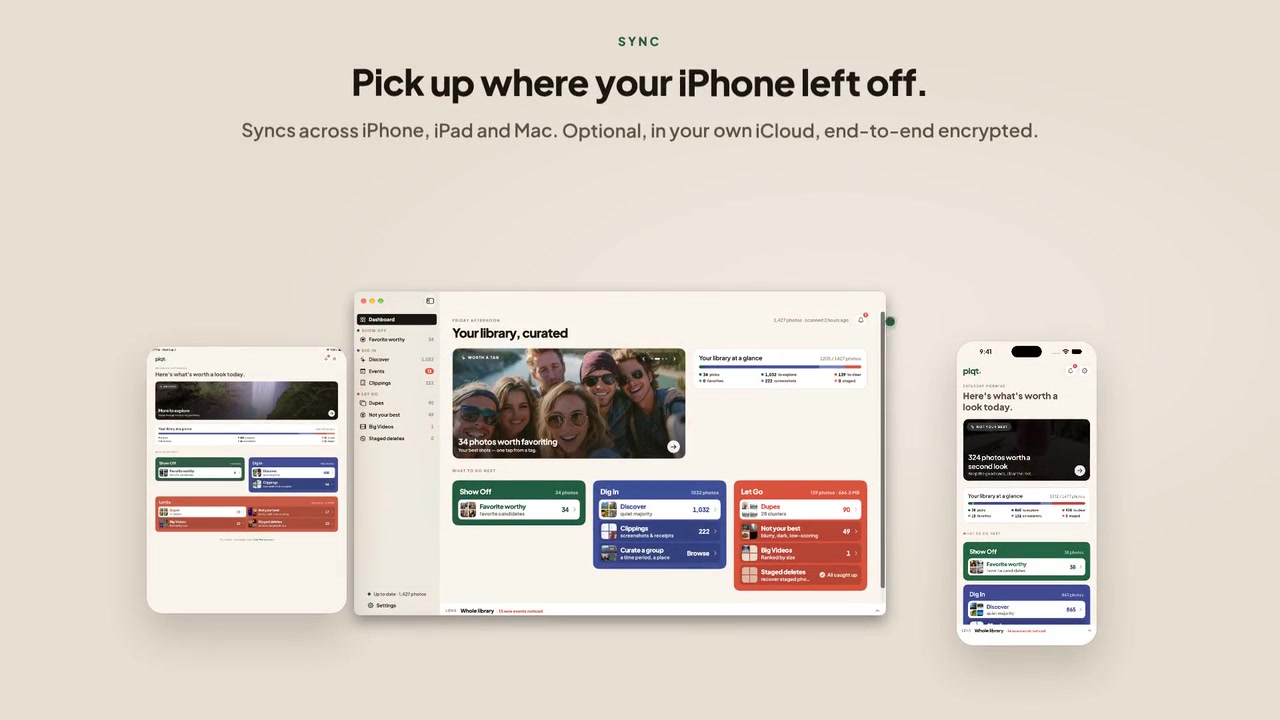
On 4 November 2026, the developer of Piqt published a post titled “Piqt Is on the Mac”. It says Piqt 1.2 “brings the whole app to the Mac, built for a big screen and a keyboard, with optional iCloud sync so your Mac picks up where your iPhone left off. One purchase covers iPhone, iPad, and Mac.” For anyone whose Apple Photos library already lives on a Mac, the pitch is simple. Reviewing thousands of photos is easier in a resizable window with shortcuts than on a phone screen, and sync is meant to stop that work from being repeated on every device.
This article summarizes what the company says about the release, based on its blog, press kit, FAQ and the U.S. App Store listing as checked on 16 November 2026. It is not a hands-on review, and nothing here comes from independent testing.
What Piqt is and who can install the Mac app
Piqt is a photo and video curator for Apple Photos. It scores a library, surfaces candidates to favorite, flags duplicates and large videos, and groups photos into trips and events. It is made by 8twist LLC, which the press kit describes as an independent two-person studio. The name is pronounced “pict.” The app was first released on 20 August 2026, and the 1.1 line that preceded the Mac release found and named trips and events on-device.
The blog gives these requirements: a Mac running macOS 15 or later, or an iPhone or iPad running iOS 18 or later. The U.S. App Store listing also states that the Mac app requires macOS 15.0 or later.
There is a discrepancy on chips. The official blog states no chip cutoff, and the U.S. listing does not add one. Some regional App Store pages, such as those for Canada and Australia, add “a Mac with Apple M1 chip or later.” Nothing reviewed here says whether Intel Macs are supported, so Intel owners should check the listing for their own region before installing.
One purchase covers iPhone, iPad, and Mac. Anyone who already has Piqt Plus, per the blog, has “nothing else to buy and Mac support is included.”
What the Mac app is built around
The blog describes a windowed layout with a sidebar that holds the dashboard, Favorites, Discover, trips, Clippings, and every clean-up workflow, from Dupes to Big Videos. Resizing the window reflows the grids, the trip timeline, and the dupe compare to fit.

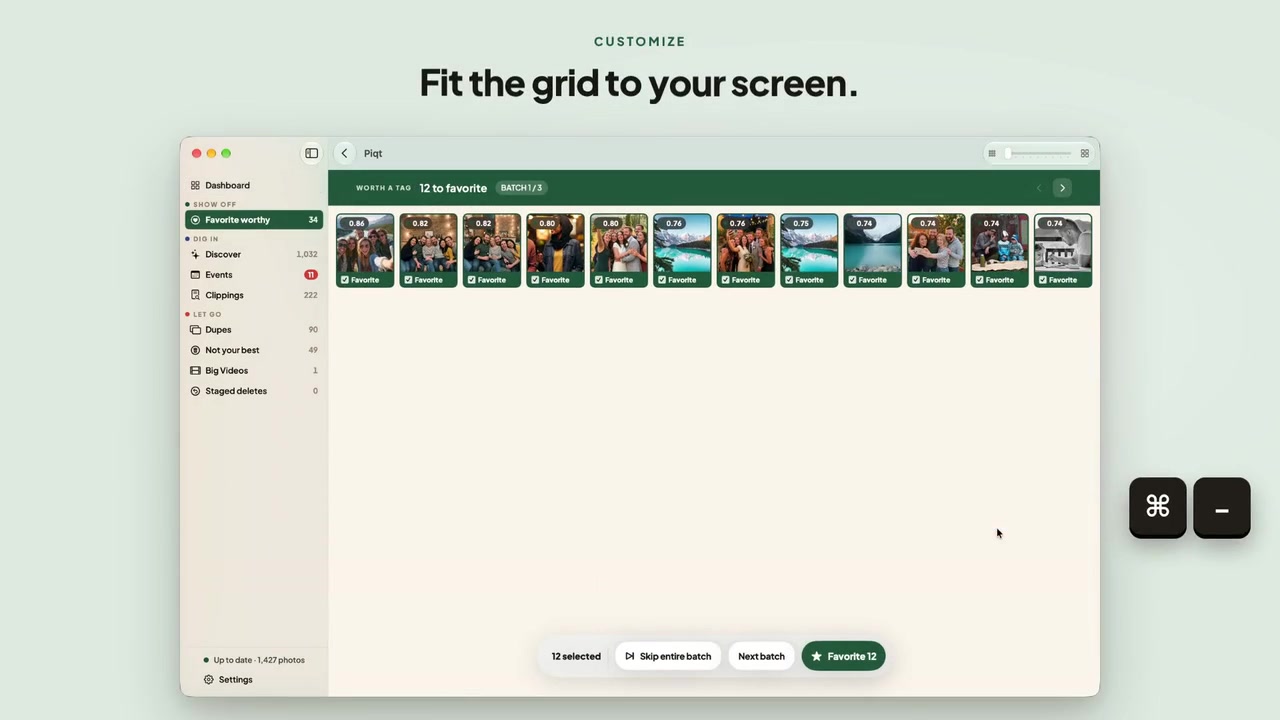
The keyboard shortcuts are the part the company presents as unique to the Mac:
- Arrow keys move through a grid, and Quick Look previews any shot.
- ⌘⌫ sets a photo aside, ⌘↩ commits the batch, and ⌘→ moves to the next one.
- ⌘D compares a group of near-duplicates side by side.
- ⌘L picks a trip, and the whole app follows it. ⌘S saves that trip as an album in Photos.
- ⌘= and ⌘- change the thumbnail size.
- ⌘0 through ⌘7 jump between sections.
The full list is under Help.
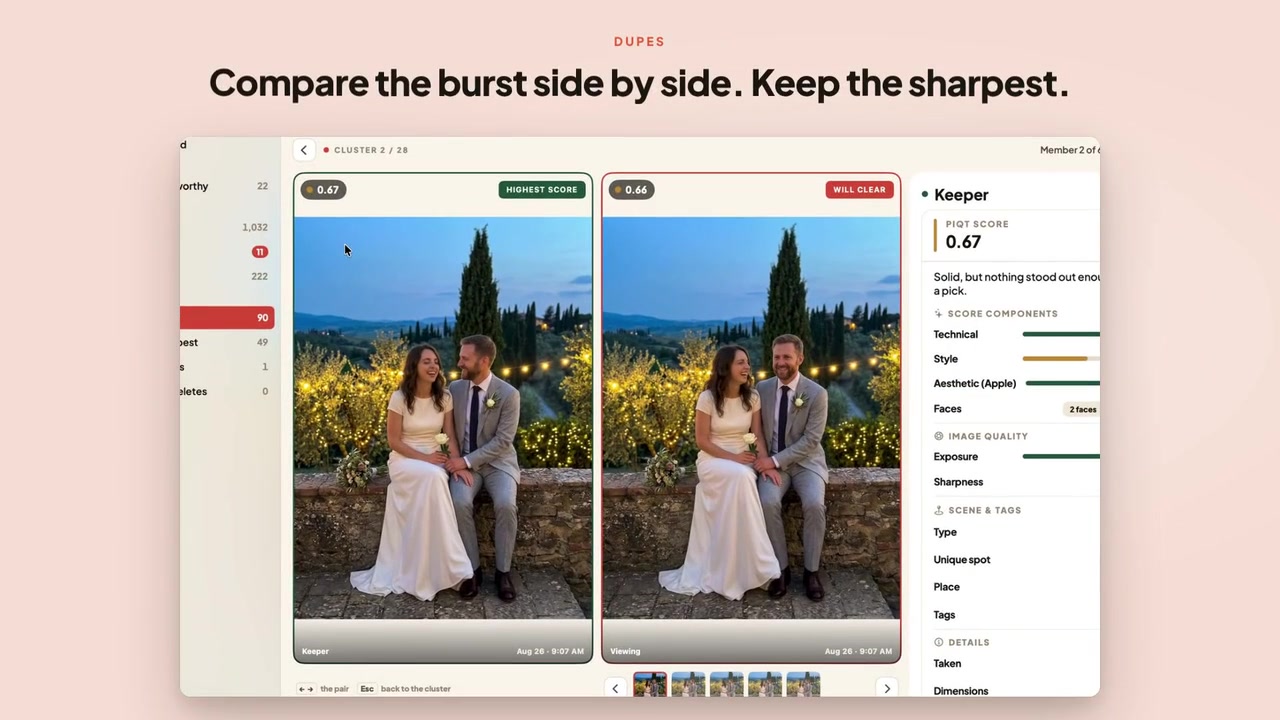
The scores behind those comparisons come from five signals, according to the site and press kit: Apple’s on-device aesthetics, technical quality, a NIMA aesthetic model trained on 255,000 human-rated images, the number and clarity of faces, and how rarely the user shoots in that place. Every score can be opened into a score sheet. These are the company’s descriptions, not measurements of how well the scoring matches anyone’s taste.
The first-launch sync offer
On first launch, the Mac app offers to turn on iCloud sync. If sync is already on for an iPhone, saying yes brings in the scores, decisions, and trips the phone has already worked out before the Mac starts scanning. The Mac can then skip photos that were already scored. For a large library, that is the practical benefit sync is meant to deliver.
How optional iCloud sync works
Sync is part of Piqt Plus and is optional. It requires iCloud Photos on each device, because that is how Piqt recognizes the same photo across devices. It can be turned on or off in Settings, and turning it off can also remove Piqt’s data from iCloud.
What syncs is Piqt’s results and the user’s decisions. Photos and videos never sync through Piqt. It also does not sync what Piqt read out of screenshots or the index it built to search them.
The blog’s privacy summary says:
- Sync goes through a private database in the user’s own iCloud account, and the developer says it cannot read any of it.
- Every synced field is end-to-end encrypted on the device before it leaves.
- A few settings, such as scoring weights, sync through iCloud’s settings store, which is not end-to-end encrypted.
- Apple can see the date range of a curated trip, though not its name, place, or photos.
These are the company’s disclosures, not independently verified. The privacy page and FAQ carry the full detail.
Other privacy claims on the press kit are that place names come from a gazetteer bundled in the app, that the company holds no location entitlement and calls no external geocoding service, and that there is no Piqt account. Optional anonymous usage counts via TelemetryDeck can be turned off.
What else shipped in 1.2 on iPhone and iPad
The same blog lists changes beyond the Mac:
- A more interactive first scan.
- Settings presets of Fewer, Standard, or More picks, and a Lenient, Standard, or Strict clear-out, with counts updating before you commit.
- On the free plan, favorites, clears, and trip albums you decide on are no longer thrown away. They are kept, ready to apply when you upgrade.
- Big Videos loads twelve at a time.
The current U.S. App Store version is 1.2.1, released 10 November 2026 (9:27 a.m. Pacific). Its notes list cross-device sync improvements and fixes:
- Scores, decisions, and trips line up even after an interrupted sync, and a one-time check after updating puts anything out of step back in place.
- Turning on iCloud sync now keeps it on. It could previously switch itself back off.
- Switching iCloud accounts no longer carries one account’s curation into the other.
- Remove from iCloud now confirms when it is complete.
- The dashboard now counts only the photos shared with Piqt instead of showing 0, and no longer says the library looks great while dupes or videos still need a look.
- A photo moved to Keep after a trip was saved for later now stays put when the trip is applied.
Several of these fixes touch sync behavior, which matters to anyone planning to rely on it. The listing also shows a 346.6 MB size, an age rating of 4+, English as the only listed language, and the Photo & Video category.
Price and what stays free
Scanning and browsing are free on every device. Piqt Plus costs $3.99 a month or $29.99 a year, both with a 7-day free trial, or $49.99 once. These figures appear in both the 4 November blog and the U.S. App Store description, checked on 16 November 2026. The app itself is listed as Free with in-app purchases.
According to the App Store description, Plus unlocks unlimited favoriting, clearing, saving trips as albums, committing a video trim, and iCloud sync. Recovering anything that was cleared is never gated.
On safety, the listing says nothing done in Piqt is permanent: cleared photos move to an album for review, and the actual delete stays in Apple’s Photos app. The site and press kit add that the album is named “Piqt: To Delete,” that video trims are non-destructive, and that the Photos delete API does not appear in Piqt’s source, with a build test that fails if it is ever added. These are the company’s own claims, not tests anyone has run for this article.
Limits and caveats
- Chip requirements differ by region. The macOS 15 floor is consistent, but the M1 wording on some regional pages is not on the official blog or the U.S. listing.
- Sync needs Plus and iCloud Photos on every device. It is not a free feature and does not work without iCloud Photos.
- Sync is not fully end-to-end encrypted. Scoring weights and similar settings use a store without that protection, and Apple can see trip date ranges.
- Sync carries results, not photos. Each device still depends on iCloud Photos to hold the library itself.
- The 1.2.1 notes show sync was still being refined. The fixes for interrupted syncs, a setting that switched itself off, and account switching suggest it is young.
- Scale claims are the company’s. Piqt says it has been tested on libraries up to 100,000 photos, with a batched, resumable initial scan. No performance figures were available to verify that.
- Localization is limited. The U.S. listing shows English only.
- No independent reviews were consulted, so how well the scores match personal taste is unknown.
Bottom line
Anyone on macOS 15 or later can install the Mac app now. Intel owners and anyone outside the U.S. should read their regional App Store page first, given the M1 wording some regions show. Because scanning and browsing are free everywhere, the free plan is a low-commitment way to see how the scoring and layout handle a real library. Decisions made there are now kept for a later upgrade rather than discarded.
Existing Plus subscribers need no new purchase, since Mac support is included. The company’s own sync disclosures are worth reading before turning sync on, and the 1.2.1 update is worth installing first, given how many of its fixes concern sync.
Sources
- https://piqt.app/blog/piqt-for-mac/
- https://piqt.app/
- https://piqt.app/press/
- https://piqt.app/privacy/
- https://piqt.app/faq/
- https://apps.apple.com/us/app/piqt-photo-video-curator/id6778080898
- Regional App Store listings (Canada, Australia) carrying the “Apple M1 chip or later” wording; no links were provided.