Most repeated positive
13authors
A complete feature set
“cleanshotx - scrolling screenshots is much more robust.”Evidence: r/macapps · Shottr vs CleanShot X in 2026. Which one are you actually sticking with?

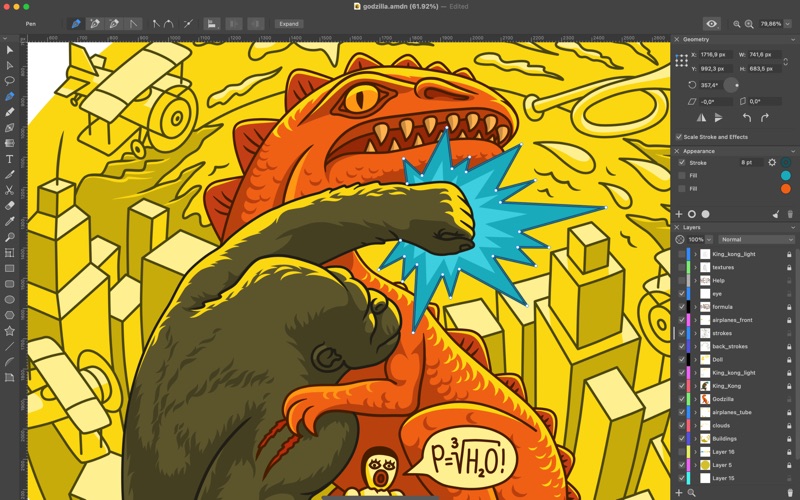
Professional Vector Design. Made for Mac. Amadine is a cutting-edge vector graphic design app developed specifically for macOS. With a sleek native interface and a robust toolkit, Amadine delivers a seamless design experience for illustrat…
Release notes parsed from trusted records and kept on this page. History provides context; a future Watch alert starts from a fresh baseline.
New Features:
Fixes and Improvements:
Be the first to request it
Request the same source-linked purchase brief shown in the completed example below. Your email starts the request and receives the result.
Want it sooner? Independent demand changes queue priority.
Completed example · CleanShot X data
Everything below belongs to CleanShot X. It is a real, completed example—not research about Amadine - Vector Design & Art.

CleanShot X
Example data
 Completed research example
Most repeated positive
13authors
“cleanshotx - scrolling screenshots is much more robust.”Evidence: r/macapps · Shottr vs CleanShot X in 2026. Which one are you actually sticking with?
Most repeated concern
16authors
“I don't think it makes sense to spend the money for Cleanshot when other apps do most of what it does for a lot less or free.”Evidence: r/macapps · Shottr vs CleanShot X in 2026. Which one are you actually sticking with?
Product context
Official or maker-supplied product information. It is kept separate from buyer evidence and independent purchase verification.
Professional Vector Design. Made for Mac.
Amadine is a cutting-edge vector graphic design app developed specifically for macOS. With a sleek native interface and a robust toolkit, Amadine delivers a seamless design experience for illustrators, graphic designers, and visual storytellers—whether you're creating intricate artwork or polished branding assets.
From initial sketches to final exports, Amadine on Mac empowers you to design with precision, speed, and creative freedom.
Why Choose Amadine for Mac?
• Comprehensive Vector Toolkit Draw, edit, and transform with over 30 precision tools for creating illustrations, logos, icons, UI/UX designs, typography, infographics, and more.
• Powerful Layer & Artboard Management Create and manage complex designs with multiple artboards, layers, and sublayers. Choose from over 15 blending modes and toggle between outline, grid, guides, and pixel preview views.
• Flexible Color Management Work in both RGB and CMYK color modes. Amadine supports color profiles for accurate on-screen representation and includes a Recolor panel for global changes in one click.
• Customizable Brushes & Dynamic Strokes Design with multiple strokes and fills per object. Use pressure-sensitive strokes, save your own stroke profiles, and add gradients or image fills with full control over brush width, angle, and shape.
• Advanced Typography Tools Design expressive text with tools for distortable text, text on paths, and text in shapes. Link multiple text boxes with flowing text and format everything in place.
• Precision Effects & Smart Tools Add visual polish with blur, shadow, glow, and inner effects. Create advanced compositions with Clipping Masks, Rounded Corners, Fusion tool, Symmetrical and Free Distortion tools.
• Built-In & Custom Shape Libraries Access a rich collection of ready-made vector shapes, or build your own libraries to speed up your workflow with reusable components. Not enough? Use the integration with Pexels, Pixabay, and Unsplash image stocks.
• Streamlined File Workflow Open, edit, and save files in Amadine’s efficient .amdc format for easy cloud storage and collaboration. Work with popular formats like SVG, PDF, AI, JPEG, PNG, TIFF, and more.
• Export with Confidence Export entire documents, individual artboards, or selected elements into vector (SVG, PDF) and raster (JPEG, PNG, TIFF) formats with professional accuracy.
Designed Exclusively for Mac Amadine is built from the ground up for macOS, offering a stable, powerful environment for vector design with full support for high-resolution displays, system integrations, and performance optimization.
A separate version is available for iPad and iPhone, tailored for mobile creativity. The integration of the macOS and iOS/iPadOS apps is achieved via iCloud.
One-Time Purchase or Subscription
Explore the full feature set with a free trial. Unlock export options with a flexible license—choose between a one-time purchase or subscription. All plans apply to the Mac version specifically.
Master vector design—right on your Mac—with Amadine.
New Features: • Sheets can have transparent backgrounds in addition to regular backgrounds. It is also possible to change the background color. • The app can vectorize bitmap images.
Fixes and Improvements: • The Offset Path tool was improved. • Fixed crash related to stroke width on iOS. • The Simplify dialog displays the number of resulting and original points more accurately. • Fixed the case when a radial gradient was displayed incorrectly after reopening a document. • The Expand tool was improved. • Other bug fixes.
More Graphics & Design apps from the directory.


