Most repeated positive
13authors
A complete feature set
“cleanshotx - scrolling screenshots is much more robust.”Evidence: r/macapps · Shottr vs CleanShot X in 2026. Which one are you actually sticking with?

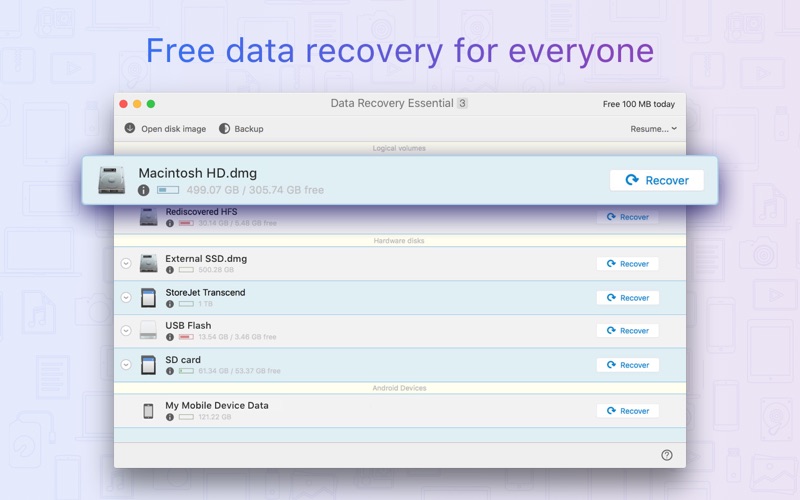
Data Recovery Essential is a fresh, constantly updated, data recovery and undelete app. It also comes with the free daily recovery of up to 100MB, that is perfect if you lost a document or two and need a quick data recovery session right a…
Release notes parsed from trusted records and kept on this page. History provides context; a future Watch alert starts from a fresh baseline.
Overall improvements for macOS 10.15 Catalina New: smart ExFAT recovery algorithms New: file signatures added to Deep Scan - AU (Audacity audio files) and PCX (bitmap images) LaCie devices recovery: critical improvements, disk disconnection prevention FAT32: improved support of lost partition recovery Disk Drill gets better at detecting and scanning external USB storage devices on macOS 10.15 Catalina Improved: original file location detection in Quick Scan Improved: recovery of fragmented files on ExFAT partitions Minor UI and tutorial enhancements Fixed: false detections of HFS+ partitions Fixed: rare cases with file name recovery during HFS+ Quick Scan Fixed: empty disk labels on macOS Catalina
Be the first to request it
Request the same source-linked purchase brief shown in the completed example below. Your email starts the request and receives the result.
Want it sooner? Independent demand changes queue priority.
Completed example · CleanShot X data
Everything below belongs to CleanShot X. It is a real, completed example—not research about Data Recovery Essential.

CleanShot X
Example data
 Completed research example
Most repeated positive
13authors
“cleanshotx - scrolling screenshots is much more robust.”Evidence: r/macapps · Shottr vs CleanShot X in 2026. Which one are you actually sticking with?
Most repeated concern
16authors
“I don't think it makes sense to spend the money for Cleanshot when other apps do most of what it does for a lot less or free.”Evidence: r/macapps · Shottr vs CleanShot X in 2026. Which one are you actually sticking with?
Product context
Official or maker-supplied product information. It is kept separate from buyer evidence and independent purchase verification.
Data Recovery Essential is a fresh, constantly updated, data recovery and undelete app. It also comes with the free daily recovery of up to 100MB, that is perfect if you lost a document or two and need a quick data recovery session right away.
Data Recovery Essential will restore all existing file formats: images and photos, music, documents, videos, ZIP and other compressed files, etc. If your lost data is not recoverable with our Quick Scan or your file system has been damaged, Deep Scan and other extensive data retrieval algorithms will reconstruct your files based on our unique collection of binary file signatures (which is also constantly updated).
Data Recovery Essential scans all existing file systems, including HFS+, NTFS, FAT32, EXT4 and others, and will also be able to find deleted data after accidental or incomplete disk format. All internal and external storage devices supported: your Mac's main hard drive, any mountable external disks, USB flash thumb drives, cameras, memory cards, and even other Macs.
Data Recovery Essential app was created by CleverFiles, the team of top-notch experts in data recovery for Macs. You are more than welcome to send any questions and tech support requests any time to help@cleverfiles.com
A regular data rescue process with Data Recovery Essential starts with creating a disk image from the storage device where the lost files reside. This step is very easy to accomplish and is required to prevent further data loss if the target drive has mechanical issues. Make sure you learn how to do it in our simple step-by-step guide here: https://www.cleverfiles.com/masver/
Once the disk image is created, load it into Data Recovery Essential app and scan it for deleted data. The app will then show all your recoverable files in a well-structured list that can be searched and filtered. You can recover selected files or just dump everything to another disk or destination and sort it out later. The data recovery process is very fast, smooth and clear.
Note: Data Recovery Essential cannot recover deleted data from iOS devices (iPhones, iPads, iPods Touch).
Overall improvements for macOS 10.15 Catalina New: smart ExFAT recovery algorithms New: file signatures added to Deep Scan - AU (Audacity audio files) and PCX (bitmap images) LaCie devices recovery: critical improvements, disk disconnection prevention FAT32: improved support of lost partition recovery Disk Drill gets better at detecting and scanning external USB storage devices on macOS 10.15 Catalina Improved: original file location detection in Quick Scan Improved: recovery of fragmented files on ExFAT partitions Minor UI and tutorial enhancements Fixed: false detections of HFS+ partitions Fixed: rare cases with file name recovery during HFS+ Quick Scan Fixed: empty disk labels on macOS Catalina
More Graphics & Design apps from the directory.