Most repeated positive
13authors
A complete feature set
“cleanshotx - scrolling screenshots is much more robust.”Evidence: r/macapps · Shottr vs CleanShot X in 2026. Which one are you actually sticking with?

*** Best New Apps! Highly recommended by Apple! *** Publisher Lite is a powerful desktop publishing and page layout app for both business and home use. Publisher Lite empowers you to quickly design and create any type of deluxe and profess…
Release notes parsed from trusted records and kept on this page. History provides context; a future Watch alert starts from a fresh baseline.
Be the first to request it
Request the same source-linked purchase brief shown in the completed example below. Your email starts the request and receives the result.
Want it sooner? Independent demand changes queue priority.
Completed example · CleanShot X data
Everything below belongs to CleanShot X. It is a real, completed example—not research about Publisher Lite.

CleanShot X
Example data
 Completed research example
Most repeated positive
13authors
“cleanshotx - scrolling screenshots is much more robust.”Evidence: r/macapps · Shottr vs CleanShot X in 2026. Which one are you actually sticking with?
Most repeated concern
16authors
“I don't think it makes sense to spend the money for Cleanshot when other apps do most of what it does for a lot less or free.”Evidence: r/macapps · Shottr vs CleanShot X in 2026. Which one are you actually sticking with?
Product context
Official or maker-supplied product information. It is kept separate from buyer evidence and independent purchase verification.
*** Best New Apps! Highly recommended by Apple! ***
Publisher Lite is a powerful desktop publishing and page layout app for both business and home use.
Publisher Lite empowers you to quickly design and create any type of deluxe and professional looking prints that you might need. It can’t be any easier to create flyers, brochures, business cards, newsletters, adverts, reports, calendars, posters, booklets, etc. than with this app.
The new version now adds support for object/text style profiles, enhances text editing features, improves print settings, comes with new smart shapes, integrates with iCloud, features a brand new UI and also brings many other improvements and bug fixes.
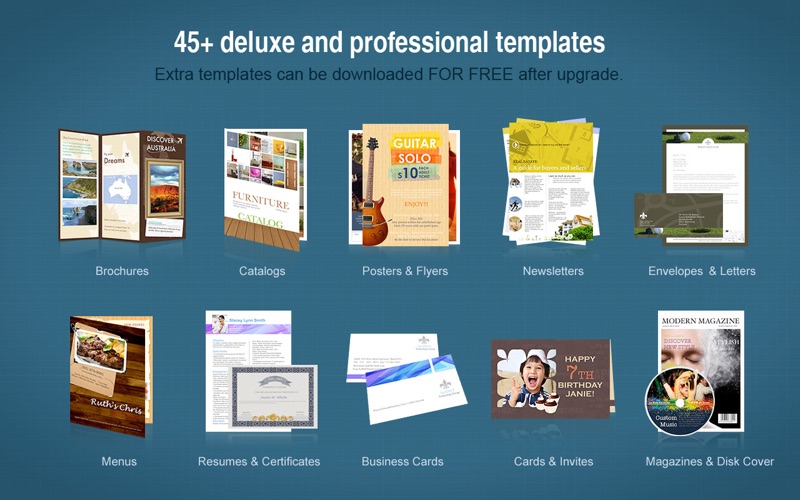
Professional templates and decorations • 45+ professional templates for flyers, brochures, newsletters, adverts, reports, calendars, posters, booklets, and more. • Hundreds of delicate clipart. You can also search the web for images inside the app. • 50+ professional backgrounds. • 15+ photo frames and masks. • Additional template packages are available in the Store.
Page setup • Set page size and orientation (landscape and portrait) of the page. • Support customizing page margins. • Create and edit multiple pages.
A variety of objects • Photo objects from iPhoto or from any folder in Finder. Support almost all formats like JPG, TIFF, PNG, GIF, PDF, EPS, AI, SVG, etc. • Apply delicate clipart to make the page looks amazing. • Insert text object and edit the color, font, size, margin, columns, line spacing, text wrap, bullets/lists and more. • Add various preconfigured shape objects. • Add calendar to create custom calendars.
Editing features • Apply any preset object/text style in just one click. • Reposition & resize, rotate any object at ease. • Personalize opacity, mirror effect & flip of the objects. • Choose from 50+ preset backgrounds to decorate the document. • Add color fill/pattern image fill, stroke, shadow or reflection to any object. • Select multiple objects to align, center and make same size of the objects as a whole. • Lock/Unlock, Group/Ungroup objects for easy operation. • Auto snap between one object and another, and between an object and the page margin as well. • Crop photo or manipulate the frame easily. • Apply frames, mask, filters, etc. to photos and it is easy to adjust image colors. • Manage layers of different objects. • Support undo/redo, copy/paste/duplicate and other common editing features. • Support zooming in/out on the page, and Fit Width/Fit Page to view the page. • Support displaying rulers in the editing panel for better alignment of objects.
Export, print and share conveniently • Print the pages directly with improved print settings like printing by Scale to paper size and Tile, etc. • Export the pages as PDF, JPG, PNG, TIFF, BMP, and PSD. • Share the pages via Email, Message, Airdrop, Twitter, Facebook and Flickr.
* Fully compatible with Sonoma.
More Graphics & Design apps from the directory.