Most repeated positive
13authors
A complete feature set
“cleanshotx - scrolling screenshots is much more robust.”Evidence: r/macapps · Shottr vs CleanShot X in 2026. Which one are you actually sticking with?

Fig Player, is a media player for Mac that supports a wide variety of media files and allows you to listen to music, watch videos and movies. If you have an extensive media library but don’t have a good media player for Mac, here’s a good…
Release notes parsed from trusted records and kept on this page. History provides context; a future Watch alert starts from a fresh baseline.
Be the first to request it
Request the same source-linked purchase brief shown in the completed example below. Your email starts the request and receives the result.
Want it sooner? Independent demand changes queue priority.
Completed example · CleanShot X data
Everything below belongs to CleanShot X. It is a real, completed example—not research about Fig Player - play mp4 mkv mp3.

CleanShot X
Example data
 Completed research example
Most repeated positive
13authors
“cleanshotx - scrolling screenshots is much more robust.”Evidence: r/macapps · Shottr vs CleanShot X in 2026. Which one are you actually sticking with?
Most repeated concern
16authors
“I don't think it makes sense to spend the money for Cleanshot when other apps do most of what it does for a lot less or free.”Evidence: r/macapps · Shottr vs CleanShot X in 2026. Which one are you actually sticking with?
Product context
Official or maker-supplied product information. It is kept separate from buyer evidence and independent purchase verification.
Fig Player, is a media player for Mac that supports a wide variety of media files and allows you to listen to music, watch videos and movies.
If you have an extensive media library but don’t have a good media player for Mac, here’s a good solution. Fig Player. It’s free to use and comes with a friendly interface. On the screen, you’ll be able to see all of the buttons that give you control over your experience, such as the play and stop button, playback options, volume slider, preview section, screenshot, and recording.
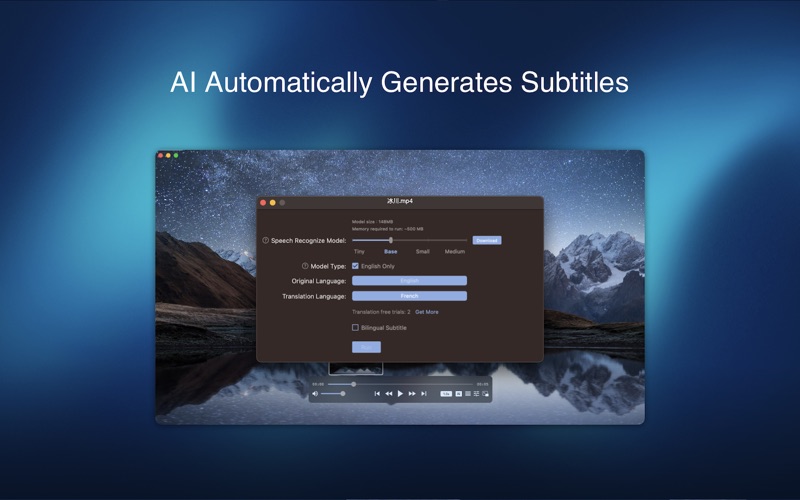
More Advanced Features * Smooth, seamless video play, support 4K. * Auto deinterlacing. * H/W-acceleration. * A-B loop. * Frame by Frame playback. * PIP mode. * Support various Subtitle formats(Text subtitles(SRT), Vobsub and ASS/SSA, etc.). * AI subtitle generation * Choose which one when you have multiple sound output devices. * Create the scene poster with snapshots. * Playlist with upper-level folder name. * Support multiple windows and play multiple videos at the same time. * Support Wireless display to DLNA, Chromecast, Roku devices. * OCR Text Recognition(macOS 12+)
Supported Formats: Videos: mkv, rmvb, rm, avi, mov, wmv, flv, f4v, f4p, f4a, f4b, swf, mpg, mpeg, mpeg1, mpeg2, m1v, m2v, mpv, mp4, mpeg4, m4v, 3gp, 3gpp, 3g2, 3gp2, m2p, ps, ts, m2ts, mts, mt2s, ogm, ogv, divx, dv, asf, wtv, webm, etc.
Audios: flac, ape, m2a, mp1, mp2, mpa, mp3, mpg3, m4a, m4b, wma, wav, wv, xm, aiff, aif, ac3, a52, aac, opus, ogg, oga, mid, midi, mka, etc.
Subtitles: ASS, SSA, SRT, IDX&SUB
Fig Player for Mac offers the following options for upgrading to VIP service. With VIP service have access to all advanced services.
VIP features:
OCR Text Recognition - One-click recognize various language, free copy Screencasting - Various formats, multiple devices, cast screen as you like Video clip recording - Any video, on-demand clips, automatic recording
Service: Upgrade to VIP to get unlimited access One-time purchase for lifetime access Monthly subscription Yearly subscription
Price may vary by location.
Privacy Policy and Terms of Use https://docs.google.com/document/d/1eNiz0I03h2Nn93Q3uhtQESO9OzbS\_TlglKZ40hPnXl0/edit?usp=sharing https://docs.google.com/document/d/1Dcg9cgQ7sWhTo34wQp1dUh7kKVvljLC8doE295Am5gU/edit?usp=sharing
- Bug fixes
More Entertainment apps from the directory.


