Most repeated positive
13authors
A complete feature set
“cleanshotx - scrolling screenshots is much more robust.”Evidence: r/macapps · Shottr vs CleanShot X in 2026. Which one are you actually sticking with?

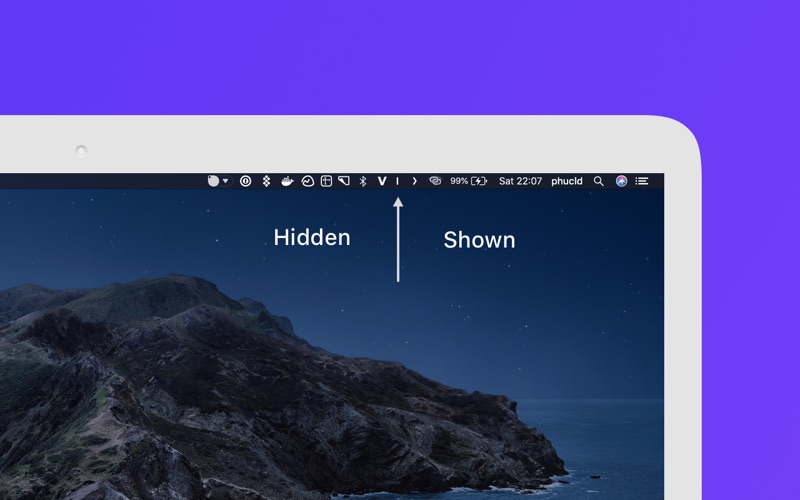
Hidden lets you hide menu bar items to give your Mac a cleaner look. Features: - Launch at login - Auto-hide after 5/10/15/30/60 seconds - Show/hide with global shortcut - Full menu bar mode - RTL languages supported. If you require any fu…
Release notes parsed from trusted records and kept on this page. History provides context; a future Watch alert starts from a fresh baseline.
The new version of Hidden bar release with a bunch of features and bugs fixed New mode: Use the full menu bar on expanding. Users with a small screen like MacBook Air, MacBook Pro 13 inch going to happy with this feature ( thanks many people raise the idea and correct the function name, you know it you :) )
Always hidden feature now doesn’t require restarting the app.
We also add a tutorial for the "Always hidden" feature.
New icons for the app, more consistent with the latest macOS (thank @p-z-l)
The Vietnamese language now supported.
Many languages add to the app. Many thanks to the people who help us localize the app. @C-uo, @p-z-l for Japanese - Chinese Eberhard Woentz for German @AmrIKhudair for Arabic @skeithtan for French (fr) @p-z-l for RTL language support.
Be the first to request it
Request the same source-linked purchase brief shown in the completed example below. Your email starts the request and receives the result.
Want it sooner? Independent demand changes queue priority.
Completed example · CleanShot X data
Everything below belongs to CleanShot X. It is a real, completed example—not research about Hidden Bar.

CleanShot X
Example data
 Completed research example
Most repeated positive
13authors
“cleanshotx - scrolling screenshots is much more robust.”Evidence: r/macapps · Shottr vs CleanShot X in 2026. Which one are you actually sticking with?
Most repeated concern
16authors
“I don't think it makes sense to spend the money for Cleanshot when other apps do most of what it does for a lot less or free.”Evidence: r/macapps · Shottr vs CleanShot X in 2026. Which one are you actually sticking with?
Product context
Official or maker-supplied product information. It is kept separate from buyer evidence and independent purchase verification.
Hidden lets you hide menu bar items to give your Mac a cleaner look.
Features: - Launch at login - Auto-hide after 5/10/15/30/60 seconds - Show/hide with global shortcut - Full menu bar mode - RTL languages supported.
If you require any further information or feature, feel free to contact us: macos@d.foundation
The new version of Hidden bar release with a bunch of features and bugs fixed New mode: Use the full menu bar on expanding. Users with a small screen like MacBook Air, MacBook Pro 13 inch going to happy with this feature ( thanks many people raise the idea and correct the function name, you know it you :) )
Always hidden feature now doesn’t require restarting the app.
We also add a tutorial for the "Always hidden" feature.
New icons for the app, more consistent with the latest macOS (thank @p-z-l)
The Vietnamese language now supported.
Many languages add to the app. Many thanks to the people who help us localize the app. @C-uo, @p-z-l for Japanese - Chinese Eberhard Woentz for German @AmrIKhudair for Arabic @skeithtan for French (fr) @p-z-l for RTL language support.
Recent conversations with a verified link to this App.

318 upvotes · 108 comments ·
More Window & Workspace apps from the directory.