Most repeated positive
13authors
A complete feature set
“cleanshotx - scrolling screenshots is much more robust.”Evidence: r/macapps · Shottr vs CleanShot X in 2026. Which one are you actually sticking with?

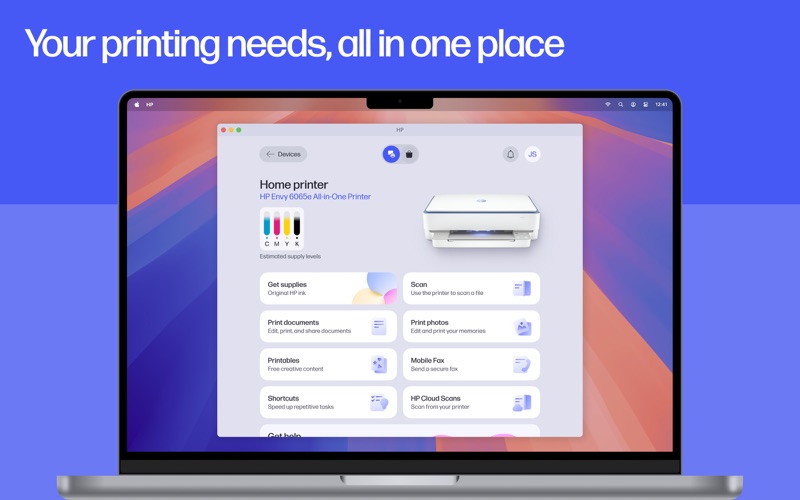
The go-to app for your HP devices. Set up your new printer, personalize your experience, print and scan photos or documents, and contact support—all in one place. Formerly HP Smart, the new HP app[1] offers you more ways to get more from y…
Release notes parsed from trusted records and kept on this page. History provides context; a future Watch alert starts from a fresh baseline.
HP Smart is now HP app! We redesigned the app for a simpler, more convenient experience. You can still print and scan from your HP printer, but we added more features with personalized recommendations to enhance your experience.
Be the first to request it
Request the same source-linked purchase brief shown in the completed example below. Your email starts the request and receives the result.
Want it sooner? Independent demand changes queue priority.
Completed example · CleanShot X data
Everything below belongs to CleanShot X. It is a real, completed example—not research about HP: Print and Support.

CleanShot X
Example data
 Completed research example
Most repeated positive
13authors
“cleanshotx - scrolling screenshots is much more robust.”Evidence: r/macapps · Shottr vs CleanShot X in 2026. Which one are you actually sticking with?
Most repeated concern
16authors
“I don't think it makes sense to spend the money for Cleanshot when other apps do most of what it does for a lot less or free.”Evidence: r/macapps · Shottr vs CleanShot X in 2026. Which one are you actually sticking with?
Product context
Official or maker-supplied product information. It is kept separate from buyer evidence and independent purchase verification.
The go-to app for your HP devices. Set up your new printer, personalize your experience, print and scan photos or documents, and contact support—all in one place.
Formerly HP Smart, the new HP app[1] offers you more ways to get more from your HP device.
Easy Setup, Wherever You Are New device? No problem. Get up and running fast with a guided setup that does the heavy lifting for you. Once you're ready to go, you can manage your printer and stay on top of the essentials, like checking your ink levels.
Make the Most of Your Device Stay informed with top recommendations. Plus, you can adjust your device settings and discover HP products that match your needs—it is all about making your tech work just the way you like it.
Print and Scan, On Your Time Print a school form from the kitchen or a last-minute birthday card. Even, scan receipts in seconds and send it straight to your email. Whether you're at home or at the office, completing your print tasks is a click away.
Instant Help Whenever You Need It When something goes wrong, help is right there—make a quick call, message live chat or find answers in the app. You’ll be back to what matters before you know it.
But wait, your experience just gets better and better!
• Unlock a world of creativity with HP Printables[2]. Explore tons of cards, coloring pages, educational worksheets, and fun crafts projects.
• Adjust and edit your documents before you hit print.
• Set up custom shortcuts for print tasks you use often.
• Automatically correct images, name files, flatten pages, extract text, and scan multiple pages at the same time with the HP app.[3]
• Get a notification when your printer is low on ink or paper and easily order more to keep printing uninterrupted.
We're always adding cool new features to the app. Make sure you turn on auto-updates, so you don't miss all the latest improvements!
Disclaimers
\1. HP Smart and myHP are now the HP app, available for download on macOS devices; and for iOS mobile phones and iPads. The HP app requires download available at www.hp.com/hp-app. Not all HP devices, services, apps are available in the HP app. Certain features are available in English language only, and may vary by printer and PC model/country, and between desktop/mobile applications. HP reserves the right to introduce charges for use of select HP app functionality. Internet access required. HP account required for full functionality. Fax sending capability only. Live chat and phone support are available during business hours and varies by country. Chat service is localized in supported regions, and where not supported, will default to English. Supported conferencing features vary by device and device configuration. For complete Terms of Service see: www.hp.com/hp-app-terms-of-use.
\2. Printables are for personal use only and may not be distributed for any commercial purpose.
\3. Choose HP+ at setup to activate benefits. HP+ requires an HP account, ongoing connection to the internet, and the use of only Original HP ink for the life of the printer. More at hp.com/plus
HP Smart is now HP app! We redesigned the app for a simpler, more convenient experience. You can still print and scan from your HP printer, but we added more features with personalized recommendations to enhance your experience.
More Productivity apps from the directory.