Most repeated positive
13authors
A complete feature set
“cleanshotx - scrolling screenshots is much more robust.”Evidence: r/macapps · Shottr vs CleanShot X in 2026. Which one are you actually sticking with?

KeyEcho is a professional keyboard sound enhancement application that transforms your typing experience with ultra-realistic audio feedback. It precisely simulates the complete keystroke cycle by providing distinct sounds for both key pres…
Release notes parsed from trusted records and kept on this page. History provides context; a future Watch alert starts from a fresh baseline.
Add several key sound effects
Be the first to request it
Request the same source-linked purchase brief shown in the completed example below. Your email starts the request and receives the result.
Want it sooner? Independent demand changes queue priority.
Completed example · CleanShot X data
Everything below belongs to CleanShot X. It is a real, completed example—not research about KeyEcho - mechanical key sound.

CleanShot X
Example data
 Completed research example
Most repeated positive
13authors
“cleanshotx - scrolling screenshots is much more robust.”Evidence: r/macapps · Shottr vs CleanShot X in 2026. Which one are you actually sticking with?
Most repeated concern
16authors
“I don't think it makes sense to spend the money for Cleanshot when other apps do most of what it does for a lot less or free.”Evidence: r/macapps · Shottr vs CleanShot X in 2026. Which one are you actually sticking with?
Product context
Official or maker-supplied product information. It is kept separate from buyer evidence and independent purchase verification.
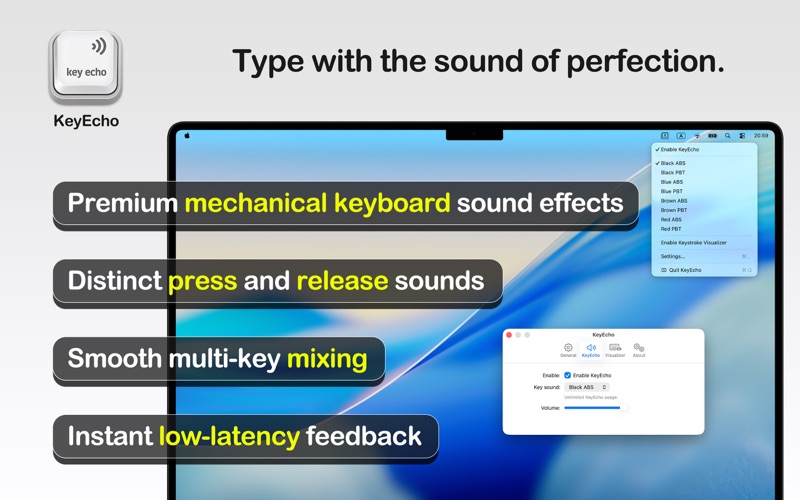
KeyEcho is a professional keyboard sound enhancement application that transforms your typing experience with ultra-realistic audio feedback. It precisely simulates the complete keystroke cycle by providing distinct sounds for both key press and release actions, with full support for simultaneous multi-key presses, delivering an authentic mechanical keyboard experience with unparalleled realism, making typing more engaging and satisfying.
Now KeyEcho also includes a powerful Keystroke Visualizer—a clean on-screen overlay that displays what you type in real time. It’s perfect for screen recordings, tutorials, live demos, presentations, and streaming, helping your audience follow along effortlessly while you work.
Key Features
- Multiple high-quality sound packs, including mechanical keyboard sounds - Ultra-realistic dual-sound feedback system (press and release) - Seamless multi-key sound mixing for simultaneous keystrokes - Real-time audio feedback with minimal latency - Adjustable volume control - Runs efficiently in the background - Keystroke Visualizer - Real-time on-screen keystroke overlay - Easy access through menu bar - Modern and intuitive user interface
Whether you enjoy the satisfying click of mechanical keyboards, prefer a personalized typing experience, need audio feedback while typing, or simply want to make your daily computer interaction more enjoyable, KeyEcho provides the perfect solution to enhance your typing experience.
Feel free to contact us with any questions, feedback, or suggestions. We are here to help you! Email: pm@utap.me
Add several key sound effects
More Lifestyle apps from the directory.