Most repeated positive
13authors
A complete feature set
“cleanshotx - scrolling screenshots is much more robust.”Evidence: r/macapps · Shottr vs CleanShot X in 2026. Which one are you actually sticking with?

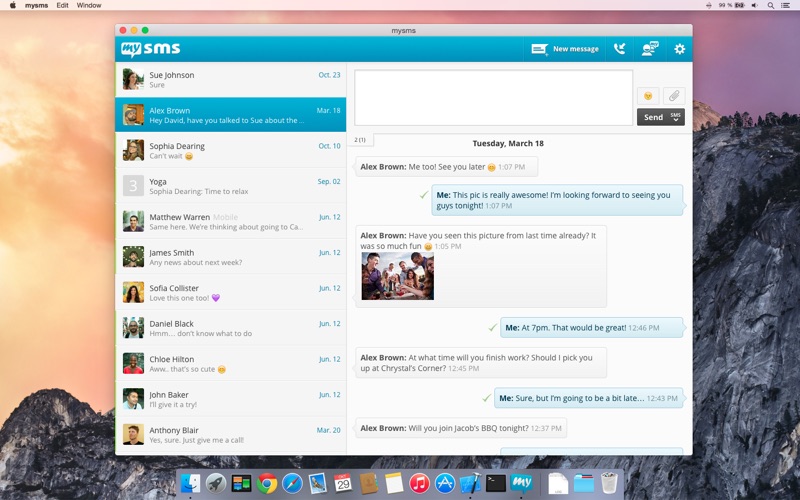
Send & receive all your messages on your computer and tablet – just like on your smartphone. Install mysms and you’ll be able to: * Send and receive messages on your computer * Automatically sync all the messages on your smartphone, tablet…
Release notes parsed from trusted records and kept on this page. History provides context; a future Watch alert starts from a fresh baseline.
Performance improvements and bug fixes
Be the first to request it
Request the same source-linked purchase brief shown in the completed example below. Your email starts the request and receives the result.
Want it sooner? Independent demand changes queue priority.
Completed example · CleanShot X data
Everything below belongs to CleanShot X. It is a real, completed example—not research about mysms - SMS Texting & Sync.

CleanShot X
Example data
 Completed research example
Most repeated positive
13authors
“cleanshotx - scrolling screenshots is much more robust.”Evidence: r/macapps · Shottr vs CleanShot X in 2026. Which one are you actually sticking with?
Most repeated concern
16authors
“I don't think it makes sense to spend the money for Cleanshot when other apps do most of what it does for a lot less or free.”Evidence: r/macapps · Shottr vs CleanShot X in 2026. Which one are you actually sticking with?
Product context
Official or maker-supplied product information. It is kept separate from buyer evidence and independent purchase verification.
Send & receive all your messages on your computer and tablet – just like on your smartphone.
Install mysms and you’ll be able to: * Send and receive messages on your computer * Automatically sync all the messages on your smartphone, tablet and computer * Call notifications - when you receive a call on your phone
*** PLEASE NOTE: This app is not self-contained. To be able to use mysms, you have to have mysms installed on your smartphone. ***
Just follow the following steps and you’ll be on your way:
Step 1) Install mysms on your smartphone and register. Step 2) Start the mysms application and log in using your number and password.
Why you should be using mysms:
ON YOUR SMARTPHONE AND ON THE COMPUTER Send and receive messages on your computer just as you would on your smartphone. All of your messages are automatically kept in sync – that means that you can access them from any of your devices whenever you want.
FREE TO FRIENDS If a contact also uses mysms, you can text each other for free using mysms friends.
SEND PICTURES AND FILES A picture is worth a thousand words! With mysms you can share your happiest moments with your family and friends. Also, sending all other kinds of files, like videos or word documents, is mere child’s play.
SEND TEXT MESSAGES REMOTELY So you pay a flat rate for texting and you want to make use of this on your computer? When you use mysms, you can send texts via your network service provider and there are no additional costs.
SAVE TEXTS TO EVERNOTE mysms integrates with Evernote, so you will never lose a message again. You can save, manage and search your text messages in your Evernote account.
******************
We’re always happy to hear from you! Do you have a suggestion? A question? A problem using the application? Just contact us at http://support.mysms.com and we’ll get back to you as quickly as possible.
You can reach us on Facebook at www.facebook.com/mysms, on Twitter @mysms as well as on Google+ gplus.to/mysms
Performance improvements and bug fixes
More Social Networking apps from the directory.


