Most repeated positive
13authors
A complete feature set
“cleanshotx - scrolling screenshots is much more robust.”Evidence: r/macapps · Shottr vs CleanShot X in 2026. Which one are you actually sticking with?

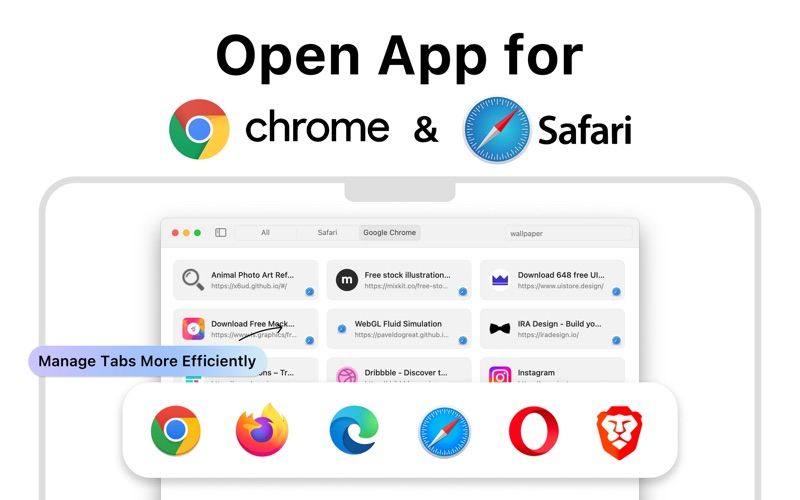
Open App is a browser tab management app designed specifically for macOS, allowing users to centrally display and operate all open tabs in both Chrome and Safari. With a simple and intuitive interface, users can browse, switch, and manage…
Release notes parsed from trusted records and kept on this page. History provides context; a future Watch alert starts from a fresh baseline.
Be the first to request it
Request the same source-linked purchase brief shown in the completed example below. Your email starts the request and receives the result.
Want it sooner? Independent demand changes queue priority.
Completed example · CleanShot X data
Everything below belongs to CleanShot X. It is a real, completed example—not research about Open App for All Browser.

CleanShot X
Example data
 Completed research example
Most repeated positive
13authors
“cleanshotx - scrolling screenshots is much more robust.”Evidence: r/macapps · Shottr vs CleanShot X in 2026. Which one are you actually sticking with?
Most repeated concern
16authors
“I don't think it makes sense to spend the money for Cleanshot when other apps do most of what it does for a lot less or free.”Evidence: r/macapps · Shottr vs CleanShot X in 2026. Which one are you actually sticking with?
Product context
Official or maker-supplied product information. It is kept separate from buyer evidence and independent purchase verification.
Open App is a browser tab management app designed specifically for macOS, allowing users to centrally display and operate all open tabs in both Chrome and Safari. With a simple and intuitive interface, users can browse, switch, and manage web content more efficiently, improving their multitasking productivity.
Main Features
• Centralized Tab Display Automatically syncs and groups all open tabs from Chrome and Safari. Tabs are clearly categorized by browser type and window hierarchy, enabling users to quickly see all currently open web pages, streamline workflow, and avoid duplicate pages.
• One-Click Tab Control Allows users to open, switch, close, and create new tabs directly from the menu bar without opening the browser. This is especially convenient for quickly switching between different tasks or projects, enhancing multitasking efficiency.
• Powerful Search Function Built-in fast search engine enables real-time search across all open tabs. Supports fuzzy matching by title or URL keywords, allowing users to instantly locate the needed page regardless of the number of tabs, greatly reducing search time.
• Menu Bar Icon for Quick Access The app icon stays resident in the menu bar for constant access. Users can click the icon to instantly expand the tab management panel, view current web page status, or perform tab operations anytime. The operation is intuitive and responsive, greatly improving convenience.
• Low Resource Usage & Stable Operation Adopts system-level optimization architecture to ensure ultra-low resource consumption during daily use. The app runs smoothly even with a large number of tabs open, without impacting the performance of other applications.
Target Users
This app is ideal for macOS users who frequently use multiple web tabs, especially: • Professionals engaged in data research or web-based studies • Developers and designers who need to quickly switch between multiple development environments • Students who frequently browse different learning resources • Power users who value browser efficiency and desktop organization
Purchase Options • Annual Subscription — USD $19.99 / year Unlock all premium features with continuous updates and priority support.
• One-Time Purchase — USD $29.99 Pay once and enjoy full access forever. No renewals, no recurring fees.
Payment will be charged to your Apple ID account at the confirmation of purchase. Subscriptions automatically renew unless canceled at least 24 hours before the end of the current period. Your account will be charged for renewal within 24 hours before the end of the current period. You can manage and cancel your subscriptions at any time by going to your account settings on the App Store after purchase. Any unused portion of a free trial period, if offered, will be forfeited when you purchase a subscription.
By using this app, you agree to our Privacy Policy and Terms of Use: • Privacy Policy: https://innovatechsolu.com/privacy-policy.html • Terms of Use: https://innovatechsolu.com/terms-of-service.html
Disclaimer: Safari, Chrome, and their icons are registered trademarks or trademarks of their respective companies. Our use of these icons is solely for functional description purposes and does not imply any affiliation with or endorsement by Apple Inc. or Google LLC.
• Ul Enhancements & Bug Fixes.
More Communication & Meetings apps from the directory.