Most repeated positive
13authors
A complete feature set
“cleanshotx - scrolling screenshots is much more robust.”Evidence: r/macapps · Shottr vs CleanShot X in 2026. Which one are you actually sticking with?

********************************************************* Please purchase to remove watermark if you like Paint X. ********************************************************* Paint X is a classic painting application to draw, color, and edit…
Release notes parsed from trusted records and kept on this page. History provides context; a future Watch alert starts from a fresh baseline.
Fixed some minor bugs.
Be the first to request it
Request the same source-linked purchase brief shown in the completed example below. Your email starts the request and receives the result.
Want it sooner? Independent demand changes queue priority.
Completed example · CleanShot X data
Everything below belongs to CleanShot X. It is a real, completed example—not research about Paint X - Paint, Draw and Edit.

CleanShot X
Example data
 Completed research example
Most repeated positive
13authors
“cleanshotx - scrolling screenshots is much more robust.”Evidence: r/macapps · Shottr vs CleanShot X in 2026. Which one are you actually sticking with?
Most repeated concern
16authors
“I don't think it makes sense to spend the money for Cleanshot when other apps do most of what it does for a lot less or free.”Evidence: r/macapps · Shottr vs CleanShot X in 2026. Which one are you actually sticking with?
Product context
Official or maker-supplied product information. It is kept separate from buyer evidence and independent purchase verification.
********************************************************* Please purchase to remove watermark if you like Paint X. *********************************************************
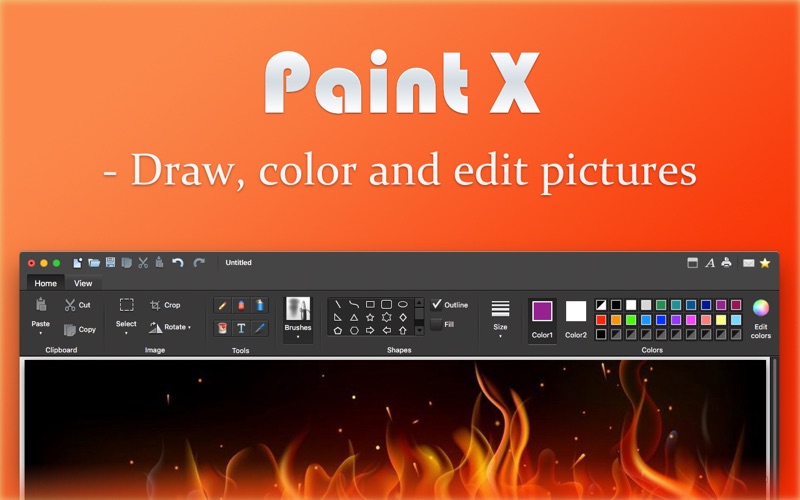
Paint X is a classic painting application to draw, color, and edit pictures. You can use Paint X like a digital sketchpad to make simple pictures, creative projects, or to add text and designs to other pictures, such as those taken with your digital camera.
This tried-and-true program is easier to use and fun, too. The realistic digital "brushes" will bring your pictures to life in shades of watercolor, crayon, and calligraphy. And the ribbon—the strip across the top of the window that shows what a program can do—displays choices out in the open rather than in menus.
Efficient tools: • Pencil tool, Eraser tool, Airbrush tool, Fill tool, Text tool, Color picker tool, Rectangle selection tool, Free-form selection tool • Over 150 built-in paintbrushes: DNA brush, Calligraphy brush, Blur brush, Ink brush and so on • 25 ready-made shapes: Line, Curve, Oval, Five-point star, Heart, Cloud, Smile and so on
Drawing functionality: • Rotate/Resize shapes or selection freely • Flip the image horizontal/vertical • Crop image by selection • Paint with a transparency color anywhere • Stroke/Fill shapes with respective colors • Select the most recently used colors from the builtin color-panel • Cut/Copy/Paste • Paste from an image file
Other features: • Canvas/image size is adjustable • Support Drag and drop operation • Support Zoom In/Out feature • The maximum undo/redo times is adjustable • Support multiple image windows opened at the same time • Support printing • Support file formats: png, tiff, bmp, jpeg, gif
and much more ...
Take your time and enjoy it!
Please feel free to contact us if you have any questions or suggestions.
Email: info@jobssoft.com
Fixed some minor bugs.
More Graphics & Design apps from the directory.
