Most repeated positive
13authors
A complete feature set
“cleanshotx - scrolling screenshots is much more robust.”Evidence: r/macapps · Shottr vs CleanShot X in 2026. Which one are you actually sticking with?

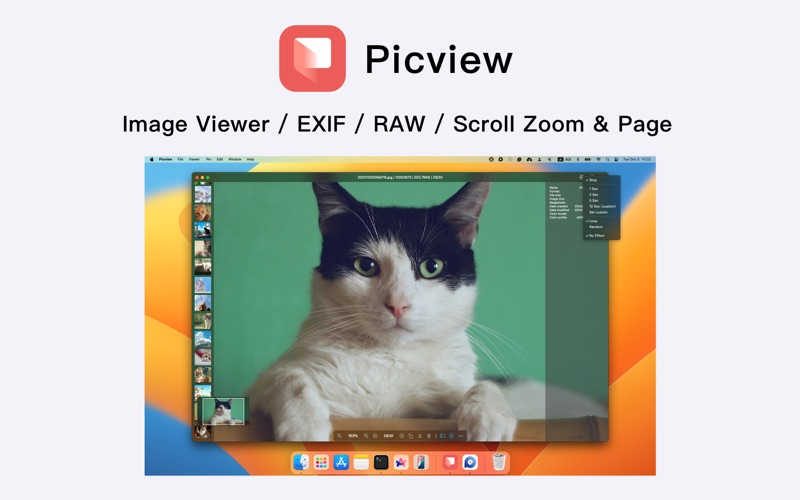
Picview works great with JPEG, HEIC, PSD, RAW, WEBP, PNG, GIF, and many other formats. Provides basic image processing, including flip and rotate, EXIF, and other information. Supports keyboard shortcuts and trackpad gestures. The most imp…
Release notes parsed from trusted records and kept on this page. History provides context; a future Watch alert starts from a fresh baseline.
Be the first to request it
Request the same source-linked purchase brief shown in the completed example below. Your email starts the request and receives the result.
Want it sooner? Independent demand changes queue priority.
Completed example · CleanShot X data
Everything below belongs to CleanShot X. It is a real, completed example—not research about Picview - Image Viewer.

CleanShot X
Example data
 Completed research example
Most repeated positive
13authors
“cleanshotx - scrolling screenshots is much more robust.”Evidence: r/macapps · Shottr vs CleanShot X in 2026. Which one are you actually sticking with?
Most repeated concern
16authors
“I don't think it makes sense to spend the money for Cleanshot when other apps do most of what it does for a lot less or free.”Evidence: r/macapps · Shottr vs CleanShot X in 2026. Which one are you actually sticking with?
Product context
Official or maker-supplied product information. It is kept separate from buyer evidence and independent purchase verification.
Picview works great with JPEG, HEIC, PSD, RAW, WEBP, PNG, GIF, and many other formats. Provides basic image processing, including flip and rotate, EXIF, and other information. Supports keyboard shortcuts and trackpad gestures. The most important, Picview like Windows' default picture viewer — Photos, where zoom in and out with the mouse wheel and switch between images with arrow keys and/or with on-screen buttons.
Double-click to open and view instantly. Rich gesture support. \1. Keyboard: Arrow keys to flip, up/down to zoom, ESC to close. Custom shortcuts supported. \2. Mouse: Scroll to zoom, Command + scroll to flip, Option + scroll to pan. Double-click to close/zoom/fullscreen. \3. Trackpad: Two-finger swipe to flip, pinch to zoom in/out.
Clean, minimal interface with no distractions and fast loading. \1. Focus on Image: Borderless window with auto-hide title bar and toolbar. \2. Slideshow: Auto-play with shuffle and loop support. \3. Fullscreen Mode: View images in immersive fullscreen with auto-hidden cursor.
Fixed or adaptive window sizes. Choose the mode that fits you best. \1. Window Strategy: 9 instant-switch modes like fixed size, fit-to-image, etc. \2. View Styles: Single/multi-window, grid, or pin-to-desktop browsing. \3. Pin to Desktop: Turn any image or text into sticky notes on your desktop. \4. Long Image Support: Auto-scroll to top, drag to move, zoom with scroll.
Open one image to view all in the folder. \1. Sort Images: Sort by capture time, size, and more. \2. Filter by Type: Filter images by file extension. \3. Subfolder Support: Browse images inside subfolders recursively.
From vectors to RAW, almost all common formats supported. \1. Format Rich: View over 30 formats including PNG, JPG, WEBP, BMP, ICO, GIF, CR2, CR3, NEF, and more. \2. EXIF Info: View color profile, shot time, camera/lens model, ISO, aperture, exposure, and more.
AI-powered tools make images interactive and actionable. \1. Text Selection: Recognize text in images for selection, copy, and translation. \2. Object Extraction: Detect main subjects, copy and paste them into other apps.
- Email:office.chitaner@gmail.com - Telegram invite link: https://t.me/+2Im1PTFR4chjYWFl
Terms of Use: https://www.apple.com/legal/internet-services/itunes/dev/stdeula/
- Fixed an issue with custom slideshow playback duration
More Graphics & Design apps from the directory.


