Most repeated positive
13authors
A complete feature set
“cleanshotx - scrolling screenshots is much more robust.”Evidence: r/macapps · Shottr vs CleanShot X in 2026. Which one are you actually sticking with?

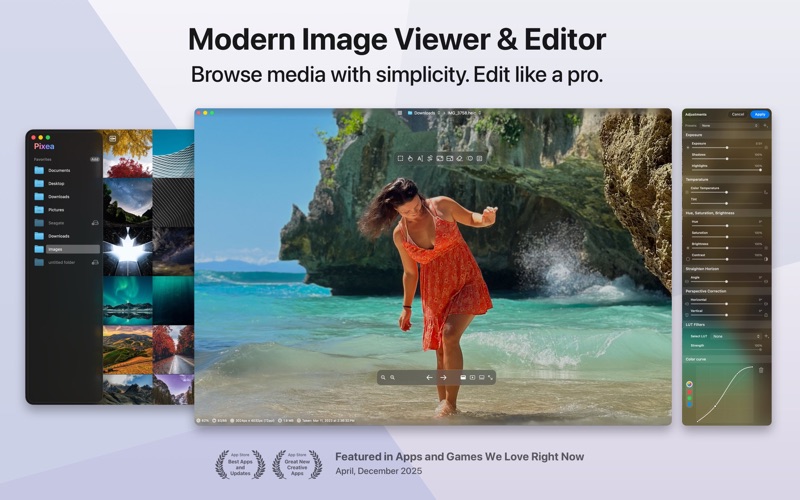
Pixea is a modern image editor & media viewer for macOS, featuring a clean, minimal interface. Pixea works great with HEIC, JPEG XL, PSD, RAW, WEBP, MKV, MP4, and many other formats. Enjoy the all-new way to browse media folders, photo lib…
Release notes parsed from trusted records and kept on this page. History provides context; a future Watch alert starts from a fresh baseline.
Pixea 8.2 features new adjustment tools, photo library file support, and other improvements.
New adjustment tools
Photo library file support
Other improvements
Be the first to request it
Request the same source-linked purchase brief shown in the completed example below. Your email starts the request and receives the result.
Want it sooner? Independent demand changes queue priority.
Completed example · CleanShot X data
Everything below belongs to CleanShot X. It is a real, completed example—not research about Pixea.

CleanShot X
Example data
 Completed research example
Most repeated positive
13authors
“cleanshotx - scrolling screenshots is much more robust.”Evidence: r/macapps · Shottr vs CleanShot X in 2026. Which one are you actually sticking with?
Most repeated concern
16authors
“I don't think it makes sense to spend the money for Cleanshot when other apps do most of what it does for a lot less or free.”Evidence: r/macapps · Shottr vs CleanShot X in 2026. Which one are you actually sticking with?
Product context
Official or maker-supplied product information. It is kept separate from buyer evidence and independent purchase verification.
Pixea is a modern image editor & media viewer for macOS, featuring a clean, minimal interface. Pixea works great with HEIC, JPEG XL, PSD, RAW, WEBP, MKV, MP4, and many other formats. Enjoy the all-new way to browse media folders, photo libraries, and archives. Search, filter, sort, or shuffle your media files, then enhance them with precise adjustments and intelligent tools. All in one streamlined app.
Explore your media with speed and clarity: • Open images, videos, and archives instantly • Search, filter, sort, or shuffle your library • Navigate seamlessly with keyboard shortcuts and trackpad gestures
Take full control over light, color, and detail: • Adjust exposure, contrast, hue, saturation, brightness, temperature, and tint • Apply LUT filters, tweak color curves, and adjust HSL per channel • Adjust focus and apply depth-based adjustments • Straighten the horizon and correct perspective with ease • Apply lens corrections • Remove unwanted objects, people, or defects with built-in intelligent tools • Upscale images 2× or 4× with intelligent detail enhancement
Work efficiently at scale: • Apply edits to multiple images at once • Convert formats in bulk • Optimize entire collections in seconds
Supported Image formats: JPEG, HEIC, GIF, PNG, TIFF, JPEG XL, AVIF, Photoshop (PSD), BMP, Fax images, macOS and Windows icons, SCV sequences, Radiance images, and Google's WebP. RAW formats: Leica DNG and RAW, Sony ARW, Olympus ORF, Minolta MRW, Nikon NEF, Fuji RAF, Panasonic RW2, Canon CR2, CR3 and CRW, Hasselblad 3FR. Sketch files (preview only). Photo library files, ZIP archives, CBZ comic books.
Video formats: MP4, MOV, A4V, FLV, AVI, WMV, MPEG, VOB, RM, MKV.
Export formats: JPEG, JPEG-2000, JPEG XL, WebP, AVIF, HEIC, PNG, TIFF, BMP, GIF.
* Some features require Pixea Plus subscription.
Pixea 8.2 features new adjustment tools, photo library file support, and other improvements.
New adjustment tools • Lens correction • Vignette • Brilliance • Vibrance • Depth-based adjustments: brilliance, vibrance • Improved highlights adjustment
Photo library file support • .photolibrary and .migratedphotolibrary files support • View and edit locally synced originals in photo libraries.
Other improvements • Export to HEIF and AVIF fixes • Liquid glass theme improvements • Other bug fixes and improvements
Recent conversations with a verified link to this App.

120 upvotes · 47 comments ·
6 upvotes · 12 comments ·
More Video Editing apps from the directory.

