Most repeated positive
13authors
A complete feature set
“cleanshotx - scrolling screenshots is much more robust.”Evidence: r/macapps · Shottr vs CleanShot X in 2026. Which one are you actually sticking with?

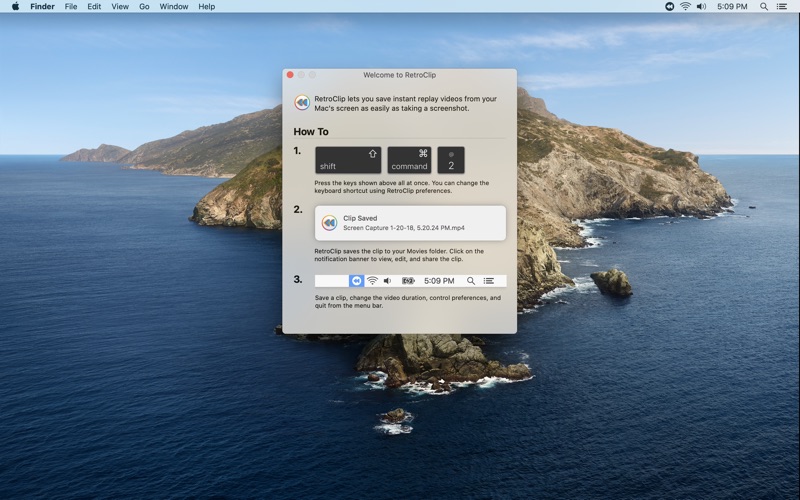
RetroClip lets you save instant replay videos from your Mac's screen as easily as taking a screenshot. HOW IT WORKS When you open RetroClip, it starts recording your Mac's screen right away, but it doesn't create any files or use any disk…
Release notes parsed from trusted records and kept on this page. History provides context; a future Watch alert starts from a fresh baseline.
Be the first to request it
Request the same source-linked purchase brief shown in the completed example below. Your email starts the request and receives the result.
Want it sooner? Independent demand changes queue priority.
Completed example · CleanShot X data
Everything below belongs to CleanShot X. It is a real, completed example—not research about RetroClip.

CleanShot X
Example data
 Completed research example
Most repeated positive
13authors
“cleanshotx - scrolling screenshots is much more robust.”Evidence: r/macapps · Shottr vs CleanShot X in 2026. Which one are you actually sticking with?
Most repeated concern
16authors
“I don't think it makes sense to spend the money for Cleanshot when other apps do most of what it does for a lot less or free.”Evidence: r/macapps · Shottr vs CleanShot X in 2026. Which one are you actually sticking with?
Product context
Official or maker-supplied product information. It is kept separate from buyer evidence and independent purchase verification.
RetroClip lets you save instant replay videos from your Mac's screen as easily as taking a screenshot.
HOW IT WORKS When you open RetroClip, it starts recording your Mac's screen right away, but it doesn't create any files or use any disk space. Instead, it records to a fixed length region of memory. As the memory fills up, older video frames are removed to make space for newer ones. Nothing is saved permanently until you press the RetroClip keyboard shortcut or use the menu bar to save a clip. Then, a video of up to the last 5 minutes from your screen is instantly saved to the Movies folder on your Mac.
Unlike other screen capture utilities, RetroClip is designed to be left running continuously. RetroClip won't fill up your disk, and it has been carefully engineered to make efficient use of your Mac's hardware. This means you can run RetroClip alongside performance intensive applications or games without any slowdown, or you can use RetroClip while on battery power without worrying about finding an outlet.
WHO IT'S FOR - Gamers - Software Developers and QA - Anyone who doesn't want to miss a thing
• RetroClip is now totally free to use! • Record clips up to 5 minutes in length. • Video quality is now a setting under Preferences. • Bug fixes
More Video Editing apps from the directory.


