Most repeated positive
13authors
A complete feature set
“cleanshotx - scrolling screenshots is much more robust.”Evidence: r/macapps · Shottr vs CleanShot X in 2026. Which one are you actually sticking with?

Since its launch in 2006, Sweet Home 3D has become a trusted choice for millions worldwide, with over 50 million downloads. Sweet Home 3D combines ease of use with professional-grade functionality, allowing users of all skill levels to cre…
Release notes parsed from trusted records and kept on this page. History provides context; a future Watch alert starts from a fresh baseline.
Bug fixing and improvements
Be the first to request it
Request the same source-linked purchase brief shown in the completed example below. Your email starts the request and receives the result.
Want it sooner? Independent demand changes queue priority.
Completed example · CleanShot X data
Everything below belongs to CleanShot X. It is a real, completed example—not research about Sweet Home 3D Plan Your House.

CleanShot X
Example data
 Completed research example
Most repeated positive
13authors
“cleanshotx - scrolling screenshots is much more robust.”Evidence: r/macapps · Shottr vs CleanShot X in 2026. Which one are you actually sticking with?
Most repeated concern
16authors
“I don't think it makes sense to spend the money for Cleanshot when other apps do most of what it does for a lot less or free.”Evidence: r/macapps · Shottr vs CleanShot X in 2026. Which one are you actually sticking with?
Product context
Official or maker-supplied product information. It is kept separate from buyer evidence and independent purchase verification.
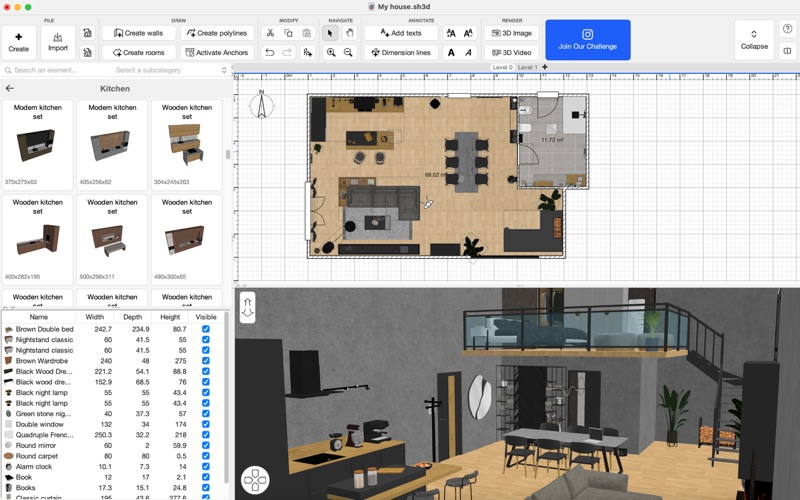
Since its launch in 2006, Sweet Home 3D has become a trusted choice for millions worldwide, with over 50 million downloads. Sweet Home 3D combines ease of use with professional-grade functionality, allowing users of all skill levels to create their dream spaces effortlessly.
Why Choose Sweet Home 3D? - Navigate a user-friendly interface: Place furniture and design elements with simple drag-and-drop functionality, making it easy to navigate and customize - Visualize your design both in 2D and 3D: Simultaneously watch 2D and 3D views to explore your design from different perspectives, giving you a true feel of your envisioned space - Add furniture to your design: Choose from +1.600 furniture pieces, lighting options, and decor items with +400 textures to furnish your space exactly as you envision - Import additional 3D Models: Import custom 3D models to add unique furniture and decor elements, ensuring that your design is as unique as your style - Be precise: Set precise dimensions and adjust room layouts to ensure accuracy and compatibility with your actual space - Create photos and video rendering: Create high-quality snapshots and top-tier video walkthroughs of your designs to showcase every detail of your project in motion - Save and share your designs: Export high-quality images of your designs and share them easily with friends, family, or professionals for feedback - Multi-Language Support: Sweet Home 3D is available in multiple languages, making it accessible for users around the globe.
Features at a glance: - Easy-to-use 2D floor plan creation with instant 3D visualization - +1600 items with customizable dimensions and color - +400 textures, colors and patterns to customize your items - Unlimited number of projects - Seamless model and textures imports and customizable options for unique designs - Access to a supportive online community for tips, inspiration, and feedback - Save projects to various formats, including PDF, SVG, and high-quality image files
Download Sweet Home 3D today and start bringing your dream home to life!
Subscribe to access to premium app features; subscription details are the following:
- Length: weekly or yearly - Free trial: only on selected subscriptions - Your payment will be charged to your iTunes Account as soon as you confirm your purchase - You can manage your subscriptions and turn off auto-renewal from your Account Settings after the purchase - Your subscription will renew automatically, unless you turn off auto-renew at least 24 hours before the end of the current period - The cost of renewal will be charged to your account in the 24 hours prior to the end of the current period - When canceling a subscription, your subscription will stay active until the end of the period. Auto-renewal will be disabled, but the current subscription will not be refunded - Any unused portion of a free trial period, if offered, will be forfeited when purchasing a subscription
Terms & Conditions: https://sweethome3d.notion.site/iOS-Android-Sweet-Home-3D-Terms-Conditions-13ccf6557a08802b971ec995f00eaf5f?pvs=4
Privacy Policy: https://sweethome3d.notion.site/iOS-Android-Sweet-Home-3D-Privacy-Policy-138cf6557a08805ea75ad0f6dc7e9508?pvs=4
Pay a visit to our website for more information: https://www.sweethome3d.com
If you have any questions, please contact us at info@sweethome3d.com
Bug fixing and improvements
More Graphics & Design apps from the directory.


