Most repeated positive
13authors
A complete feature set
“cleanshotx - scrolling screenshots is much more robust.”Evidence: r/macapps · Shottr vs CleanShot X in 2026. Which one are you actually sticking with?

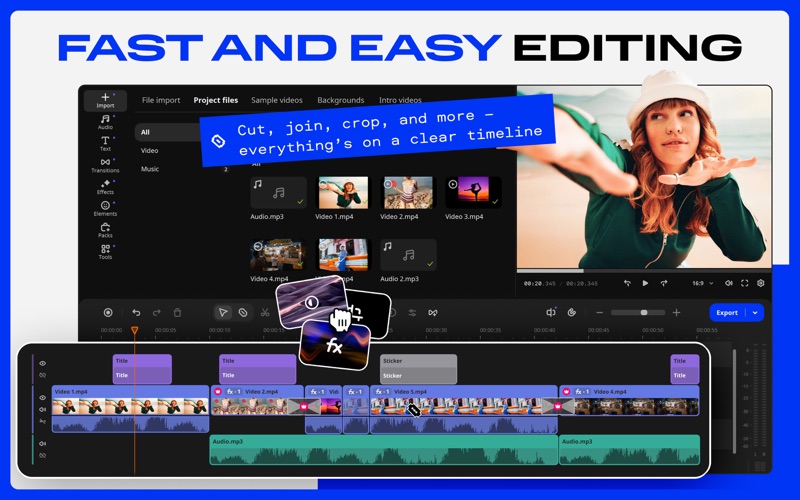
CREATE AWESOME VIDEOS EASILY Movavi Video Editor is your simple yet powerful app for making wow videos. Whether you're making a vlog, promo reel, presentation, or family video – you'll love the result, and so will your viewers. With native…
Release notes parsed from trusted records and kept on this page. History provides context; a future Watch alert starts from a fresh baseline.
Minor improvements and bug fixes.
Be the first to request it
Request the same source-linked purchase brief shown in the completed example below. Your email starts the request and receives the result.
Want it sooner? Independent demand changes queue priority.
Completed example · CleanShot X data
Everything below belongs to CleanShot X. It is a real, completed example—not research about Video Editor Movavi.

CleanShot X
Example data
 Completed research example
Most repeated positive
13authors
“cleanshotx - scrolling screenshots is much more robust.”Evidence: r/macapps · Shottr vs CleanShot X in 2026. Which one are you actually sticking with?
Most repeated concern
16authors
“I don't think it makes sense to spend the money for Cleanshot when other apps do most of what it does for a lot less or free.”Evidence: r/macapps · Shottr vs CleanShot X in 2026. Which one are you actually sticking with?
Product context
Official or maker-supplied product information. It is kept separate from buyer evidence and independent purchase verification.
CREATE AWESOME VIDEOS EASILY
Movavi Video Editor is your simple yet powerful app for making wow videos. Whether you're making a vlog, promo reel, presentation, or family video – you'll love the result, and so will your viewers. With native support for M1, M2, and M3 chips, the app runs super-smooth – speeding up previewing and export for faster, more enjoyable content creation.
► BEGINNER-FRIENDLY INTERFACE
Enjoy the clean design, where every tool is easy to use – even if it’s your first time editing.
– Navigate intuitively through the layout you’ll get right away – Ease into the process even quicker with helpful tooltips – Just add your clips and start creating – there’s no learning curve
► EFFORTLESS EDITING
Tweak your videos on the clear timeline. Whatever you want to adjust, there’s a handy tool to help you do it quickly and easily. Want to create an epic time-lapse? Try ultra-fast playback!
– Cut clips quickly and precisely with the Blade tool – Crop, rotate, change speed, or swap backgrounds – all in seconds – Boost colors with ready-made templates or fine-tune them by hand – Speed up videos up to 100x
► WOW: AUTOMATIC SUBTITLES AND SILENCE REMOVAL
Add auto-subtitles, style them to fit your video, and even save them as editable SRT files. Plus, save time on editing with silence removal – cut out unwanted pauses in a click or fine-tune the pause length and volume yourself.
– Add auto-generated subtitles in 13+ languages – customize font, size, and color – Save your subtitles as an SRT file – a flexible text format you can easily edit – Customize your subtitles with new styles – from neat and simple to bold and punchy – Remove silences automatically or adjust them manually for full control
► 800+ BUILT-IN EFFECTS
Pick from hundreds of effects to give your video extra pizzazz – just hover over any effect for a preview, then simply drag and drop it onto your clip. Don’t miss the new realistic, customizable effects that will fit any clip perfectly.
– Use animated title presets to make your text pop – Enhance your videos in a click with the new customizable effects – Add transitions to keep cuts smooth and streamlined – Drop in stickers for fun, eye-catching accents – Use overlays to set the perfect vibe for your videos – Copy effects, color tweaks, and audio settings from one clip to another – instantly
► 10,000+ EXTRA EFFECTS
Make your video hit the high notes – with your choice of effects and music from the Movavi Effects collection. Just drag any effect onto your clip and let the wow kick in.
– Thousands of titles, transitions, intros, backgrounds, and music – For any style: vlogs, business, family, hobbies, travel, and more – For any format – from short clips to full-length vlogs – Always fresh: over 1,000 new effects added every year
► TOOLS FOR BETTER SOUND
Ensure your audio matches your visuals – so your video sounds as good as it looks.
– Instantly remove background noise like traffic or wind – Add music that fits your video’s vibe: calm, romantic, epic – you choose – Use sound effects to make your video really resonate – literally and emotionally
► FAST, ATTENTIVE SUPPORT
We’re always here to help with any questions – our response is always quick, friendly, and attentive. And if tech issues ever get too challenging, you’re covered with a 30-day money-back guarantee. For more info, visit https://help.movavi.com/
►EVERYTHING UNLOCKED – IN THE FULL VERSION
If you’re enjoying the trial, upgrade to the full version and take your videos even further – with more tools, more effects, and no watermark (of course).
– No watermark on your saved videos – Full access to all tools and effects – Priority tech support – Regular updates with new tools and effects
Terms of Use: https://www.movavi.com/tos.html Privacy Policy: https://www.movavi.com/privacy.html
Minor improvements and bug fixes.
More Photo & Video apps from the directory.


