Most repeated positive
13authors
A complete feature set
“cleanshotx - scrolling screenshots is much more robust.”Evidence: r/macapps · Shottr vs CleanShot X in 2026. Which one are you actually sticking with?

Open and view CorelDRAW (.cdr) and Corel Presentation Exchange (.cmx) files on your Mac — no CorelDRAW installation required. CDRViewer is designed exclusively for macOS with a native, Preview-style interface that feels right at home. OPEN…
Release notes parsed from trusted records and kept on this page. History provides context; a future Watch alert starts from a fresh baseline.
Added Chinese Traditional Language Support Improved Other Languages
Be the first to request it
Request the same source-linked purchase brief shown in the completed example below. Your email starts the request and receives the result.
Want it sooner? Independent demand changes queue priority.
Completed example · CleanShot X data
Everything below belongs to CleanShot X. It is a real, completed example—not research about CDRViewer.

CleanShot X
Example data
 Completed research example
Most repeated positive
13authors
“cleanshotx - scrolling screenshots is much more robust.”Evidence: r/macapps · Shottr vs CleanShot X in 2026. Which one are you actually sticking with?
Most repeated concern
16authors
“I don't think it makes sense to spend the money for Cleanshot when other apps do most of what it does for a lot less or free.”Evidence: r/macapps · Shottr vs CleanShot X in 2026. Which one are you actually sticking with?
Product context
Official or maker-supplied product information. It is kept separate from buyer evidence and independent purchase verification.
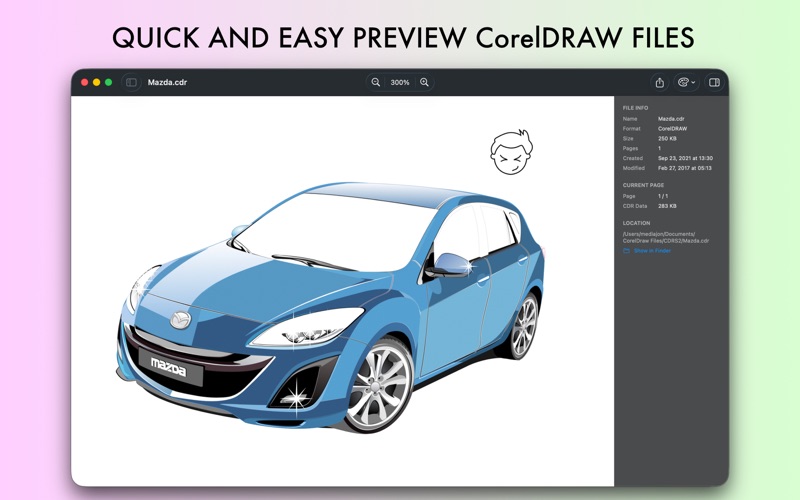
Open and view CorelDRAW (.cdr) and Corel Presentation Exchange (.cmx) files on your Mac — no CorelDRAW installation required. CDRViewer is designed exclusively for macOS with a native, Preview-style interface that feels right at home.
OPEN CDR FILES INSTANTLY Double-click any .cdr or .cmx file and see it rendered with beautiful accuracy. CDRViewer supports files created in CorelDRAW versions from the classic releases through X7, including compressed formats.
MULTI-PAGE SUPPORT Navigate documents with multiple pages effortlessly. The Preview-style sidebar shows thumbnails of every page, letting you jump between them with a single click.
SMOOTH ZOOM & PAN Zoom from 5% to 2000% with smooth, animated transitions. Pan freely around large artwork, or fit the entire document to your window with a keyboard shortcut.
DETAILED INSPECTOR See file information, page dimensions, embedded images, and more at a glance. Perfect for print professionals who need to verify document specs before sending files to production.
EXPORT TO ANY FORMAT (Pro) Convert CorelDRAW files to the formats you actually need:
PNG — lossless quality with transparent background support JPG — compressed for web and sharing PDF — vector-quality print-ready output SVG — scalable for web and further editing TIFF — lossless format for print industry
Export single pages, page ranges, or entire multi-page documents at any resolution from 72 to 600 DPI.
CUSTOMIZATION Choose your background color per document, or set a default for all future files. Light, dark, and transparent backgrounds help you see your work the way you want.
FREE TO TRY View up to 3 files per day for free. Upgrade to Pro for unlimited viewing, unlimited file sizes, export in all formats, and access to every upcoming feature.
PRIVACY FIRST CDRViewer runs entirely on your Mac. Your files never leave your device. No uploads, no cloud processing, no tracking. Fully sandboxed for your security.
WHY CDRVIEWER? Mac users have long struggled with CorelDRAW files. You either needed to install Windows, pay for expensive conversion tools, or rely on sketchy online converters that upload your files to unknown servers. CDRViewer solves this with a fast, native Mac app that respects your privacy and your workflow.
Whether you're a graphic designer receiving files from clients, a print professional preparing jobs for production, or just someone who needs to view that old .cdr file — CDRViewer is the simple, reliable solution.
DESIGNED FOR MACOS Native Apple design language, full dark mode support, multiple languages, and keyboard shortcuts that feel familiar. Built with SwiftUI for Apple Silicon and Intel Macs.
Privacy Policy: https://blue-tail.com/privacy-policy/ Terms of Service: https://blue-tail.com/terms-of-service/
Added Chinese Traditional Language Support Improved Other Languages
Recent conversations with a verified link to this App.

3 upvotes · 2 comments ·
More Graphics & Design apps from the directory.
