Jetty Pro 1.0 Arrives: John Siracusa’s Floating-Palette Utility Can Augment the Mac Dock or Replace It
On 23 November 2026, John Siracusa released Jetty Pro 1.0, a Mac utility that creates customizable Dock-like floating palettes and can augment or replace the macOS Dock. This source-based brief, drawn from the official Hypercritical announcement and documentation plus a Six Colors item, covers requirements (macOS 26.6 Tahoe or later, an Apple Account, and a subscription), the 14-day trial and $9.99-per-year introductory price through the end of 2026, why the app is not sold in the Mac App Store, official refund terms, documented differences from the Dock, and the permissions and private APIs the developer discloses. It is not a hands-on test.
Jetty Pro 1.0 Arrives: John Siracusa’s Floating-Palette Utility Can Augment the Mac Dock or Replace It
On 23 November 2026, John Siracusa released Jetty Pro 1.0, a native Mac utility that creates customizable, Dock-like floating palettes and can be used alongside the macOS Dock or, if the user prefers, in place of it. This is a source-based brief built from the official announcement on Hypercritical, the Jetty Pro product and documentation pages, and one contemporary press item from Six Colors. It is not a hands-on test, and nothing below describes performance or stability.
What Jetty Pro is, and who can run it
The announcement was posted on November 23, 2026 at 3:04 PM, and the documentation’s Releases list shows “1.0 - November 23, 2026” as the “Initial release.” The refund and privacy pages identify the company as Hypercritical LLC.
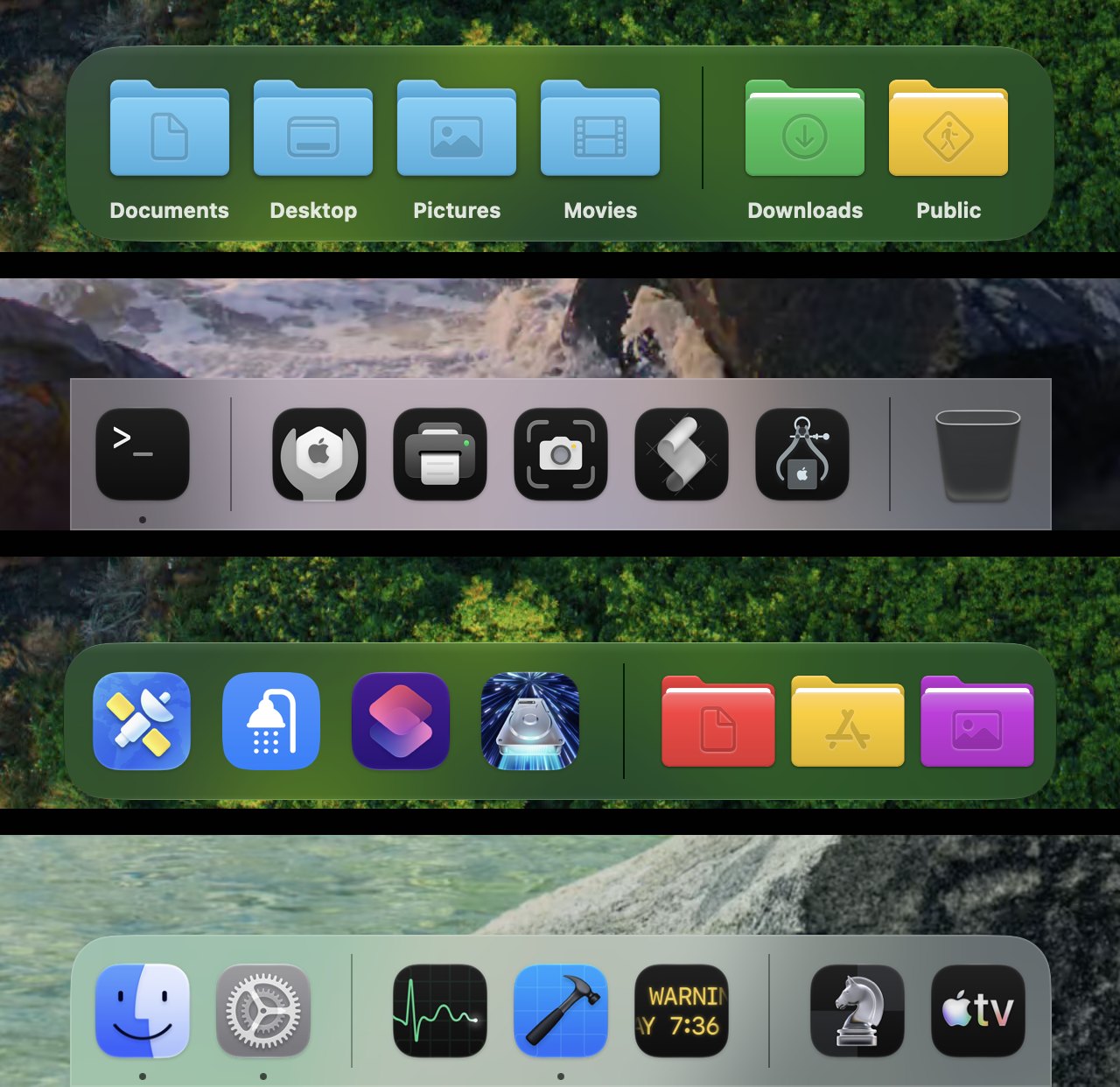
The product page says Jetty Pro “creates customizable Dock-like floating palettes around the edges of your Mac’s displays.” Palettes can hold any combination of files, folders, volumes, apps, Shortcuts, spacers, dividers, and even the Trash. The documentation calls them “palettes” rather than “Docks” to avoid confusion with the macOS Dock.
Requirements: macOS 26.6 Tahoe or later, an Apple Account, and an active subscription, which the documentation defines as either the free trial or the paid subscription. Jetty Pro runs on any Mac signed in to such an account. The documentation does not publish an Apple silicon versus Intel requirement.
Capabilities versus the Dock
Selected differences from the announcement and documentation:
-
Layout: palettes can be positioned anywhere, anchored at either end or the center, and created in as many numbers as will fit. Each can appear on one display, selected displays, or all of them.
-
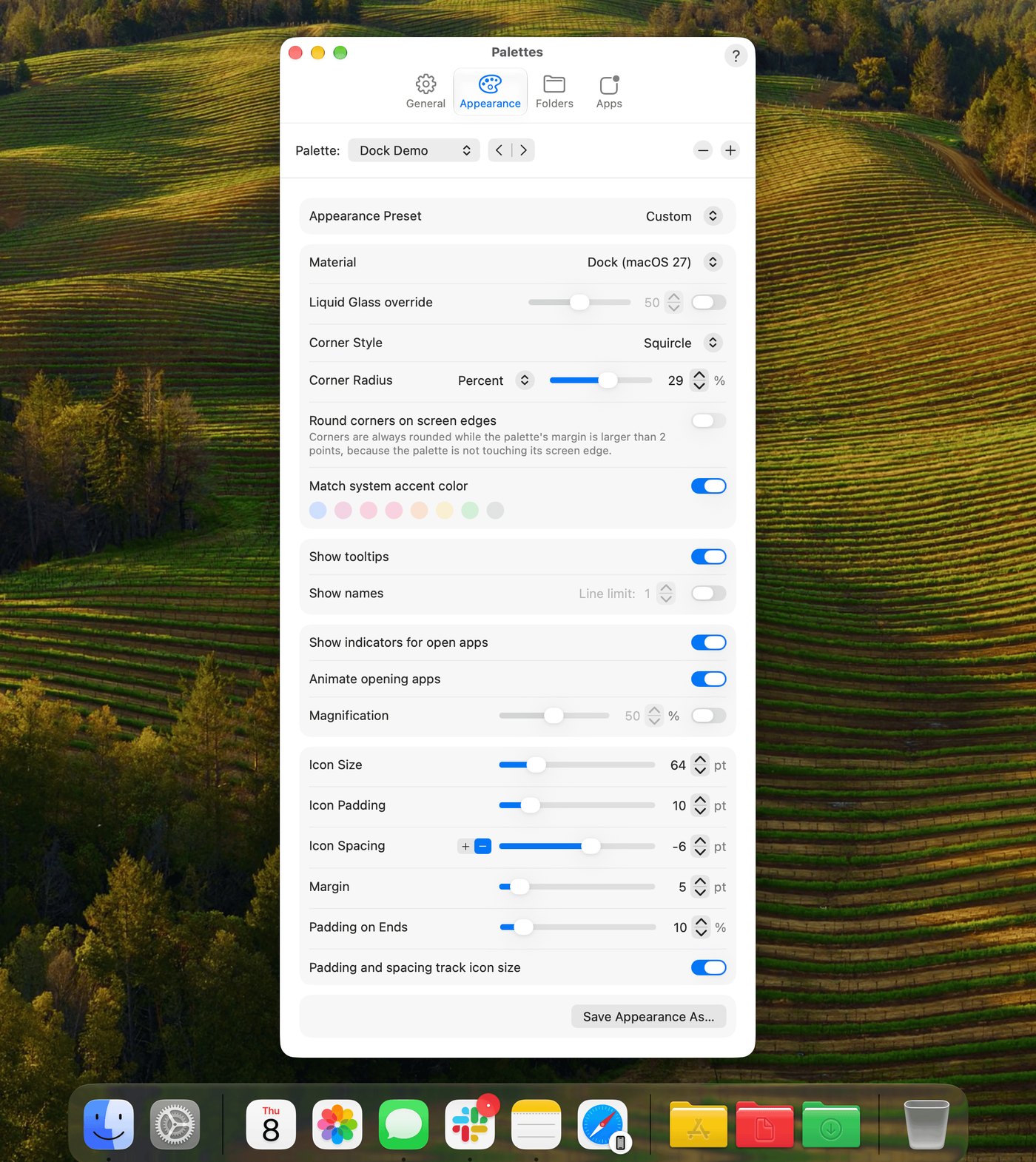
Appearance: nearly every layout metric can be adjusted, and Jetty Pro can simulate the Dock backgrounds from macOS 15, 26, and 27. Any item’s icon can be customized, even the Finder’s.
-
Folder labels: Jetty Pro shows folder label colors without also setting a folder symbol. The documentation notes that as of macOS 27 the Dock shows all folders in the default color regardless of Finder labels.
-
Badges and running apps: notification badges can be hidden for specific apps, but only in specific palettes, including System Settings. Running apps can be included or excluded per palette.
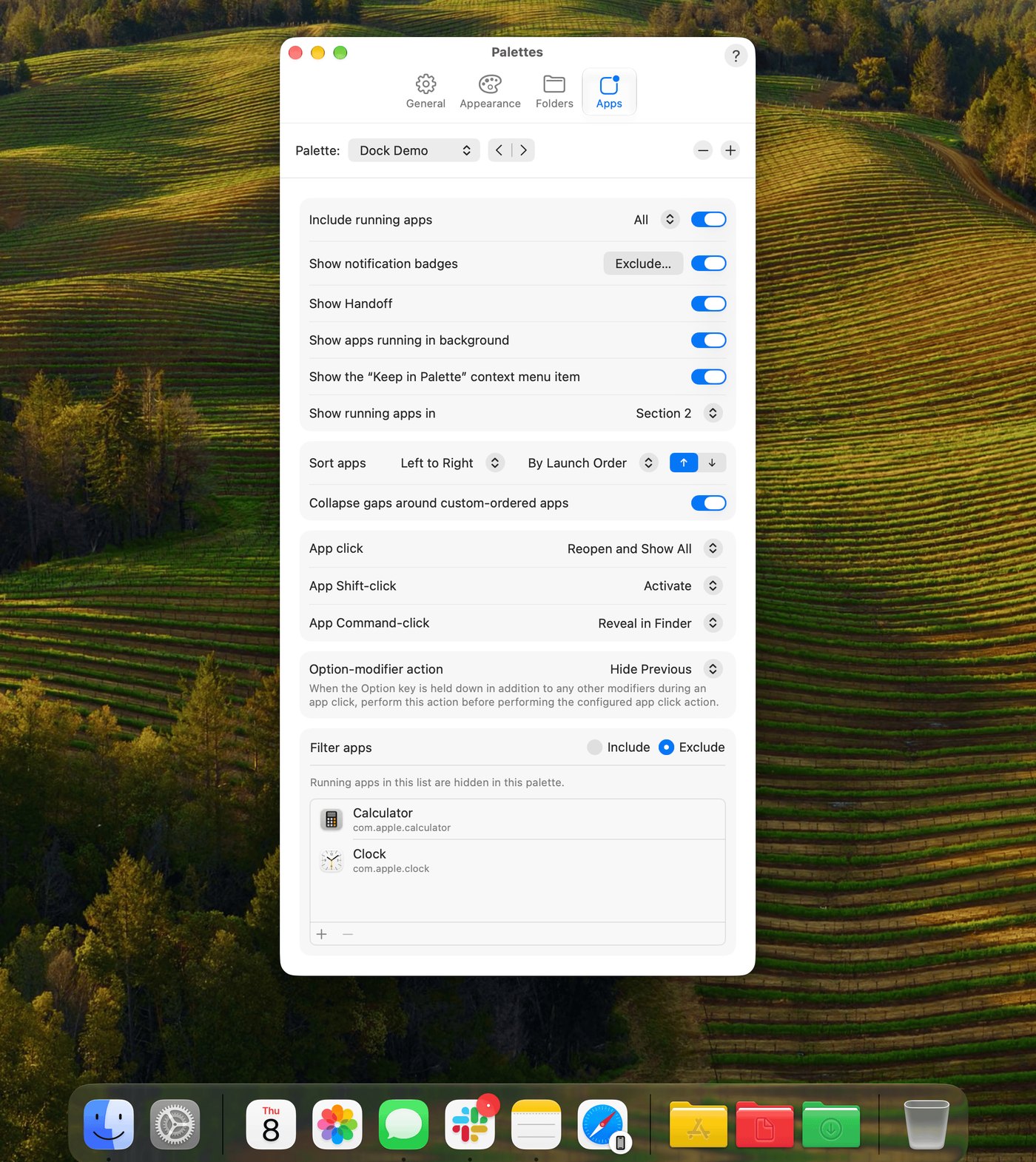
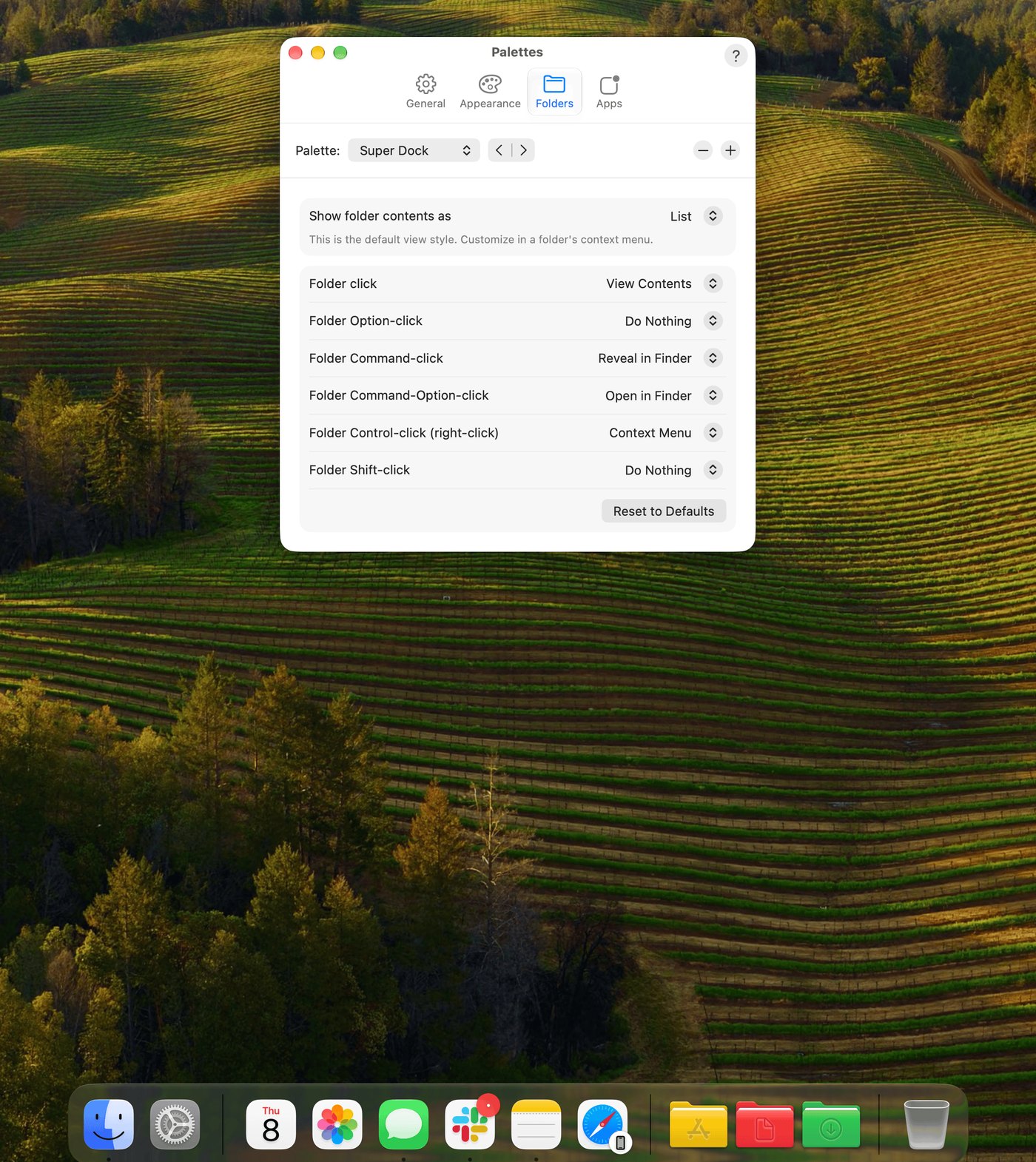
- Clicks and content: users choose what happens on a click or modifier-click of an app or folder, palettes can mix apps with other items, and Shortcut items can run a chosen Shortcut.
The documentation is explicit that replacing the Dock does not mean quitting it. Asked whether to stop or kill the macOS Dock, it answers “No.” The Dock is “uniquely privileged in macOS,” and Jetty Pro “actually uses the Dock to implement some of its features.” Jetty Pro can hide the Dock, but the Dock must remain running.
The documentation lists two things only the Dock can still do. First, some custom app icons are sent “directly to the Dock, and nowhere else,” so Jetty Pro cannot access them, though many custom icons do work. Second, custom Dock menus created with applicationDockMenu() are communicated only to the macOS Dock. The developer writes that “there are still things that only the Dock can do, but the list is not very long,” and adds, “I don’t expect most users to fully replace the Dock with Jetty Pro, but I’m happily doing so.”
Distribution, pricing, and licensing
Jetty Pro is a direct download, a “Jetty Pro.zip” file from the official website, dragged into Applications. It is not sold through the Mac App Store. Payment is handled on the web with Stripe as the payment processor, and the refund and privacy pages add that Stripe acts as merchant of record.
Pricing is a 14-day free trial followed by a $9.99 per year subscription, plus applicable taxes. The announcement frames $9.99 per year as a special introductory price “until the end of 2026.” No later price is published in the sources reviewed.
Any Mac signed in to an Apple Account with an active subscription can run it, with no limit on the number of Macs. Family Sharing is not supported, and no volume-purchase option is currently supported. An email-based authorization route exists for shared or work Macs where the purchasing account cannot stay signed in. Subscriptions are managed under Settings → License → “Manage Subscription,” or on the web; support is at jetty@hypercritical.co.
Under the refund policy, purchases and subscription fees are final and non-refundable except where required by law or stated in the policy. Hypercritical LLC “may approve or deny” a direct request based on circumstances, and submitting one “does not guarantee that a refund will be provided.” Canceling stops future renewals but does not, by itself, entitle a user to a refund of fees already paid.
Private APIs, permissions, and the subscription
The app was first planned as two products: a Mac App Store “Jetty” and a more powerful unsandboxed “Jetty Pro.” After less than two weeks, plain Jetty was abandoned because “it had all the same limitations as SwitchGlass when it came to duplicating the features of the Dock.” Per the documentation, Jetty Pro became the one and only app.
The announcement says Jetty Pro “uses every private API it can get its hands on, and it requires a ton of special permissions.” The documentation defines a private API as one never intended for app makers, which Apple can change or remove at any time without notice, and calls this one of the main reasons the app cannot be sold in the Mac App Store. Features it says are not possible there include notification badges on running apps, simulating the Dock’s background appearance, accurately tracking window visibility, and opening the Trash in the Finder from a palette icon.
That is also the developer’s reason for a subscription. His other three apps are one-time purchases, but Jetty Pro’s private-API use makes the maintenance burden “so high that recurring revenue from a subscription is the only way I feel like I have any hope of keeping the app working in the long run.” He acknowledges that pricing does not guarantee a future private API change won’t break the app, only that it gives him an ongoing financial incentive to fix problems.
The documentation says users must grant five permissions:
-
Accessibility / System Control: badges, Handoff, tracking windows across displays, and stopping background apps.
-
Automation (Finder): dragging into folders, opening or emptying the Trash, mounting volumes, resolving aliases.
-
Automation (Shortcuts Events): adding and running Shortcuts.
-
Files & Folders: protected locations such as Desktop, Documents, and iCloud Drive.
-
Screen & System Audio Recording: showing minimized windows in palettes. The documentation states that Jetty Pro does not record what is on the screen and does not record audio of any kind.
The System Settings path for Accessibility differs across macOS 26, 27.0–27.2, and 27.3 and later, and is more involved on 27.3+.
Who may want to look at 1.0
Going only by the official wording, 1.0 may interest people who have wanted additional or more configurable edge palettes, or folder clicks, mixed content, or per-palette badge and running-app behavior the Dock does not offer. It also requires willingness to grant the listed permissions and to accept an unsandboxed, private-API app sold by subscription.
It is not in the Mac App Store, there is no current non-Pro Jetty, it neither requires nor allows quitting the Dock, and it does not claim to match every Dock behavior. Six Colors, which reports Jason Snell’s own beta use, describes the app as filling a gap “since DragThing died in 2019.”
Read the official announcement and the documentation first.