Things for Mac 3.25, Released 24 November 2026, Adds Touch Support Limited by Cultured Code to the New MacBook Pros
Source-based brief on Cultured Code’s Things for Mac 3.25, officially dated 24 November 2026. Official pages say the update adds touch gestures, refined drag-and-drop, and larger touch targets, and that touch support currently requires a MacBook Pro with a PROLED XDR display. The blog also says touch input is only available on the new MacBook Pros, with a tooltip about trying it if an iPad is connected as an external display (requires OS 27). The Mac app requires macOS 13.3 or later. Official US prices at the time of research were $49.99 regular and $34.99 during a 30% Black Friday Week sale (23–30 November). Things is a one-time App Store purchase per platform, with a 15-day Mac trial. This is not a hands-on test.
Things for Mac 3.25, Released 24 November 2026, Adds Touch Support Limited by Cultured Code to the New MacBook Pros
Source-based brief drawn from Cultured Code's official pages and one same-day press report. It is not a hands-on test.
On 24 November 2026, Cultured Code released Things for Mac 3.25, which adds touch support. The blog post "Things for Touch Macs" and the Mac release notes carry that date; neither gives a time of day or timezone. The blog says: "Things 3.25 is available now on the Mac App Store." MacRumors published same-day coverage.
One caveat: a public iTunes Lookup request for the US listing (id 904280696), made on 24 November 2026 at about 5:11 PM PT, still returned version 3.24.2, dated 5 November 2026. This article does not independently confirm that the live storefront version string had already switched to 3.25. Availability is attributed to Cultured Code, and store listings can lag.
What Things is
Things, sold by Cultured Code GmbH & Co. KG, is a personal task manager that its homepage says "helps you plan your day, manage your projects, and make real progress toward your goals." It is sold as separate one-time App Store purchases for Mac, iPhone, iPad, and Vision, with the Watch app included with the iPhone app. Sync uses free Things Cloud.
What 3.25 changes
The release notes headline the update: "Introduced full support for touchscreen Macs:" The blog says: "Things is now fully optimized for touchscreen Macs, with intuitive swipe gestures, smooth drag and drop, touch-optimized dialogs, and numerous refinements throughout." It adds: "Apple brought touch input to the new MacBook Pros. We’ve now gone through the app to add new functionality and refine the touch interactions throughout."
Swipe. Per the release notes, a right swipe on a to-do opens the scheduling dialog, a left swipe toggles selection, and a two-finger swipe up or down a list selects multiple items. The blog: "Swipe right to schedule; left to select. Keep swiping left on other to-dos to add them to your selection. To quickly select a whole range of to-dos, swipe up or down the list with two fingers." The sources word the right swipe three ways: "schedule" (blog), "open the scheduling dialog" (release notes), and "reschedule" (screenshot caption).
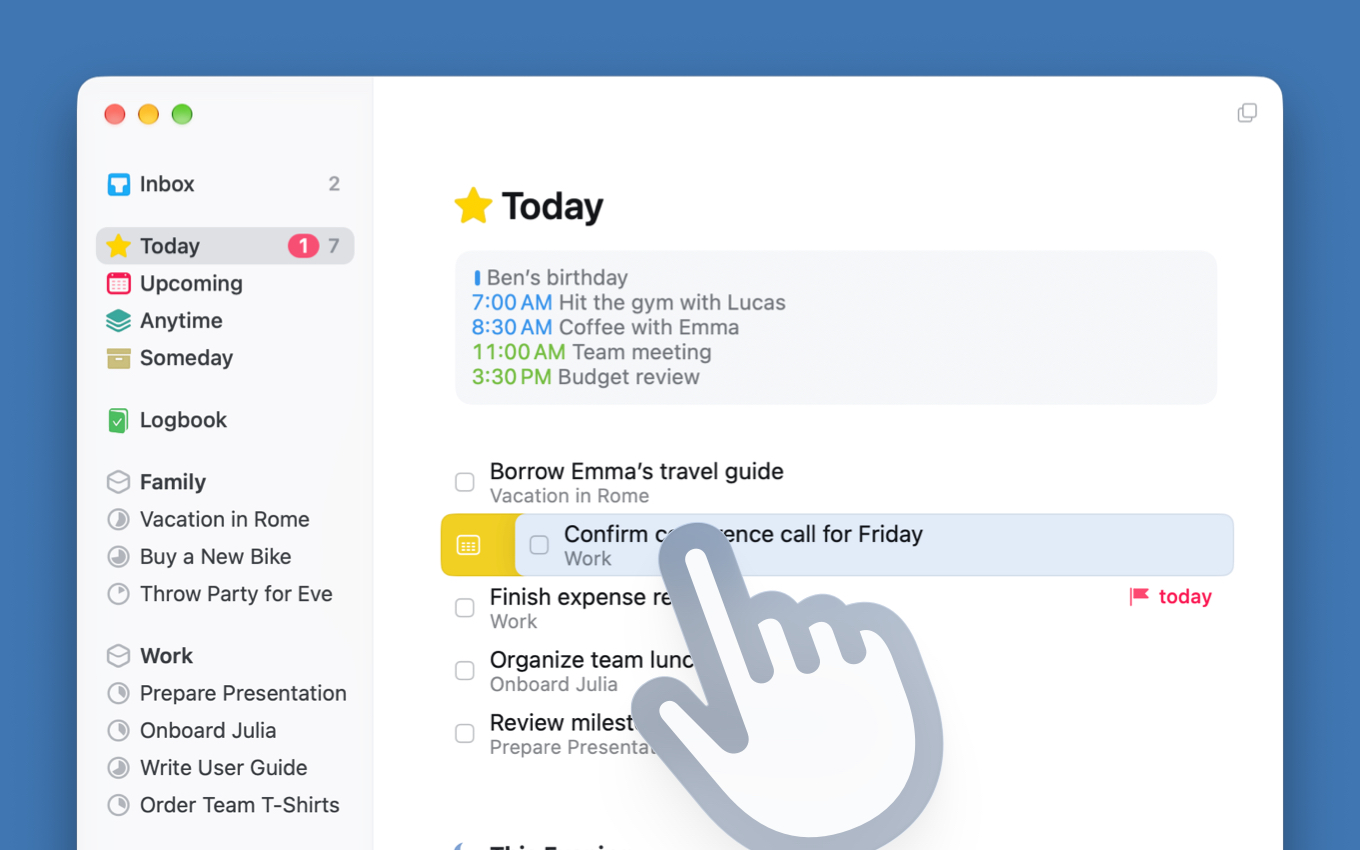
Swipe right to reschedule on a touchscreen Mac. Official product screenshot from Cultured Code’s 24 November 2026 blog post “Things for Touch Macs.” Source: https://culturedcode.com/frozen/2026/11/mactouch-swipe.jpg
Expanding to-dos. The release notes: "Tap once to select a to-do, then tap again to expand it. Double-tapping also works." The blog uses a different verb: "Tap a to-do to select it, then tap again to open it."
Drag and drop. The notes describe smoother, more responsive dragging of individual to-dos, headings, and groups of selected items. Tap and hold on selected items lifts the whole selection, and large selections extending beyond the visible screen are handled better. The blog says Cultured Code spent "quite some time refining drag and drop for touch input to make it feel as natural as it does in Things on your iPhone." That is the company's description, not an observation made here.
Menus and pickers. Rows are taller and tap targets larger in custom menus and date pickers opened via touch. The official screenshot shows a pointer and a finger both aiming at "Today" in the When dialog, with the touch layout having taller rows and more space between dates.
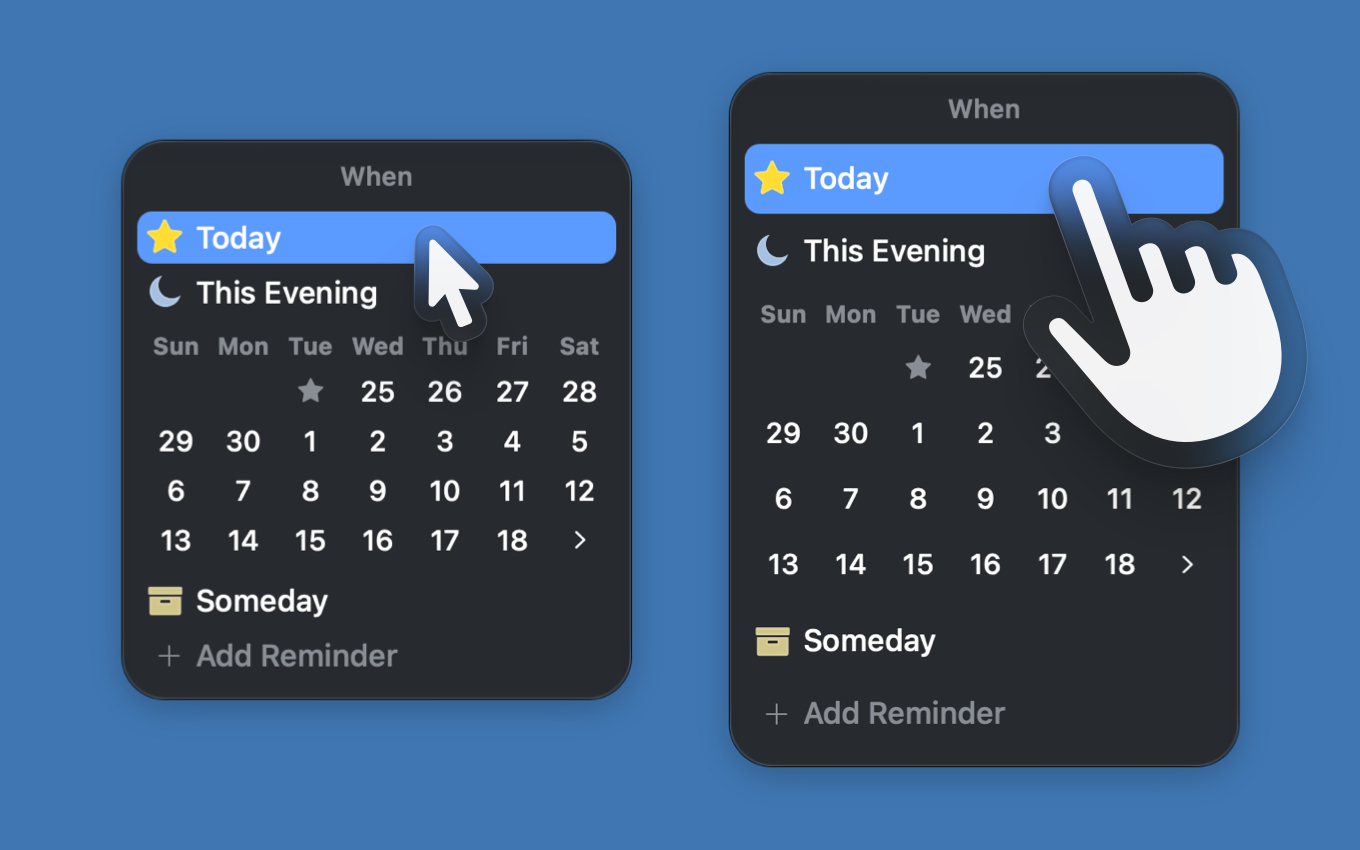
Things’ menus and dialogs provide a little more space when invoked via touch. Official product screenshot from Cultured Code’s 24 November 2026 blog post “Things for Touch Macs.” Source: https://culturedcode.com/frozen/2026/11/mactouch-menu.jpg
Other refinements. Tap and hold on a checkbox cancels a to-do or checklist item; sidebar resizing by touch is improved; drag and drop for checklist items inside a to-do is improved; button tap targets are enlarged throughout the app; and there are "numerous smaller refinements." The notes are written as touch additions and list no pointer-interface changes, so this article makes no claim about cursor or trackpad behavior.
The hardware limit
The release notes say: "At this time, touch support requires a MacBook Pro with PROLED XDR display." The blog says: "At this time, touch input is only available on the new MacBook Pros." A tooltip on the blog adds: "You can also try it out if you have an iPad connected to your Mac as an external display. Requires OS 27." It links to Apple's iPad second-display page. No other compatible Macs are named, and none are assumed here.
Requirements, pricing, and terms
Requirements. Version 3.25 requires macOS 13.3 or later. Official pages do not say whether the app is Intel, Apple silicon, or both. Per Getting Things, Things will not work on Windows, Android, Linux, "the Internet (through a web browser)" or "any non-Apple device".
Distribution and price. Things is sold only through Apple's App Store, as "Things 3". Cultured Code says: "Things 3 is a one-time purchase for each platform; there are no subscriptions." There is no official bundle. A Black Friday Week sale gives 30% off from November 23–30, with the App Store price already discounted; it ends Monday, November 30, and no timezone is published. Cultured Code's official US prices:
| App | Regular (US) | Sale (US) |
|---|---|---|
| Mac | $49.99 | $34.99 |
| iPhone | $9.99 | $6.99 |
| iPad | $19.99 | $13.99 |
| Vision | $29.99 | $20.99 |
A US Mac App Store lookup at the same time also showed $34.99. Apple sets local-currency prices, so readers elsewhere should check their own storefront.
Trial. The Mac app has a 15-day trial from first launch, with "Access all features without limitations." Deleting the app instead involves "no auto-renewals or hidden fees." After expiry the trial turns read-only: earlier data "is safely stored on your Mac" and is picked up if the trial is extended or the full version is purchased, but "Anything that you added or changed after the trial has expired (Read-only mode) will not be saved and sync will be disabled." Sync can be tested during the trial. There is no iPhone, iPad, or Vision trial.
Licenses and sharing. Installing on other devices of the same kind costs nothing extra, using the same Apple Account. Family Sharing is supported "so you can share the Things app with family members at no extra cost" and covers the app license only. Collaboration is not included: "No. At this time, Things does not support real-time sharing of to-dos or lists."
Refunds. "If you end up not liking Things after a purchase, you have to ask Apple for a refund because they handle all transactions in their App Store. We do not handle your purchase so we can’t issue refunds ourselves."
Who this update is for
Based on the official wording, 3.25 matters most to owners of a qualifying MacBook Pro who want native touch gestures in Things. Existing Mac owners receive it as a regular update to an app they already own. Anyone considering a first purchase should check the sale dates and trial terms.
3.25 is not a new product or a new subscription, and the official notes do not describe a new iOS companion version in this release. Touch input is, in the company's words, limited "at this time" to the hardware above.